LCEStudio Review: Minecraft Legacy Save Editor
github.com · checked 4 Oct 2026
Free Windows software for working with Minecraft Legacy Console saves through editing, viewing, repair, and conversion.
How it plugs in
Signal on Minecraft World Converters6.3#6 of 18
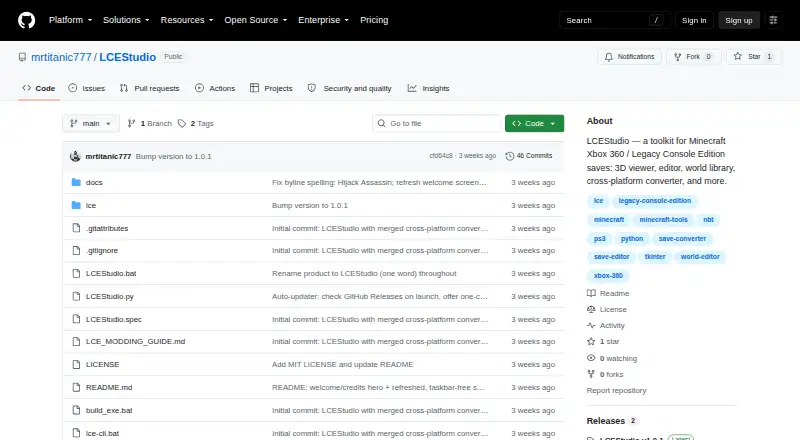
LCEStudio runs as a portable 64-bit Windows utility for Xbox 360 and other Legacy Console Edition worlds. It handles saves from TU0 to TU75, offers map and 3D editing, moves worlds between console editions and Java, and provides repair, generation, and save-history features. The project is MIT-licensed and unofficial.
Review
In a line
For Windows users, LCEStudio brings browsing, editing, visualization, conversion, and writing of Minecraft Xbox 360 and Legacy Console Edition worlds into one toolkit.
What it does
Its world library presents saves with thumbnails, platform and title-update details, search, filters, and Open, Convert, and Repair actions. The editor handles inventories, blocks, entities, tile entities, players, spawn settings, and a raw NBT tree.
World inspection is available through top-down or Y-slice maps, an isometric display, and a 3D fly-through editor. In that 3D workspace, blocks can be placed, broken, or filled.
Generation features can make flat and mountain worlds, convert pixel art or 3D models into schematics, and build Skyblock, One-Chunk, Void, and Island challenge worlds. World Timelapse stores a snapshot at each save so older versions can be browsed and restored.
How it connects
The program supports Legacy Console chunk data from TU0 through TU75, covering old-NBT, tile-storage v8–v11, and Aquatic sectioned v12 formats. It moves worlds between Xbox 360, PS3, and Windows Legacy Console Edition, exports them to Java Edition Anvil, retargets title updates, and can re-sign STFS BIN files.
The v1.0.1 release is a portable Windows 64-bit executable, so it needs no installation or separate Python setup. A command-line interface is also available through lce-cli.bat or python -m lce.
The source is MIT-licensed. The project says saves are copied to .bak files and round-trip checked before writing; bundled third-party binaries keep their own licenses.
Good fit
This tool suits people managing Minecraft Xbox 360, PS3, or Windows Legacy Console Edition worlds. It is useful for inspecting saves, changing world data, moving worlds between supported editions, and recovering certain entity or lighting problems.
Its generator, map, 3D, conversion, and time-lapse features put many save tasks in one Windows program.
Watch for
LCEStudio runs on Windows 64-bit. Its stated formats cover Legacy Console saves through TU75 and Java Edition Anvil as a conversion target; it does not provide Java-Bedrock conversion.
The project calls itself unofficial and fan-made, with no affiliation or endorsement from Mojang or Microsoft. Check that your world uses a supported Legacy Console format before changing it.
Pricing
LCEStudio is free. The project offers a free plan, and its MIT license permits use, copying, modification, distribution, sublicensing, and sale, while third-party components retain their own licenses.
Verdict
Choose LCEStudio if you work with Legacy Console Edition saves and want one Windows application for editing, viewing, conversion, repair, generation, and versioned backups. Its TU0–TU75 coverage and Java export make it useful for older worlds, while the portable release avoids an installer.
Skip it if you need Java-Bedrock conversion, a non-Windows platform, or support outside the listed Legacy Console formats.
Our take
LCEStudio is a practical choice for owners of Xbox 360, PS3, or Windows Legacy Console worlds who need detailed save work without paying. It combines file conversion, visual editing, repair commands, generators, and restore points in a portable Windows package. The main trade-offs are its Windows-only delivery, focus on Legacy Console formats, and lack of Java-Bedrock conversion. Its unofficial status also matters if you require an officially supported Minecraft utility. Confirm your title-update and format needs before relying on it for an important save.
- Free and MIT-licensed
- Handles Legacy Console formats from TU0 through TU75
- Converts console worlds and exports to Java Edition Anvil
- Includes map, 3D, repair, generator, and history tools
- Portable Windows 64-bit release needs no installation
- Windows 64-bit only
- No Java-Bedrock conversion
- Focused on Xbox 360, PS3, and Windows Legacy Console saves
- Unofficial and not endorsed by Mojang or Microsoft
- Pick it ifEditing and converting Legacy Console Edition saves; Windows users managing older Minecraft worlds; Recovering, generating, or versioning supported saves
- Skip it ifYou need Java-Bedrock conversion; You use a non-Windows platform; Your save is outside the listed Legacy Console formats
Pricing
LCEStudio costs nothing. The free plan and MIT license allow use and modification; bundled third-party binaries have separate licenses.
- MIT-licensed softwareMIT license permits use, copying, modification, distribution, sublicensing, and sale; third-party components retain their own licensesFree
As github.com lists them, checked 4 Oct 2026.
Questions
What platforms does LCEStudio support?
The v1.0.1 release is a portable executable for Windows 64-bit. It does not list releases for other platforms.
Which Minecraft worlds can it open?
Xbox 360, PS3, and Windows Legacy Console Edition saves are supported through LCE chunk formats spanning TU0 to TU75.
Can LCEStudio convert worlds to Java?
Yes. It exports supported Legacy Console worlds to Java Edition Anvil. Java-Bedrock conversion is not provided.
Does it make backups before saving?
The README says saves are backed up as .bak files and checked through a round trip before they are written.
Is LCEStudio free?
Yes. It has a free plan and MIT-licensed source code. Third-party bundled binaries keep their respective licenses.
Does it have a command-line option?
Yes. The project provides a command-line interface that runs through lce-cli.bat or python -m lce.
Near it
All alternatives →- W
 WorldSwitch#5 on this board
- LLegacyEditor#7 on this board
- MVMC Version Converter#4 on this board
- LLCE2JE#8 on this board
- J
 je2be#3 on this board
- B
 Bridger#9 on this board
- JWJava2Nukkit World Converter#2 on this board
- C
 Chunkoid#10 on this board
- C
 Chunker#1 on this board
- STServer to Singleplayer World Converter#11 on this board