MC Version Converter Review
github.com · checked 30 Sept 2026
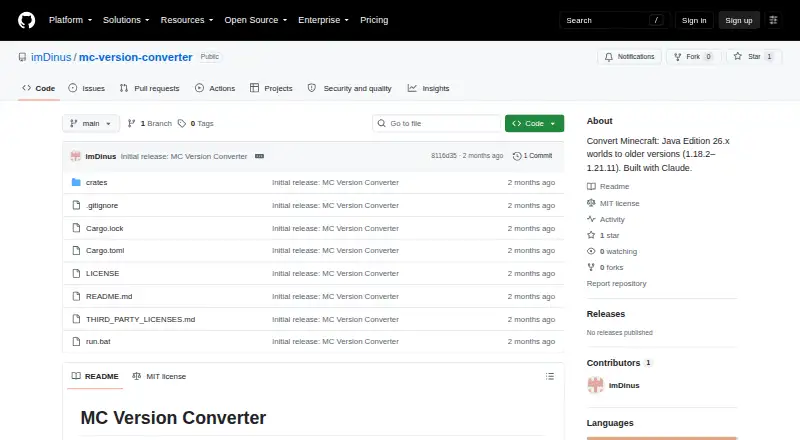
Free Rust software that makes Minecraft Java worlds from 26.1 onward readable by releases 1.18.2–1.21.11.
How it plugs in
Signal on Minecraft World Converters6.6#4 of 18
For Minecraft: Java Edition worlds created in 26.1 or newer, MC Version Converter produces files that supported older releases can open. It runs on Linux, macOS, and Windows, and leaves the source world untouched. The project is free, MIT-licensed source code that you build locally with Rust. Conversions can lose newer blocks, items, mobs, or other data.
Review
In a line
This free local command-line program takes Minecraft: Java Edition worlds at 26.1 or newer and prepares them for versions 1.18.2 through 1.21.11.
What it does
For older destinations, the converter restores legacy representations for items, entity equipment, attributes, sign text, and player bed respawn data. It also handles related world changes when the selected target needs them.
In batch use, every world directory inside `input_worlds/` gets its own converted directory in `output_worlds/`. Conversion writes a new copy rather than altering the source.
Newer blocks, items, and mobs may disappear when the target has no equivalent. Supplying a target-version block allowlist permits unavailable blocks to become air; without that list, the replacement step is skipped.
How it connects
The repository provides MIT-licensed source code. Build it locally with Rust by running `cargo build --release`. It works on Linux, macOS, and Windows.
This is a local command-line program for Java Edition worlds; Java-to-Bedrock conversion is not supported. Damaged region, POI, or chunk files are passed over with a warning, allowing the run to continue.
Good fit
Players or administrators with a Java world from 26.1 or newer can use it to target a supported release from 1.18.2 through 1.21.11.
It is useful when you want batch processing, a separate output folder, and a source build you can run on your own computer.
Watch for
Minecraft 1.17.x and earlier are unsupported because their world height differs from newer versions. The project describes conversion from older versions to newer ones as a future direction.
Some 26.x data has no older equivalent and is dropped. Oversized `.mcc` chunk files are copied as-is rather than converted, and blocks without a target equivalent may be replaced with air.
The tool is unofficial and is not affiliated with Mojang or Microsoft. The project documents command-line usage, error codes, and known limits, but no support service or response commitment.
Pricing
MC Version Converter is free. There is no paid plan or free trial; the free offering is the source code, which you build with Rust.
Verdict
Choose it when a Java 26.1-or-newer world needs to open in one of the listed 1.18.2–1.21.11 releases. Separate output directories and warning-based handling are useful for bulk conversion.
Avoid it for Bedrock worlds, targets at 1.17.x or earlier, or worlds where every new 26.x block, item, mob, and data field must survive. If you want to review other tools, see Minecraft World Converters.
Our take
For Java Edition owners taking recent worlds back to a defined set of older releases, MC Version Converter can be a practical option. Its free MIT-licensed source and Rust build enable local use on the three listed desktop platforms. Data loss is the key trade-off: newer content may be removed, changed to air, or dropped, while some chunk files are merely copied. Bedrock worlds, versions before 1.18.2, and upgrades from old versions to new ones are outside its current scope. Check those boundaries before relying on a converted copy.
- Free source code under the MIT License
- Runs on Linux, macOS, and Windows
- Keeps the source world intact
- Supports batch conversion into separate output folders
- Continues past corrupt files with warnings
- Requires a Rust build with cargo build --release
- Does not support Java 1.17.x or earlier targets
- Oversized .mcc chunks are copied as-is rather than converted
- No documented integrations
- Pick it ifJava worlds from 26.1+ that need 1.18.2–1.21.11 compatibility; Users comfortable building a local Rust command-line tool
- Skip it ifYou need Java-to-Bedrock conversion or targets before 1.18.2; You cannot accept loss of newer blocks, items, mobs, or other data
Pricing
Free plan only. There is no free trial because the software itself is free source code; building it requires Rust.
- MC Version ConverterSource code; build with Rust; converts Minecraft Java Edition 26.x worlds to versions 1.18.2–1.21.11Free
As github.com lists them, checked 30 Sept 2026.
Questions
What Minecraft versions does MC Version Converter support?
Worlds saved in Java Edition 26.1 or newer are converted for opening in versions 1.18.2 through 1.21.11.
Does it convert older Minecraft worlds to newer versions?
That direction is described as a future feature. The current purpose is converting 26.1-or-newer worlds to older supported targets.
Will my original world be changed?
No. Conversion writes a separate folder, leaving the original world untouched.
Can it convert many worlds at once?
Yes. Batch mode takes each directory in `input_worlds/` and creates a corresponding result directory under `output_worlds/`.
What data can be lost?
Blocks, items, mobs, and other 26.x data without an older equivalent may be dropped. With a target allowlist, some unavailable blocks may instead become air.
How do I install it?
The project is source code. On Linux, macOS, or Windows, install Rust and run `cargo build --release`.
Does it support Bedrock Edition?
No. It converts Minecraft: Java Edition worlds and does not provide Java-to-Bedrock conversion.
What happens if a world file is corrupt?
A corrupt region, POI, or chunk file is skipped with a warning, so the conversion can continue.
Near it
All alternatives →- J
 je2be#3 on this board
- W
 WorldSwitch#5 on this board
- JWJava2Nukkit World Converter#2 on this board
- LLCEStudio#6 on this board
- C
 Chunker#1 on this board
- LLegacyEditor#7 on this board
- LLCE2JE#8 on this board
- B
 Bridger#9 on this board
- C
 Chunkoid#10 on this board
- STServer to Singleplayer World Converter#11 on this board