LeadConnect: LinkedIn Outreach Automation Review
leadconnect.io · checked 15 Oct 2026
Automated LinkedIn prospecting with sequenced follow-ups, activity tracking, HubSpot transfer, and team safeguards.
How it plugs in
Signal on LinkedIn Automation Software6.3#2 of 28
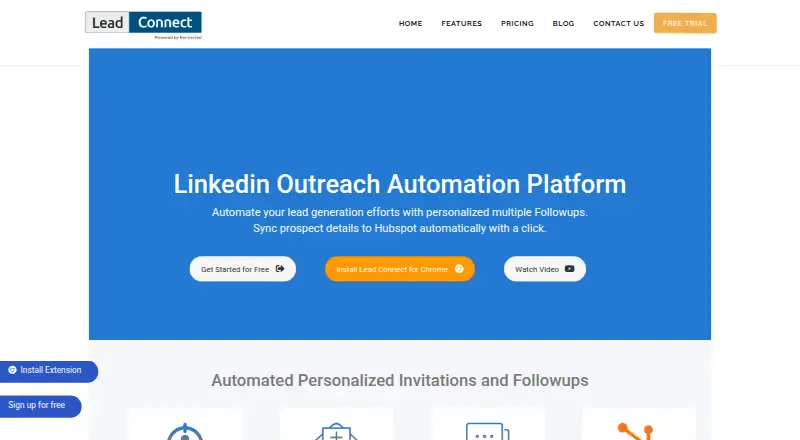
LeadConnect combines a Chrome extension with a web dashboard to manage LinkedIn invitations and subsequent messages. Audiences come from LinkedIn searches or uploaded CSV files; replies and accepted invitations are tracked, and activity can flow to HubSpot. Email-finder integrations and Zapier are available, although Chrome and an active LinkedIn session are required.
Review
In a line
LeadConnect is built for LinkedIn-based lead generation and outreach. Its Chrome extension sends invitations, runs tailored message sequences, and records prospect activity.
What it does
Audiences can come from LinkedIn Basic or Sales Navigator searches, or from an uploaded CSV. Invitation messages support personalization placeholders, and a setup can send up to 100 new invitations.
For prospects who have not responded, users can schedule as many as 10 later messages. The sequence ends automatically after a reply, while response and invitation-acceptance results are tracked.
How it connects
LeadConnect runs as a Chrome browser extension, with a reporting-only dashboard. LinkedIn prospect details and conversation activity can be sent to HubSpot, including automatically after an invitation is accepted.
FindThatLead, Hunter.io, and AnymailFinder are named integrations for locating business email addresses. Zapier can forward invitation, reply, withdrawal, and follow-up events to a compatible CRM. A shared blacklist helps teammates avoid contacting one person twice.
Good fit
LeadConnect suits people who use LinkedIn for prospecting and want scheduled, personalized outreach. Sales Navigator users, HubSpot teams, and groups sharing contact work may find the audience tools, sync, and blacklist useful.
It also fits buyers who want a free starting plan or need more daily invites and message credits as their outreach grows.
Watch for
Activity runs in Chrome, with LinkedIn logged in in the same browser session. Chrome must remain open, so this is not background automation from a closed computer. Extension data is stored locally and may be lost if the extension is uninstalled.
LeadConnect says its extension is not endorsed or certified by LinkedIn and warns that use may breach LinkedIn rules or lead to account restrictions. Daily invitations may also be limited by the connected LinkedIn account.
The terms provide the service as-is and as-available, without guaranteed continuous availability. The privacy policy says safeguards are used but does not guarantee information security or privacy.
Pricing
LeadConnect uses a freemium model, with a no-cost tier, paid subscriptions, and a seven-day trial. FREE FOREVER carries no charge and permits up to 2 invitations daily, 6 message credits daily, and 5 templates.
The PROFESSIONAL tier is $25.95 monthly and allows 30 invitations per day, 90 message credits per day, 10 templates, HubSpot integration, and a team blacklist. GROW is $45.95 monthly with 60 invitations per day, 180 message credits per day, 30 templates, HubSpot integration, a team blacklist, and team sync.
ULTIMATE costs $85.95 monthly and raises the allowance to 100 invitations per day and 300 message credits per day, with unlimited templates, HubSpot integration, a team blacklist, and team sync. A full refund is available for a new subscription requested within seven days of payment; renewals are generally excluded.
Verdict
Choose LeadConnect if your outreach starts on LinkedIn and you want scheduled messages, reply-based stopping, and optional HubSpot or Zapier handoffs. The free plan offers a small way to begin, while paid tiers add capacity and team features.
Avoid it if outreach must run while nobody has Chrome open, if losing locally stored extension data would be unacceptable, or if LinkedIn policy risk is not acceptable.
Our take
LeadConnect is a practical match for LinkedIn prospecting that needs message sequences, reply tracking, and CRM handoffs. Its free tier lowers the entry cost, and paid plans increase daily allowances while adding HubSpot and team controls. The main trade-offs are operational: Chrome and an active LinkedIn session are required, extension data is local, and the terms warn about account restrictions. It is not a fit for unattended background work or teams that need guaranteed availability and privacy.
- Free plan with daily invites, message credits, and templates
- Sequences of up to 10 follow-ups end when a prospect responds
- HubSpot sync and Zapier events support CRM workflows
- A shared blacklist reduces duplicate outreach
- Chrome and an open LinkedIn session are required for activity
- LinkedIn use may lead to account restrictions
- Uninstalling the extension can remove locally stored data
- The connected LinkedIn account may constrain daily invitations
- Pick it ifLinkedIn prospecting with scheduled follow-ups; Teams using HubSpot or Zapier for prospect activity; Buyers wanting a free starting plan
- Skip it ifYou need automation to run while Chrome and your computer are closed; Your team cannot accept LinkedIn policy or account-risk warnings; You require cloud-stored extension data and guaranteed availability
Pricing
The service includes a seven-day trial; new subscriptions can qualify for a full refund when requested within seven days of payment.
- FREE FOREVERfree forever · up to 2 invites per day · 6 message credits per day · 5 templatesFree
- PROFESSIONALmonthly · up to 30 invites per day · 90 message credits per day · 10 templates · HubSpot integration · team blacklist$25.95/mo
- GROWmonthly · up to 60 invites per day · 180 message credits per day · 30 templates · HubSpot integration · team blacklist · team sync$45.95/mo
- ULTIMATEmonthly · up to 100 invites per day · 300 message credits per day · unlimited templates · HubSpot integration · team blacklist · team sync$85.95/mo
As leadconnect.io lists them, checked 15 Oct 2026.
Questions
Is there a no-cost LeadConnect tier?
Yes. The FREE FOREVER option is free and provides up to 2 invitations each day, 6 message credits each day, and 5 templates.
What are LeadConnect’s subscription prices?
Monthly paid options are $25.95, $45.95, and $85.95, and a seven-day trial is available.
Can I use LeadConnect with Sales Navigator?
Yes. Audiences may be built from LinkedIn Basic or Sales Navigator searches, or imported from a CSV.
Do follow-up sequences end after someone replies?
Yes. Later scheduled messages for a connected prospect stop automatically once that prospect responds.
Can prospect activity be sent to HubSpot?
Yes. LinkedIn prospect details and conversation activity can sync to HubSpot, including automatically after an invitation is accepted.
Will LeadConnect operate if my computer is turned off?
No. The Chrome extension performs the activity, so Chrome must be open with LinkedIn signed in to that same browser session.
What CRM connections are available beyond HubSpot?
Zapier can pass invitation, response, withdrawal, and follow-up events to any CRM that Zapier supports.
Does LinkedIn endorse LeadConnect?
No. LeadConnect states that LinkedIn does not endorse or certify its browser extension, which is provided at the user’s risk.