LeadsRocket: LinkedIn Campaign Automation Review
leadsrocket.signimus.com · checked 15 Oct 2026
Automate LinkedIn campaigns with branching funnels, follow-ups and performance tracking.
How it plugs in
Signal on LinkedIn Automation Software6.6#1 of 28
LeadsRocket handles LinkedIn prospecting and outreach, from connection requests to personalized follow-ups. Its branching campaign flows organize connection, message, wait and condition steps, while funnels segment prospects and the dashboard measures replies and conversions. CSV import, Sales Navigator syncing and CRM delivery are supported through Zapier, native connectors or webhooks. The product is listed for Windows, macOS and Linux, with API and extension options.
Review
In a line
LeadsRocket is a LinkedIn automation product for lead generation, networking and outreach. It combines connection activity, tailored follow-ups, prospect funnels and campaign reporting.
What it does
Campaigns are assembled with drag-and-drop branching sequences that can connect, pause, send messages, evaluate conditions and follow up. Profile visits, skill endorsements, messages and connection requests can be automated, with randomized timing and warm-up settings.
Funnels organize prospects according to seniority, industry and intent, while lists can be synchronized from Sales Navigator searches. An older product page also describes searches using job titles, locations and keywords, including premium profiles, plus bulk messages to first-, second- and third-level connections.
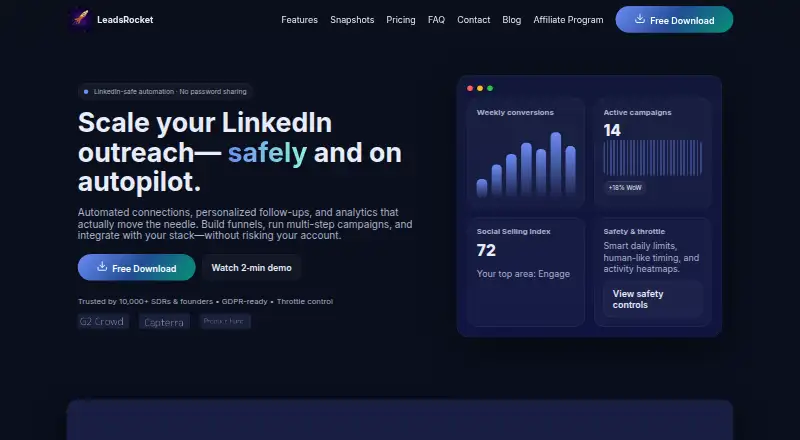
Campaign dashboards show conversions, reply rates and SSI across campaigns, lists and teammates. Performance reports are available in Excel format.
How it connects
CSV lists can be brought in, duplicate contacts removed, and replies or qualified leads exported to a CRM. Qualified prospects can also move to CRMs through Zapier, native connectors or webhooks.
API access and custom integrations appear on listed plans. Business Essential also lists a Chrome extension for automated messaging, commenting and network additions. Account access uses a LinkedIn session instead of a shared password, with role-based permissions.
LeadsRocket supports API and browser-extension access alongside desktop use on Windows, macOS and Linux. Support channels listed by the maker include email, live chat, documentation and tutorials.
Good fit
LeadsRocket suits SDRs, founders and teams that need repeatable LinkedIn prospecting. It fits campaigns requiring branching follow-ups, Sales Navigator list syncing, CSV handling and CRM hand-off.
Daily caps, randomized activity windows, action queues and alerts provide controls for managing automated activity.
Watch for
The maker says excessive messaging may temporarily restrict a LinkedIn account and advises following LinkedIn's terms. Check that the available filters and analytics views match your needs before committing.
A listed reviewer wanted more flexible filters for large LinkedIn searches, deeper campaign comparison views and mobile access for checking campaign status.
Pricing
LeadsRocket offers both a free plan and a free trial. The pricing note lists entry pricing from ₹1,199 per month with a 60-day trial.
Listed tiers are Growth at $8 monthly, Starter at $10, Customised at $100 and Business Essential at $139.97. Growth covers four users, unlimited campaigns, messages, connections and comments, along with API access and custom integrations.
Starter provides automated outreach, scraping for up to 500 LinkedIn profiles, spam prevention and a 14-day money-back guarantee. Customised adds search and filtering, Sales Navigator and CSV support, job applications, and automation for up to 400 profiles. Business Essential includes one custom feature, detailed analytics, a Chrome extension, custom API or CRM integrations, webhooks and dedicated support.
Verdict
Choose LeadsRocket if LinkedIn is a core source of prospects and you need campaign branching, follow-up automation, list segmentation and CRM exports in one place. Desktop, API and extension options accommodate different setups, while session-based access avoids sharing a password.
Be cautious if your outreach volume could breach LinkedIn rules, or if you need mobile monitoring, highly flexible search filters or side-by-side campaign analysis.
Our take
LeadsRocket fits teams running structured LinkedIn prospecting rather than occasional manual outreach. It brings together branching sequences, Sales Navigator syncing, CSV cleanup and CRM delivery, with reporting for replies and conversions. The free option and trial provide a way to test fit. Confirm required integrations, plan limits and your LinkedIn-compliance approach first.
- Branching campaign builder for connections, waits, messages and follow-ups
- Sales Navigator syncing plus seniority, industry and intent segments
- CSV import, duplicate removal and CRM exports
- Conversion, reply-rate and SSI reporting by campaign and teammate
- Excessive automated messaging may temporarily restrict a LinkedIn account
- A reviewer wanted more flexible large-result search filters
- Mobile campaign-status checking is not available
- A reviewer wanted deeper campaign comparison analytics
- Pick it ifSDRs and founders running repeatable LinkedIn outreach; Teams that need Sales Navigator lists sent to a CRM; Campaigns requiring automated follow-up branches
- Skip it ifYou need mobile monitoring or advanced cross-campaign analytics; Your LinkedIn policy limits do not allow automated outreach; You need highly flexible filtering for very large searches
Pricing
LeadsRocket has a free plan and trial.
- StarterFree · Campaigns & Leads · Connections & Messages · Priority Chat Support · CSV import/Export · Advanced Analytics · limited to 60 daysFree
- Growth$8.00 4 User Per Month · Bulk profile extractor · unlimited campaigns · unlimited messages and connections · unlimited comments · API access and custom integrations · 24/7 support$8/mo
- Starter$10/month · No duplicate connection requests or messages · fully automated · scrape 500 LinkedIn profiles and send connection requests · spam prevention · no ads · 14-day money-back guarantee$10/mo
- Customised$100/month · Free-trial and starter features · 24/7 support · search and filtering · auto-apply to up to 100 jobs at a time · LinkedIn/Sales Navigator integration and CSV import · manual login/logout · message/comment automation for up to 400 profiles · 14-day money-back guarantee$100/mo
- Business Essential$139.97 · Growth features · one custom feature included · custom automation · CSV import/export · detailed analytics · 60-day trial · Chrome extension · custom API/CRM integrations · webhooks · direct LinkedIn/Sales Navigator/Business/Recruiter integration · dedicated support$140/mo
- Growth₹1199 ₹399 /mo Diwali Offer · Everything in Free Plan · Profile Extractor · Messages & Connections · Comments or Message · Unlimited Plan₹399/mo
As leadsrocket.signimus.com lists them, checked 15 Oct 2026.
Questions
Does LeadsRocket have a free plan?
Yes. A free plan and free trial are listed.
Which systems can LeadsRocket run on?
The product is listed for Windows, macOS and Linux, with API and browser-extension access.
Can it connect to a CRM?
Qualified leads can be routed through Zapier, native connectors or webhooks, and listed plans include custom API or CRM integrations.
Does it support Sales Navigator?
Yes. Lists can sync from Sales Navigator searches, and one listed plan includes direct LinkedIn and Sales Navigator integration.
How does LeadsRocket access LinkedIn accounts?
The current site describes session-based LinkedIn access without shared passwords, along with role-based permissions.
What happens if I send too many messages?
The maker warns that excessive messaging may temporarily restrict a LinkedIn account and advises following LinkedIn's terms.
Can I import existing lead lists?
Yes. CSV files can be imported, duplicate contacts removed, and replies or qualified leads exported to a CRM.