Linly-Dubbing Review: Open-Source AI Video Dubbing
github.com · checked 9 Oct 2026
Open-source, self-hosted AI dubbing and subtitle translation for multilingual video.
How it plugs in
Signal on AI Dubbing Software6.3#11 of 26
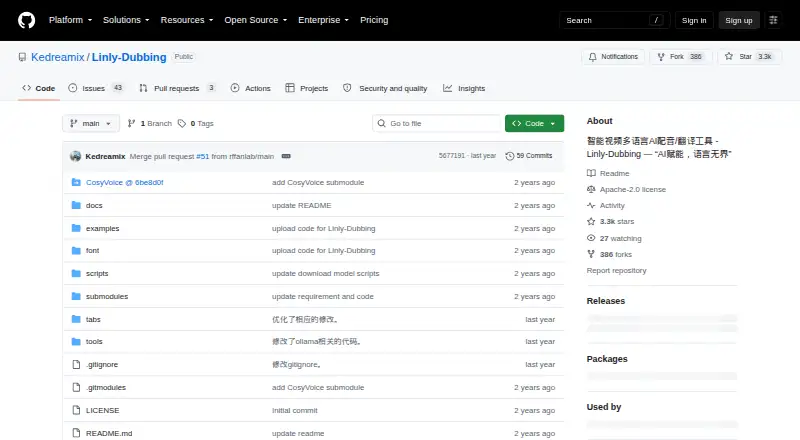
Linly-Dubbing provides open-source software for dubbing and translating Chinese and other-language video. It combines speech recognition, translation, voice synthesis, voice cloning, speaker matching, and lip sync. The project runs on Linux or Windows as a local web interface, with a Colab option. Setup involves Python, PyTorch, CUDA, downloaded models, and possible service credentials.
Review
In a line
This open-source project handles AI dubbing and subtitle translation across multiple languages. It is aimed at people who want to create translated video with locally managed software, rather than a hosted subscription service.
What it does
The tool turns spoken video into text, identifies speakers, translates the text, and creates dubbed speech. Translation can be handled by OpenAI models, local Qwen, or Google Translate.
Speech synthesis is available through Edge TTS, XTTS, CosyVoice, and GPT-SoVITS. Cloned voices can echo the source speaker, while speaker matching keeps assignments aligned with the right people.
Linly-Dubbing also uses Linly-Talker for lip synchronization. Its video features cover subtitles, background music, music-volume changes, playback-speed adjustments, and vocal separation through Demucs or UVR5.
Using yt-dlp, the project can fetch video and audio automatically from YouTube and other websites. It supports Chinese and other languages.
How it connects
The project uses the Apache License 2.0 and comes from a Git repository. It launches a local web interface at 127.0.0.1:6006, with instructions for Linux and Windows. A Colab script provides an online option.
Its documented connections are the speech, translation, synthesis, download, and vocal-separation tools used in the workflow. Depending on your setup, it may need Hugging Face credentials or credentials for OpenAI, Bytedance TTS, or Baidu services.
Good fit
This suits creators, translators, and technical users who need multilingual dubbing or subtitles and are willing to run the software themselves. It is useful when speaker identity, voice resemblance, and lip movement matter in the finished video.
People working with Chinese and other languages can choose among several translation and speech engines, then add subtitles or background music in the same video workflow. For a broader starting point, see AI Dubbing Software.
Watch for
The project characterizes installation as very slow. Setup entails configuring dependencies, downloading models, and defining environment variables. Its documented test combinations use Python 3.10, PyTorch 2.3.1, and CUDA 11.8 or 12.1.
The repository's releases page currently lists no releases, so installation follows the project documentation rather than a packaged release. Some configurations also depend on external service credentials.
Users are instructed to observe copyright, data-protection, and privacy laws and obtain authorization from the original author or rights holders before using material.
Pricing
Linly-Dubbing is free and open source. There is no paid plan listed in the facts.
You may still need to provide your own computer, downloaded models, and any credentials required by the services you select.
Verdict
Choose Linly-Dubbing if you want an Apache-licensed project that can handle transcription, translation, voice generation, voice matching, and lip sync in a self-hosted workflow. Its Linux and Windows instructions, local WebUI, and Colab script give you several ways to run it.
Avoid it if you need a quick, packaged setup or a product with published releases. The slow installation, model downloads, environment configuration, and possible third-party credentials make it a poor match for buyers seeking a ready-to-use service.
Our take
Linly-Dubbing is a sensible choice for people who control their own setup and want broad control over multilingual video dubbing. Recognition, translation, speech generation, voice cloning, and lip synchronization are gathered in one open-source project, with Linux, Windows, local WebUI, and Colab paths. The trade-off is preparation: installation is slow, models must be downloaded, and some configurations call for outside credentials. Check your legal rights to the source video and your ability to manage the documented Python, PyTorch, CUDA, and environment settings before committing.
- Free, open-source project under the Apache License 2.0
- Supports speech recognition, speaker matching, translation, and lip sync
- Provides multiple documented choices for translation and speech synthesis
- Runs on Linux and Windows with a local WebUI
- Can add subtitles, music, and playback-speed changes
- The project describes installation as very slow and dependency configuration is required
- Setup includes downloading models and defining environment variables
- Some configurations need external service credentials
- The releases page currently lists no releases
- Users must handle copyright, privacy, and data-protection compliance
- Pick it ifSelf-hosted multilingual video dubbing projects; Users who need voice matching and lip synchronization; Technical teams working with Chinese and other languages
- Skip it ifYou want a packaged service with a quick installation; You cannot manage local models, dependencies, or environment settings; You lack permission to use the source video or voices
Pricing
The software is free and open source. Budget for your own computer, model downloads, and any external services or credentials your chosen configuration uses.
Questions
Is Linly-Dubbing free?
Yes. The project is free and open source under the Apache License 2.0.
Which systems can run it?
The documented setup covers Linux and Windows. It launches a local WebUI, and the README also links to a Colab script for an online option.
What languages does it support?
It supports dubbing and subtitle translation in Chinese and other languages.
Can it copy a speaker's voice?
Yes. Voice cloning can produce speech that resembles the original video's voice, and speaker matching is also supported.
Does it synchronize lips?
Yes. Linly-Dubbing uses Linly-Talker's digital-human lip-sync technology to synchronize dubbed speech with the video's visuals.
What setup does it use?
The documented instructions specify Python 3.10, PyTorch 2.3.1, and CUDA 11.8 or 12.1. Dependency configuration, model downloads, and environment-variable setup are required.
Do I need outside accounts or keys?
Depending on configuration, you may need Hugging Face credentials or credentials for OpenAI, Bytedance TTS, or Baidu services.
Can I download videos with it?
The README describes yt-dlp-based automatic downloading of video and audio from YouTube and other sites.
Near it
All alternatives →- CACAMB.AI#10 on this board
- ODOpen Dubbing#12 on this board
- UDUnmixr Dubbing#9 on this board
- BA
 BlipCut AI Video Translator#13 on this board
- P
 pyVideoTrans#8 on this board
- VVideoLingo#14 on this board
- D
 Dubverse#7 on this board
- BD
 Bluez Dubbing#15 on this board
- M
 Maestra#6 on this board
- DMdubly.me#16 on this board