
Lipsyn.cc Review
lipsyn.cc · checked 20 Oct 2026
Online lip-sync video maker with web, API, and Adobe Express support.
How it plugs in
Signal on AI Video Lip Sync Tools6.3#8 of 28
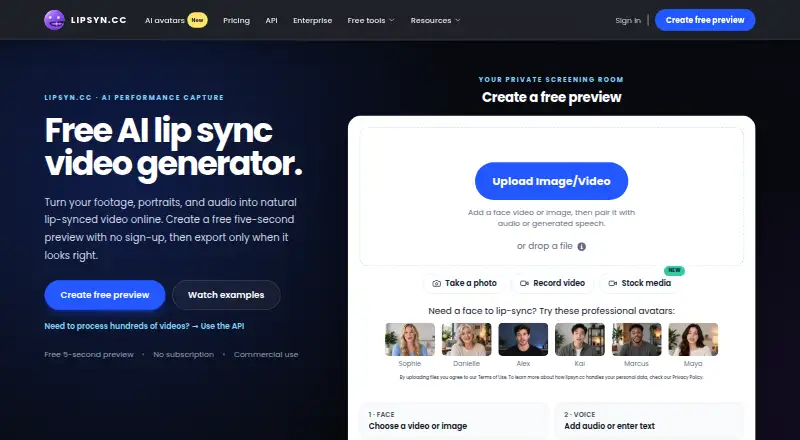
Lipsyn.cc turns videos, portraits, or illustrated characters plus audio into lip-synced videos. It runs on the web and through an API, offers a free five-second preview, and supports generated or uploaded speech in 91 languages. Exports reach 1080p, and commercial use is included when you own the uploaded media rights.
Review
In a line
Lipsyn.cc is an online tool for matching mouth movement to supplied audio. Videos, portraits, and illustrated characters can become speaking clips with it.
What it does
Upload face media and audio, or generate speech in the workflow, then receive a lip-synced video. A still portrait can become a talking video, and selectable avatars include Sophie, Alex, Kai, Marcus, Maya, and Danielle.
The service lists 91 languages and more than 90 voices. Signed-in users can reuse one visual with multiple audio tracks as a batch. Users can make a five-second preview at no cost, without signing up or entering card details, and pay only when selecting a full export.
Full exports support up to 1080p. The company says commercial use is included when you own the rights to the uploaded media. Processing is estimated at about five times the video length, with an email when the file is ready.
How it connects
Lipsyn.cc runs on the web and has an API for automated jobs. API renders run in the background and can report back by webhook or by status checks. The docs show cURL, Python, and Node.js usage and link to a public examples repository.
Adobe Express users can create lip-sync videos through the available plugin. Video inputs include MP4, M4V, WebM, MPG, and MPEG; image inputs include JPG, PNG, GIF, and WEBP; audio inputs include MP3, WAV, FLAC, AAC, OGG, and related formats.
API keys are bearer keys managed in the account dashboard, where usage can be viewed and keys disabled or deleted. Each key allows 60 requests per minute; uploads may reach 512 MB, media may run 120 minutes, and accounts can process five videos concurrently.
Good fit
Lipsyn.cc identifies content creators, marketing teams, localization studios, and agencies making talking portraits, avatar clips, or localized videos as its intended users.
It suits buyers who need browser access, an Adobe Express workflow, or programmatic rendering. Media can run for up to 120 minutes, and lip-sync can cover as many as three characters, with the closest-to-camera faces selected.
Watch for
Results can suffer with covered faces, cuts, extreme angles, extra faces, background noise, or overlapping voices. The site recommends one clear, forward-facing face.
A video can include up to three lip-synced characters. Lower-resolution uploads are matched rather than enlarged beyond 1080p. The Adobe Express plugin keeps processed videos in Recent Activity for seven days unless downloaded sooner.
The terms make completed generations and minute-pack purchases nonrefundable. If video creation fails, the used minutes go back to the account. The service says it follows GDPR and Austrian data protection laws, and that uploaded content is not used for training or other purposes.
Pricing
Lipsyn.cc lists paid use from €7.99 and also offers a free preview: five seconds, no sign-up, no card, with full export optional.
One-time prepaid packs are Quick Take at €11.99 for 5 minutes, Creator at €23.84 for 10 minutes, Studio at €69.42 for 30 minutes, Pro Studio at €135.85 for 60 minutes, and Agency at €398.20 for 180 minutes. Minutes do not expire. Output at 1080p or higher uses twice the video duration.
Pay as you go has no listed price and uses a per-minute rate that varies by resolution, with a minimum payment. Enterprise pricing is available on request for custom volume, priority support, API, and team workflows. Checkout supports Stripe, PayPal, Apple Pay, Google Pay, and other currencies.
Verdict
Choose Lipsyn.cc if you need lip-synced talking images or videos with a quick browser preview, broad language coverage, or an API. The Adobe Express plugin may suit teams already working there, while prepaid minutes that never expire can fit occasional projects.
Check face quality, audio clarity, resolution needs, and refund terms before buying. Skip it if your source footage regularly has blocked or angled faces, multiple voices, or scenes that need results beyond the stated limits. For broader tool comparisons, see AI video lip-sync tools.
Our take
Lipsyn.cc is a practical option for creators and teams that want talking portraits, avatar videos, or localized clips without committing before a short preview. Its web app, Adobe Express plugin, and documented API cover both manual and automated work. The main checks are source quality, processing time, and prepaid-minute rules. Confirm that you hold the necessary commercial rights for uploaded media, and note that completed generations cannot be refunded.
- Five-second preview available without sign-up or card
- Supports uploaded or generated speech in 91 languages
- Web app, API, and Adobe Express plugin
- Exports include commercial use when you own media rights
- Prepaid minute balances never expire
- Completed generations and minute packs are not refundable
- Occlusion, angles, noise, and overlapping voices reduce results
- 1080p-or-higher API output uses twice the duration
- Processing is estimated at about five times video length
- Adobe plugin history lasts seven days unless downloaded
- Pick it ifCreators making talking portraits or avatar videos; Teams needing API or Adobe Express workflows; Localization and agency projects
- Skip it ifYour footage often has covered, angled, or multiple faces; You need guaranteed results beyond the stated resolution and limits; You require refunds for completed generations
Pricing
Users can make a free five-second preview without signing up or entering card details. Enterprise pricing is on request.
- Free previewNo card; five-second preview · 5 seconds · no sign-up · full export optionalFree
- Quick Take5 minutes prepaid · Minutes never expire · 1080p+ consumes 2× duration€11.99 one-time
- Creator10 minutes prepaid · Minutes never expire · 1080p+ consumes 2× duration€23.84 one-time
- Studio30 minutes prepaid · Minutes never expire · 1080p+ consumes 2× duration€69.42 one-time
- Pro Studio60 minutes prepaid · Minutes never expire · 1080p+ consumes 2× duration€136 one-time
- Agency180 minutes prepaid · Minutes never expire · 1080p+ consumes 2× duration€398 one-time
- Pay as you goPer-minute rate varies by resolution; VAT at checkout · One complete video · minimum payment appliesOn request
- EnterpriseCustom volume pricing · Priority support · API and team workflowsOn request
As lipsyn.cc lists them, checked 20 Oct 2026.
Questions
Can I try Lipsyn.cc without signing up?
Yes. A five-second preview can be created at no charge without an account or payment card; payment is optional for a full export.
What languages and voices are supported?
The site lists speech support for 91 languages and more than 90 voices. Speech can come from an uploaded audio file or be generated in the workflow.
What files can I upload?
Video formats include MP4, M4V, WebM, MPG, and MPEG. Images include JPG, PNG, GIF, and WEBP. Audio includes MP3, WAV, FLAC, AAC, OGG, and related formats.
How long can a video or audio file be?
Uploads can be up to 512 MB, and video or audio can run up to 120 minutes. Up to three characters can be lip-synced in one video.
Does Lipsyn.cc have an API?
Yes. Background API jobs can return results through webhooks or status polling, and the documentation provides cURL, Python, and Node.js examples.
Are commercial rights included?
The company says full exports include commercial-use rights when you own the rights to the uploaded media.
Can I get a refund?
Completed generations and minute-pack purchases cannot be refunded. Minutes from failed video creation are returned to the account.
Does it connect to Adobe Express?
Yes. The service advertises a plugin that lets Adobe Express users create lip-sync videos within that app.