
MadMapper: Video, LED and Laser Mapping Software
madmapper.com · checked 15 Oct 2026
Video, LED and laser mapping software for performances, installations and architectural displays.
How it plugs in
Signal on Projection Mapping Software6.4#4 of 24
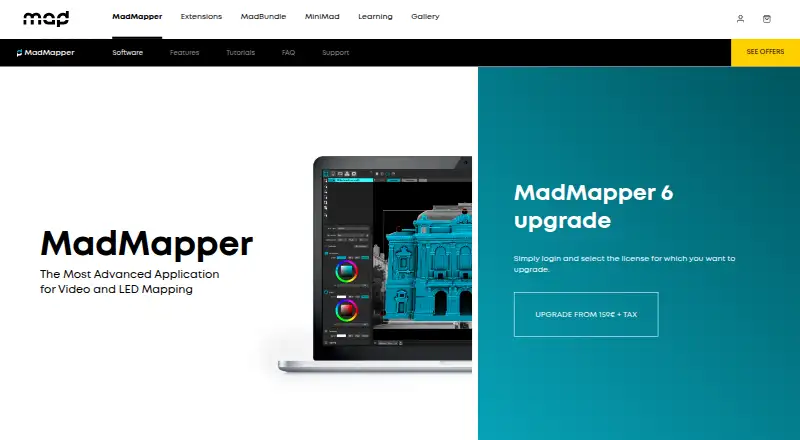
MadMapper maps video, LED and laser content onto physical surfaces. It supports projection mapping, 3D calibration, LED and DMX control, timelines, cues, live inputs and generative materials. macOS and Windows versions include an OSC control API; evaluation is free with watermarked output, while paid licenses begin at €39 a month.
Review
In a line
MadMapper is software for mapping video and LED content onto physical surfaces. People use it for performances, installations and architectural displays, including laser work through the MadLaser extension.
What it does
The application places media on irregular surfaces with Bezier masking, mesh warping, soft-edge blending and 3D surface mapping. A compatible camera can scan a projector view with structured light to help map physical objects.
It handles video, images, OBJ 3D files, audio and live camera input. Users can build generative shader materials, edit them live, and arrange animated timelines, time markers, montage tracks, schedules and parameter cues.
Projector capacity depends on the computer and graphics hardware. In testing, the maker ran 16 Full HD outputs from one PC; video resolution can reach 16K.
How it connects
MIDI, OSC with OSC Query, Art-Net, Ableton Link, Spout, Syphon, NDI and the MiniMad remote controller provide networking and live-control options. DMX features include Art-Net 4, sACN 3, synchronized universes, output rates up to 1000 frames per second and as many as 4096 DMX universes.
The published OSC command and channel list provides a public control API for application, preview and media operations. Media import covers MP4, H.264, H.265/HEVC, ProRes, DNxHD, HAP, JPEG, PNG, TIFF, EXR, PSD, OBJ and many audio formats.
MadMapper is proprietary software, not open source. It runs on Windows 10 64-bit and macOS 10.13 or newer, with native Apple Silicon support since version 5.
Good fit
Visual and digital artists, scenographers, stage designers, VJs and other creative people use it for mapped projections, LED displays and physical installations.
The mix of projector mapping, camera scanning, DMX, live control, timelines and generative materials fits productions that need several output and control systems. For an overview of this category, see Projection Mapping Software.
Watch for
In the free demo, output is watermarked; projects cannot be loaded or saved, SVG/PNG/PDF export and material publishing are disabled, Space Scanner runs at one-quarter resolution, and DMX devices black out every 30 seconds.
MadMapper 6 needs at least 300 MB of disk space, 2 GB of RAM and an OpenGL 3.3-capable graphics card. Advanced work benefits from two to four CPU cores and 8 GB of RAM.
Perpetual licenses start at two seats, seats cannot be added later, and sharing a license is prohibited. Check the computer, projector and control hardware against the required outputs before buying.
Pricing
A free Try MadMapper plan includes all features but has watermarked input and output, a DMX blackout every 30 seconds and quarter-resolution Space Scanner. There is no separate free trial.
Temporary installations costs €39 per month excluding tax and applies to current and future versions. Artist costs €399 once, excluding tax, and grants a perpetual license for the current 6.xx version with one spare-computer seat.
Verdict
Choose MadMapper when a project combines projection or LED mapping with live control, DMX, scanning or scheduled playback. Its broad media support and public OSC controls can fit complex show setups.
The free plan is useful for checking workflows, but its watermarks, blocked saves and export limits prevent it from serving as a normal production license. Teams should also confirm hardware capacity and the fixed seat terms before committing.
Our take
MadMapper is a strong match for artists and production crews building mapped visuals across projectors, LEDs or lasers. It covers detailed surface work, high-resolution media, camera scanning, DMX and live protocols in one application. The free version lets you explore the feature set, but watermarks, blocked saves and periodic DMX blackouts make it unsuitable for finished shows. Buyers should verify GPU capacity, operating-system support and the two-seat starting point for perpetual licenses. The €39-a-month temporary plan is the clearest route for short installations, while the €399 license targets ongoing work on version 6.xx.
- Supports projection, LED and laser mapping workflows
- Supports 16K video and projector counts limited by the host system
- Includes DMX, MIDI, OSC, NDI, Spout and Syphon control
- Public OSC API and extensive media-format support
- Free plan includes all features for evaluation
- Watermarks appear in the free demo, with saving and exports unavailable
- DMX devices black out every 30 seconds in the demo
- Perpetual licenses start at two seats
- Seats cannot be added later or shared
- Requires an OpenGL 3.3-capable GPU
- Pick it ifVisual artists and VJs mapping media onto physical surfaces; Stage and installation teams using projectors, LEDs or lasers; Shows needing DMX, live control and timed cues
- Skip it ifYou need open-source software; You need unrestricted saving, exports or DMX in a free version; Your hardware cannot meet the GPU, RAM or output demands
Pricing
The free plan is for evaluation and adds watermarks and other limits. For a perpetual current-version license, the one-time price is €399 and includes one spare-computer seat; prices exclude tax.
- Try MadMapperAll features · watermarked input/output · DMX blackout every 30 seconds · Space Scanner at quarter resolutionFree
- Temporary installationsFrom 39€/month excl tax · All features · temporary license supports current and future versions€39/mo
- ArtistFrom 399€ excl tax · All features · perpetual for current 6.xx version · one spare-computer seat€399 one-time
- Artistsexcl tax · All MadMapper features · perpetual license for current 6.xx version · one extra seat for a spare computer€399 one-time
As madmapper.com lists them, checked 15 Oct 2026.
Questions
Does MadMapper have a free plan?
Yes. Try MadMapper is free and includes all features, but adds watermarked input and output, quarter-resolution Space Scanner and a DMX blackout every 30 seconds.
What operating systems does MadMapper support?
The FAQ lists Windows 10 64-bit and macOS 10.13 or newer. Native Apple Silicon support has been available since version 5.
Can MadMapper control DMX and LEDs?
Yes. LED scanning, fixture creation, Art-Net 4, sACN 3, universe synchronization, DMX output up to 1000 fps and as many as 4096 DMX universes are supported.
Does MadMapper offer a public API?
Its documentation publishes an OSC command and channel list for application, preview and media operations. OSC is a control method for sending messages between software.
What hardware does MadMapper 6 need?
Minimum requirements are 300 MB of disk space, 2 GB of RAM and an OpenGL 3.3-capable GPU. Advanced work benefits from two to four CPU cores and 8 GB of RAM.
Is MadMapper open source?
No. The legal information identifies proprietary software, and the product is not open source.
How does MadMapper compare with other mapping tools?
Projection-mapping alternatives are covered in Projection Mapping Software.