Heatmap and session replay tools
Mouseflow: Website Session Replay and Analytics
mouseflow.com · checked 15 Oct 2026
Website behavior analytics with session replays, heatmaps, funnels, forms, feedback and AI-assisted insights.
How it plugs in
Signal on Heatmap and session replay tools7.0#11 of 63
Mouseflow records website visits and turns clicks, movement, scrolling, forms and page content into replays and reports. Its platform includes heatmaps, journey paths, friction detection, funnels, form analytics and surveys. A free plan is available, with paid tiers based on monthly sessions, projects, funnels and data retention.
Review
In a line
Mouseflow is a hosted website analytics service from a Copenhagen company founded in 2009. It records visitor interactions and analyzes them in one platform.
What it does
Mouseflow captures clicks, mouse movement, scrolling, forms and page content as people browse. It says every session is recorded without sampling, then presents video-style replays of individual visits.
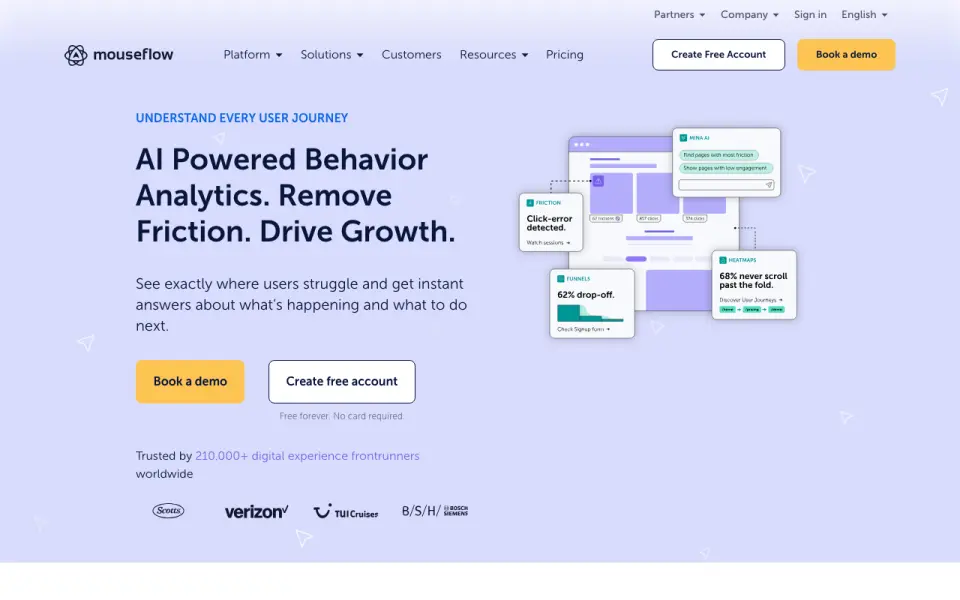
Reports include click, scroll, geo, attention, movement, interactive and friction heatmaps, plus journey paths, conversion funnels, form analysis and feedback surveys. Automatic friction checks can flag dead clicks, JavaScript errors and other troublesome interactions. Ask Mina accepts questions about behavior data, while Mina Insights highlights patterns and friction.
Mouseflow brings session replay, heatmaps and behavior analysis into one platform.
How it connects
Typical setup adds a JavaScript snippet before the closing body tag. Plugins and integrations are also available. Popular listed connections include Adobe Analytics, Google Analytics, Google Tag Manager, AB Tasty, Shopify and Google Ads.
Mouseflow has a public REST API with US and EU endpoints, Basic authentication and JSON responses. Its JavaScript API can tag recordings, identify visitors, control recording, create virtual pageviews and send custom form, revenue, 404 and dead-click events.
It is not open source and is offered as hosted SaaS rather than self-hosted software. IP addresses and sensitive form values are masked or excluded by default; EU and US account data are stored in their respective regions.
Good fit
Mouseflow suits marketing, conversion-rate, ecommerce, UX and design, and analytics teams that need to see how visitors use a site and where they leave.
It is useful when a team wants replay alongside heatmaps, funnels, journey analysis, form drop-off reports or feedback surveys. The service also lists in-app chat support, with personalized onboarding and training for enterprise customers.
Watch for
Monthly session allowances matter. When an account reaches its limit, tracking stops until the next refill unless the customer asks for a refill or upgrades.
Check privacy and regional requirements before setup. Mouseflow states that its infrastructure supports GDPR, CCPA/CPRA, HIPAA for the US region, PCI DSS payment vendors, ISO 27001 and other listed frameworks, but the hosted service does not provide an underlying source-code licence.
The JavaScript installation and optional API work may need website or analytics-team involvement.
Pricing
Mouseflow uses a freemium model. The Free plan is billed monthly at no charge and includes 500 sessions each month, one website project, one funnel and one month of data retention. A 14-day trial is also available.
Essential is $25 a month, billed monthly, for 5,000 sessions, one project, one funnel and three months of retention. Advanced is $109 a month for 25,000 sessions, two projects, five funnels and six months of retention.
Premium is $319 a month for 100,000 sessions, five projects, 10 funnels and 12 months of retention. Enterprise uses a custom quote with custom limits plus enterprise controls and support.
Verdict
Choose Mouseflow if seeing real visitor behavior matters more than simply counting page views. Its mix of replay, heatmaps, journey paths, friction checks, funnels, forms and surveys covers several investigation tasks in one hosted service.
The free tier gives small sites a way to start, while higher plans raise session, project, funnel and retention limits. Confirm that the monthly allowance fits traffic, and confirm regional privacy needs before committing.
If you need open-source software or a self-hosted installation, Mouseflow is not a match.
Our take
Mouseflow makes sense for teams that need recordings and analysis of real website visits, not just aggregate traffic numbers. It brings several views together, including replays, heatmaps, path analysis, friction events, funnels, forms and surveys, with AI features for questions and pattern finding. Start with the free plan if 500 monthly sessions and short retention are enough. Move up when traffic or reporting needs exceed those limits. Do not choose it when open-source code or self-hosting is a requirement.
- Records 100% of sessions without sampling
- Includes replays, heatmaps, funnels, forms and surveys
- Public REST and JavaScript APIs
- Free plan and 14-day trial
- EU and US data residency options
- Tracking stops after the monthly session limit
- Hosted SaaS only; not open source or self-hosted
- Paid plans rise with session volume
- Installation uses a JavaScript snippet
- Pick it ifMarketing and conversion teams studying visitor behavior; Ecommerce, UX and analytics teams; Sites needing replay plus funnels and form analysis
- Skip it ifYou require open-source code or self-hosting; Your traffic may exceed the plan's session allowance; You need longer retention than the selected tier provides
Pricing
The free tier covers 500 sessions a month with one project and one month of retention.
- Freemonthly · 500 sessions/month · 1 website project · 1 funnel · 1 month data retentionFree
- Essentialmonthly · 5,000 sessions/month · 1 website project · 1 funnel · 3 months data retention$25/mo
- Advancedmonthly · 25,000 sessions/month · 2 website projects · 5 funnels · 6 months data retention$109/mo
- Premiummonthly · 100,000 sessions/month · 5 website projects · 10 funnels · 12 months data retention$319/mo
- Enterprisecustom quote · Custom sessions, projects, funnels and retention · enterprise controls and supportOn request
As mouseflow.com lists them, checked 15 Oct 2026.
Questions
Does Mouseflow have a free plan?
Yes. Free is billed monthly at no charge and includes 500 sessions per month, one website project, one funnel and one month of data retention.
Is there a free trial?
Yes. Mouseflow lists a 14-day trial in addition to its free plan.
How is Mouseflow installed?
The normal setup adds a JavaScript snippet before the website's closing body tag. Plugins and integrations are also available.
What does Mouseflow record?
It tracks clicks, mouse movement, scrolling, forms and page content, then sends that information to its platform for analysis.
Does Mouseflow offer an API?
Yes. It has a REST API with US and EU endpoints, plus a JavaScript API for tagging, visitor identification, recording controls and custom events.
What happens when I reach my session limit?
Tracking stops until the next monthly refill unless you request a refill or upgrade the account.
Is Mouseflow open source or self-hosted?
No. Its licence describes hosted SaaS access, and no underlying source-code licence or self-hosted deployment is provided.