Nanome: Collaborative Molecular Visualization Software
nanome.ai · checked 15 Oct 2026
Shared molecular visualization and drug-discovery environment spanning XR and the MARA AI copilot.
How it plugs in
Signal on Virtual Reality Software6.7#2 of 30
Teams use Nanome to bring protein and small-molecule structures into a common workspace for inspection. It runs in modern browsers, Windows PCs and supported XR headsets, with Android XR and iOS access listed. Tools cover measurements, molecule building, docking review, trajectory playback and interaction reports. MARA adds scientific tools through natural-language requests, REST, Python notebooks and MCP.
Review
In a line
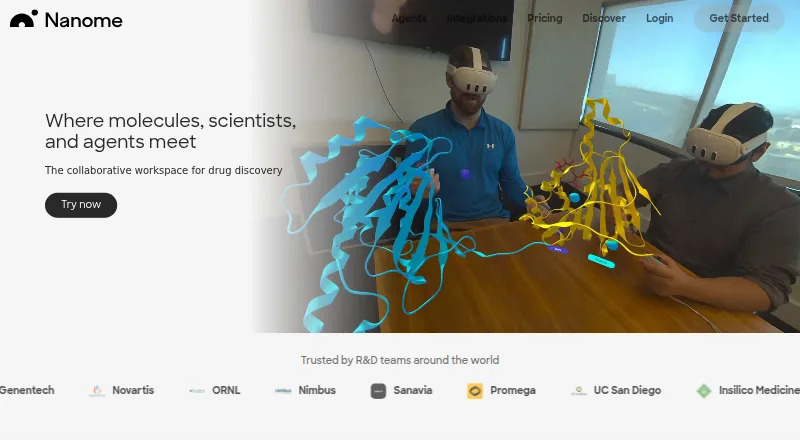
Nanome is a collaborative workspace for viewing molecular structures and supporting drug-discovery work. People can work together in a browser, on Windows, or through supported XR headsets, with MARA as an AI copilot.
What it does
Users load protein and small-molecule files, build 3D scenes, inspect binding sites and review docking poses. Editing includes amino-acid mutations, rotamer changes, structure minimization, measurements, selections and a 3D chemical builder.
Nanome can play molecular-dynamics trajectories frame by frame, with a documented limit of 2,000 frames per trajectory. Interaction tools show chemical contacts, support inline notes and can create an interaction report.
MARA accepts plain-language requests and runs docking, structure preparation, cheminformatics and other scientific tools inside the workspace. Its library contains more than 300 tools spanning 26 scientific categories.
How it connects
The listed connections cover Schrödinger LiveDesign, CDD Vault, OpenEye/Cadence, Discngine 3decision, KNIME Server, CCG MOE, Boltz and OpenFold. Structures can come from RCSB PDB, PubChem, DrugBank or local files.
On the free web plan, users can upload PDB, SDF and CIF files directly. Other listed formats include mmCIF/PDBx, MOL, MOL2, SMILES, XYZ, PQR, PDBQT, MAE, MAEGZ, MOE, PSE, GRO, XTC, TRR, DCD and DX.
Every MARA tool has a REST endpoint. A Python package works with Jupyter notebooks, and Nanome publishes a Claude Code skill plus an MCP server. Nanome is not open source.
Commercial Enterprise can run in a private cloud or on premises, connect internal databases and use internal large-language-model or MCP servers. Hosted setups require outbound TCP 443, with TLS/SSL inspection exemptions for Nanome hosts.
Good fit
Nanome suits students, researchers, laboratories and commercial teams that need shared 3D molecular review. Web, XR and PCVR participants can join one live workspace and see changes together.
Academic plans target individual users or institutions deploying at scale. Commercial Enterprise adds private deployment, custom development and internal system connections.
Watch for
Starter permits three workspaces and one project, with 50 MARA credits, five most recent files and seven days of chat history; XR collaboration on that plan is view-only.
Nanome desktop currently does not support Mac or Linux. Windows PC use lists a GTX 1070 minimum GPU, with an RTX 3060 recommended. Supported headsets include Meta Quest 3 and 3S, Samsung Galaxy XR and Apple Vision Pro.
Hosted deployments need specific network access, and Nanome's terms say absolute security for electronic transmission cannot be guaranteed. Check device, network and deployment requirements before choosing a plan.
Pricing
Nanome offers a free Starter / Free Web Seat with three workspaces, one project, PDB/SDF/CIF uploads, view-only XR collaboration, 50 MARA credits, five recent files and seven days of chat history. New accounts receive a 14-day Full license trial without needing a credit card.
The Academic Department Full Web Seat is priced at $4.17 a month with annual billing and a 50-license minimum. The Academic Department Full Seat runs $12.50 a month on annual billing, under the same 50-license minimum.
Academic Personal Full seat and Academic Classroom / Personal Full Seat each cost $20.83 a month, billed annually. Commercial Cloud or Enterprise pricing is available on request.
Verdict
Choose Nanome if your work involves protein or small-molecule structures and you need people in different places to inspect the same 3D scene. Its browser and XR options, molecular editing, trajectory playback and MARA automation cover both visual review and scientific tasks.
The free seat is suitable for limited web viewing, while academic and commercial plans add shared storage, XR access, managed devices or private deployment. Check the 50-license academic minimums, Windows and headset requirements, free-plan limits and network rules first. Mac-only desktop users and teams needing an open-source product should look elsewhere.
Our take
Nanome is a fit for molecular research groups that want shared 3D workspaces across browsers, Windows PCs and supported XR headsets. MARA extends the workspace with hundreds of scientific tools and automation interfaces. The free seat covers basic web viewing but has tight workspace, file, credit and history limits. Academic plans require annual billing and, for department seats, at least 50 licenses. Commercial users must request a price. Mac and Linux desktop support is unavailable, and private deployment is reserved for Commercial Enterprise.
- Shared live workspaces across web, XR and PCVR
- More than 300 MARA tools spanning 26 scientific categories
- REST API, Python notebooks and MCP access
- Supports molecular editing, docking review and trajectory playback
- Private-cloud or on-premises Enterprise deployment
- Starter limits workspaces, files, credits and chat history
- Mac and Linux desktop use is unsupported
- Academic department plans require 50 licenses
- Windows PC use lists a GTX 1070 minimum GPU
- Commercial pricing is available only on request
- Pick it ifResearch groups that review molecular structures together; Students, labs and companies using XR or browser workflows; Teams automating MARA tools through APIs or notebooks
- Skip it ifYou need a Mac or Linux desktop application; You require open-source software; You need more than the Starter limits without a paid plan
Pricing
A free Starter seat is available alongside a 14-day Full license trial. Commercial Cloud or Enterprise pricing is on request.
- Starter / Free Web Seat3 workspaces · 1 project · PDB/SDF/CIF upload · view-only XR collaboration · 50 MARA credits · 5 most recent files · 7 days chat historyFree
- Academic Department Full Web SeatBilled annually; minimum 50 licenses · Managed devices · shared molecular storage · syllabus and course implementation assistance$4.17/mo
- Academic Department Full SeatBilled annually; minimum 50 licenses · Web and XR · managed devices · shared molecular storage · implementation assistance$12.50/mo
- Academic Personal Full seatBilled annually · 100 MCP calls · Nanome-hosted shared tenant collaboration server · 300+ tools$20.83/mo
- Academic Classroom / Personal Full SeatBilled annually · Web plus XR · shared Nanome collaboration server · 300+ tools · 100 MCP calls · custom hosted tools$20.83/mo
- Commercial Cloud or EnterpriseSingle-tenant cloud or behind-firewall deployment · 300+ tools · custom tools · internal database and LLM/MCP integration · dedicated IT supportOn request
- Commercial Cloud / EnterpriseCustom MCP calls · Cloud or Enterprise deployment · Premium supportOn request
As nanome.ai lists them, checked 15 Oct 2026.
Questions
Does Nanome have a free plan?
Yes. The free Starter / Free Web Seat provides three workspaces, one project, PDB/SDF/CIF uploads, view-only XR collaboration, 50 MARA credits, five recent files and seven days of chat history.
How long is the Nanome trial?
Each new account receives a 14-day Full license trial, and no credit card is required.
Which devices support Nanome?
Nanome supports modern browsers, Windows PCs, Meta Quest 3 and 3S, Samsung Galaxy XR and Apple Vision Pro. Mac and Linux desktop use is not currently supported.
Can Nanome connect to other scientific software?
Nanome lists Schrödinger LiveDesign, CDD Vault, OpenEye/Cadence, Discngine 3decision, KNIME Server, CCG MOE, Boltz and OpenFold among its integrations.
Does Nanome offer an API?
Yes. Every MARA tool is exposed through a REST endpoint. A Python package supports Jupyter notebooks, and Nanome publishes a Claude Code skill and MCP server.
Can Nanome run behind a firewall?
Commercial Enterprise deployments can run in a customer private cloud or on premises, with internal database and internal LLM/MCP integration.
What does the academic pricing require?
Academic Department Full Web Seat is $4.17 a month billed annually, while Academic Department Full Seat is $12.50 a month billed annually. Each plan has a 50-license minimum.