Nikola: Free Static Site Generator Review
getnikola.com · checked 11 Oct 2026
Nikola is a free, open-source static site generator for building deployable websites from content.
How it plugs in
Signal on Static site generators7.3#6 of 35
Nikola converts written content into HTML files and other site assets that you upload to a web server. It supports blogs, multiple languages, galleries, feeds, and several input formats. The free MIT-licensed software runs on Linux, macOS, Windows, or your own host, and can be extended with Python plugins and custom themes.
Review
In a line
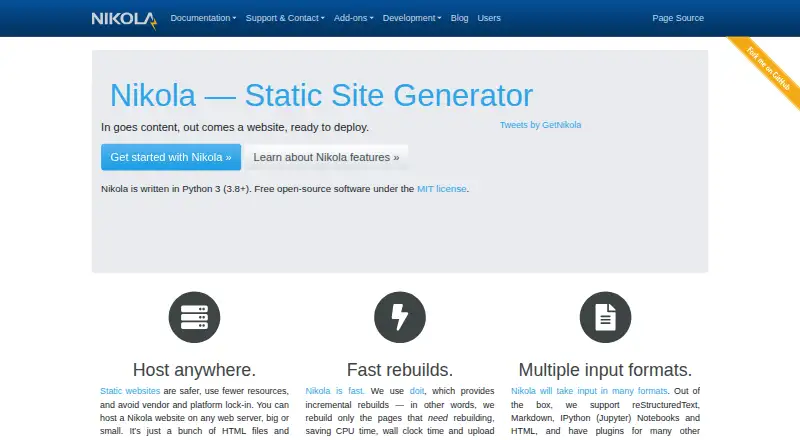
Nikola is a static site generator: it turns content into a folder of HTML files and assets ready to publish. It is free, open-source software under the MIT license.
What it does
Use Nikola to create blogs, company websites, personal sites, software project pages, or book sites. It builds only pages that changed, using doit for incremental rebuilds.
Built-in site features include comments, tags, categories, archives, RSS and Atom feeds, image galleries, and code listings. Posts can use several formats, including Markdown, reStructuredText, HTML, and IPython notebooks. Nikola supports almost 40 languages and multilingual posts.
How it connects
A generated site can run on any web server that serves HTML files, including GitHub Pages. Because the output is static, it does not require server-side code. Custom domains are supported.
Nikola can work with Dato CMS, Netlify CMS, and Contentful. It includes a WordPress importer, while plugins provide other blog importers. Python plugins add features, and Mako or Jinja2 can be used to make themes.
Nikola runs with Python 3.8 or later on Linux, macOS, Windows, or a self-hosted setup. Its code is open source under the MIT license.
Good fit
Nikola suits people who want to publish a blog or a small website as static files. It also fits company, personal, software project, and book sites.
It is useful when you need multilingual posts, custom domains, or control over themes and extensions. Its output can be moved between web servers because it is made of HTML files and assets.
Watch for
Static pages do not run code on the server, so forms cannot process user input. Comments are the exception noted in the handbook.
The getting-started guide warns that Linux distribution packages may be outdated and says the Ubuntu package is broken and unsupported. Plugins and themes listed in Nikola's indexes are not officially supported.
Nikola needs Python 3.8 or later, so check that your system can install and maintain that version before choosing it.
Pricing
Nikola is free, with no paid plan and no free-trial period. It is free open-source software under the MIT license and requires Python 3.8 or later.
Verdict
Choose Nikola if you want a no-cost, open-source way to build static blogs or websites and are comfortable installing Python and managing generated files. It offers many publishing features, multilingual content, import tools, and flexible extensions.
Look elsewhere if your site needs server-side forms or other user-input processing beyond comments, or if you need officially supported third-party plugins and themes.
Our take
Nikola is a sensible choice for writers and site owners who prefer static files, free licensing, and broad control over publishing formats and themes. It can cover blogs and several small-site types while keeping hosting portable. The trade-off is a technical setup that depends on Python, plus limited support for interactive features because pages do not execute server code. Review your form needs, installation path, and reliance on community plugins before committing.
- Free, open-source software under the MIT license
- Runs on Linux, macOS, Windows, and self-hosted setups
- Supports multiple languages and several content formats
- Includes blogs, feeds, galleries, and code listings
- Generated files can be hosted on any HTML web server
- Server-side forms cannot process user input, except comments
- Linux packages may be outdated; the Ubuntu package is unsupported
- Indexed plugins and themes are not officially supported
- Requires Python 3.8 or later
- Pick it ifStatic blogs and small websites; Multilingual publishing; People comfortable managing Python-based tools
- Skip it ifYou need interactive server-side forms; You require officially supported third-party plugins or themes; Your system cannot run Python 3.8 or later
Pricing
Nikola has one free plan: the open-source software costs nothing, has no trial period, and requires Python 3.8 or later.
- NikolaFree open-source software under the MIT license · Requires Python 3.8+Free
As getnikola.com lists them, checked 11 Oct 2026.
Questions
Is Nikola free?
Yes. Nikola is free, open-source software under the MIT license. There is no separate paid plan or free-trial period.
What does Nikola create?
It converts content into a folder of HTML files and assets that you can upload to a web server.
Where can a Nikola site run?
Any web server that serves HTML files can host the generated site. The handbook also lists GitHub Pages deployment support.
Which content formats can Nikola read?
Built-in formats include Markdown, reStructuredText, HTML, and IPython notebooks. Plugins can add other formats.
Can Nikola handle comments and feeds?
Its built-in blog features include comments, tags, categories, archives, and RSS and Atom feeds.
Does Nikola support a custom domain?
Yes. Nikola lists custom-domain support for generated sites.
Can Nikola process website forms?
No server-side code runs on a generated site, so forms cannot process user input. Comments are the stated exception.
What Python version does Nikola need?
The homepage lists Python 3.8 or later as the requirement.