Personal Knowledge Management Software
Notesium: Linked Markdown Notes on Your Computer
notesium.com · checked 15 Oct 2026
A local, open-source indexer for linked Markdown notes, with web, CLI, Vim and REST API tools.
How it plugs in
Signal on Personal Knowledge Management Software7.7#1 of 32
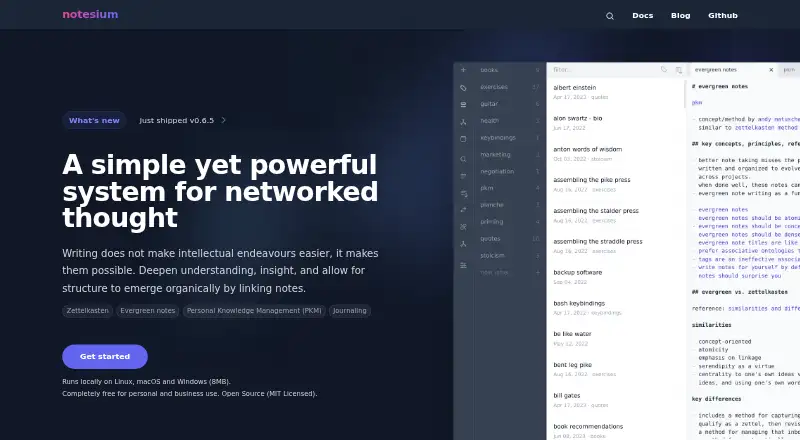
Notesium stores linked notes as plain Markdown files in one local folder. Its web editor, Finder search and graph view support Zettelkasten and Evergreen note methods. It also includes a CLI, Vim/Neovim plugin and local REST API. Notesium is free, open source under MIT, and runs on Linux, macOS, Windows and the web.
Review
In a line
Notesium is a local system for creating, storing and finding bidirectionally linked Markdown notes. It is built for Zettelkasten, Evergreen notes and personal knowledge management.
What it does
Notes are saved as plain Markdown files in one local folder. Typing [[ in the web editor opens a finder for inserting links, and saved links show both outgoing and incoming relationships.
The Finder searches all notes by their text. An interactive force graph displays note relationships, with search filters, previews, zoom and layout controls.
The embedded editor highlights Markdown, folds sections, formats tables and can emulate Vim mode. Daily and weekly notes are created through conventions in the web and Vim interfaces.
How it connects
Notesium is open source under the MIT license. It includes a command-line interface with commands for lists, links, lines, finding, statistics, web access and version details.
A Vim/Neovim plugin uses the CLI Finder and adds commands for notes, links, search, web access and periodic notes. A local REST API can create, update, delete, retrieve and list notes, but its interface is marked unstable and has no explicit versioning.
The web interface runs locally. Prebuilt binaries are available for Linux, macOS and Windows, with a documented notesium:// URI protocol for opening notes and actions.
Good fit
Notesium suits people building personal notes, knowledge bases, journals, research collections, book projects or workout records.
Its graph organization, backlinks, deterministic note names and label notes support Zettelkasten and Evergreen workflows. Offline access and local Markdown storage also suit people who want files kept on their own machine.
Watch for
The project describes itself as experimental and proof-of-concept software. It says Linux is primarily tested and supported, while macOS and Windows have only preliminary testing.
The REST API is unstable and unversioned. Writing through it requires starting the daemon with the --writable option, so check the API and deployment behavior before relying on automation.
Installation instructions ask users to verify downloaded binaries with published SHA-256 checksums. The project reports a 6.3 MB Linux build and 11.4 MB memory use for its web and API setup, while noting that results vary by system and usage.
Pricing
Notesium has one Free plan. It is free for personal and business use, includes open-source code under the MIT license, and covers Linux, macOS and Windows.
Verdict
Choose Notesium if you want a local Markdown notebook organized around links, backlinks and a visual graph. It gives both browser and Vim-based ways to work, plus a command line and local API for access.
Look elsewhere if you need a mature project, a stable versioned API or broad operating-system support today. Its experimental status and limited non-Linux testing make those checks important before adopting it for a critical knowledge base.
Our take
Notesium is a sensible choice for people who want linked Markdown notes stored locally and can accept an experimental project. Its web editor, graph, CLI and Vim integration cover several working styles, while the free MIT-licensed code keeps the cost at zero. The main risks are the unstable, unversioned API and the project's stronger Linux support compared with macOS and Windows. Treat it as a flexible personal system rather than a mature platform for dependable automation.
- Plain Markdown files stay in one local folder
- Bidirectional links, backlinks and graph view
- Web editor, CLI and Vim/Neovim integration
- Free and MIT-licensed open-source software
- Works offline on supported desktop systems
- Project is labeled experimental and proof of concept
- API is unstable and has no explicit versioning
- Linux is primarily supported; macOS and Windows are preliminary
- API writes require starting the daemon with --writable
- Pick it ifZettelkasten and Evergreen note workflows; Local personal notes, research and knowledge bases; Users who work with Markdown and Vim
- Skip it ifYou need a mature, versioned API; You require fully supported macOS or Windows deployments; You want a hosted service instead of local files
Pricing
The only listed plan is Free: no charge for personal or business use, with MIT-licensed open-source code and support for Linux, macOS and Windows.
- FreeFree for personal and business use · Open source · MIT License · Linux, macOS and WindowsFree
As notesium.com lists them, checked 15 Oct 2026.
Questions
Is Notesium free?
Yes. Notesium has a Free plan for personal and business use.
Where does Notesium store notes?
It stores notes as plain Markdown files in a single local folder.
Does Notesium work offline?
Yes. Its local deployment and offline access support use without a hosted connection.
Which systems can run Notesium?
Prebuilt binaries are provided for Linux, macOS and Windows. It also has a local web interface and API.
Does Notesium have an API?
Yes. Its local REST API can create, update, delete, retrieve and list notes. The API is unstable and has no explicit versioning.
Can I use Notesium with Vim?
Yes. A Vim/Neovim plugin uses the CLI Finder and provides commands for notes, links, search, web access and periodic notes.
Is Notesium open source?
Yes. The project repository identifies it as MIT licensed.