OpenDesign: Design Workspace for Local Agents
open-design.ai · checked 15 Oct 2026
Design workspace where local coding agents produce runnable prototypes, pages, slides, and HTML video.
How it plugs in
Signal on AI Wireframe Generators7.7#1 of 34
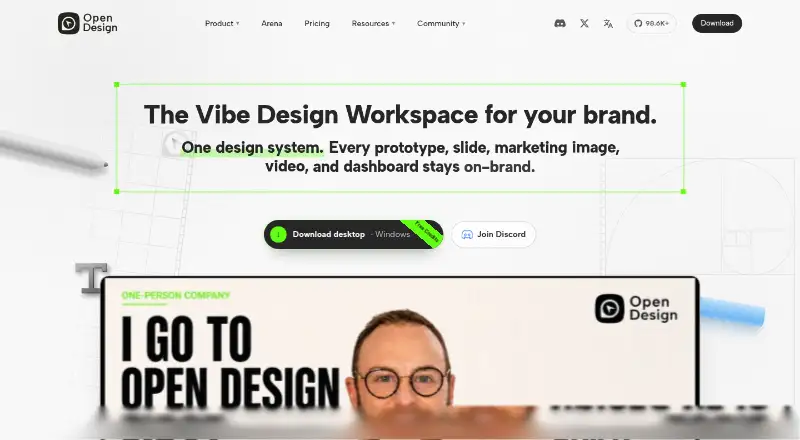
OpenDesign combines an Apache-2.0 codebase with local and hosted workflows for agent-assisted design. It turns agent output into files for prototypes, landing pages, dashboards, slide decks, brand systems, images, and HTML video. Integrations cover numerous agents and BYOK keys, while visual HTML editing supports exports such as HTML, PDF, PNG, and editable PowerPoint.
Review
In a line
OpenDesign gives local coding agents a workspace for producing design artifacts. Those artifacts include runnable prototypes, web pages, slides, and HTML video.
What it does
The workspace creates HTML, CSS, and related project files for prototypes, landing pages, dashboards, slide decks, brand systems, images, and HTML video. Projects stay in a folder on your computer when using local operation.
Its HTML preview lets you edit text, images, links, typography, dimensions, spacing, and alignment directly. Larger changes can be marked for an agent. Outputs include standalone HTML, PDF, PNG, and editable PowerPoint files for decks. Clickable prototypes and sketch or image input are supported.
How it connects
The project uses the Apache-2.0 open-source license. You can fork it, change its skills and DESIGN.md systems, or run its daemon yourself. It runs on web, Windows, macOS, Linux from source, through an API, and in a self-hosted setup.
Seventeen first-party bring-your-own-key adapters are available, covering Claude Code, Codex, Cursor, Gemini CLI, GitHub Copilot CLI, OpenCode, Qwen, Kimi, and others. An OpenDesign API key connects with Codex, Claude Code, DSH, OpenCode, and Hermes. Provider billing applies when you use your own keys, and OpenDesign credits are not used.
The desktop app, daemon, and skill runtime operate on your machine. According to OpenDesign, only the prompt and skill context go to the provider whose keys you supply, while generated files remain in the project directory. Hosted OpenDesign Cloud avoids desktop installation but needs an account and plan credits. Configured Cloudflare Pages and Vercel providers can publish supported output; hosting, domains, CMS, payments, and databases are separate.
Good fit
OpenDesign is aimed at creators, solo builders, designers, engineers, product managers, and marketing users seeking local, agent-native design workflows.
It fits people who want editable files on disk, many design systems and templates, visual HTML changes, or the option to self-host. Team plans add shared projects, design systems, plugins, roles, and view or comment access.
Watch for
There is no Figma export, although local Figma files can provide design context. OpenDesign does not supply managed hosting, domains, a CMS, ecommerce backend, or a production database.
Unused model credits reset at the end of each billing cycle and do not roll over. The download page lists macOS 11 or newer and Windows 10 or 11 x64; Linux users run from source. The source quickstart requires Node.js 24, pnpm 10.33.2, Git, and a compatible coding agent; Node 22 is unsupported.
A review describes the product as 0.x software and reports an unsigned Windows installer. A GitHub issue reports five rapid charges of about $84.01 during one attempted subscription or recharge and asks for investigation and a refund.
Pricing
OpenDesign uses a freemium model. The Free plan costs $0 and supports a local coding agent or BYOK, with no recurring OpenDesign model credits and community support. The general pricing note lists paid plans from $5/user/mo.
Go is $8 a month for the first month, then $10/month; yearly billing is $7/month, or $84/year. It includes up to $120 in monthly Design Plan credits, 10 concurrent tasks, API access, 162+ skills, 152+ design systems, and email support. Plus is $16 initially, then $20/month; yearly is $14/month, or $168/year, with up to $180 in credits, 20 tasks, publishing and share links, API access, and email support.
Pro is $70 initially, then $100/month; yearly is $60/month, or $720/year. It includes up to $480 in credits, 30 tasks, API access, publishing and share links, and priority email support. Max is $120 initially, then $200/month; yearly is $98/month, or $1,176/year, with up to $900 in credits, peak-time priority compute, dedicated customer success, and creator/developer support.
Team is $63 a month with 40% off; standard pricing is $105 per seat, with at least three seats. A three-seat example is $189/month or $2,268/year. Enterprise pricing is on request and includes shared systems, real-time collaboration, permissions, unified billing, SSO/SAML, and priority support.
Verdict
Choose OpenDesign if you want agent-generated design files that remain editable on your machine, or if you need an Apache-2.0 project you can self-host and modify. Its adapter list and BYOK option suit people already using coding agents and willing to manage provider accounts.
Look elsewhere if Figma export, managed production infrastructure, or a more mature desktop release is essential. Check renewal prices, credit limits, and the no-rollover rule before selecting a paid plan.
Our take
OpenDesign fits people who want AI-assisted design while keeping project files local and retaining control over agents, provider keys, and self-hosting. Its broad adapter support, visual HTML editing, and file exports cover many prototype and content tasks. The product is still early, has no Figma export, and leaves hosting and production services to you. For plans that include model credits, unused amounts reset each billing cycle; several monthly offers also list higher renewal prices than their introductory rates, so confirm the billing terms and workflow fit first.
- Apache-2.0 source can be forked or self-hosted.
- Local agents can keep generated files in the project folder.
- Supports 17 first-party agent adapters and BYOK provider keys.
- Exports HTML, PDF, PNG, and editable PowerPoint files.
- Visual HTML preview supports direct design edits.
- No Figma export is available.
- Hosting, domains, CMS, payments, and databases are separate.
- Unused model credits reset and do not roll over.
- Linux has no listed desktop download; source setup is required.
- Reviews report early polish and an unsigned Windows installer.
- Pick it ifLocal-first design work with coding agents; Teams needing shared design systems and projects; Users who want self-hosting and editable output files
- Skip it ifYou need direct Figma export.; You want managed hosting, domains, CMS, or production databases included.; You require a mature signed desktop release.
Pricing
A free local-agent or BYOK plan is available. Plans that include model credits reset those credits each billing cycle, without rollover. Several monthly tiers list introductory rates followed by higher renewals, while yearly prices are billed upfront at the stated annual totals.
- Freelocal coding agent or BYOK · no recurring OpenDesign model credits · community supportFree
- Go20% off first month; $10/month renewal; yearly $7/month billed $84/year · up to $120 monthly Design Plan credits · 10 concurrent tasks · API access · 162+ skills · 152+ design systems · email support$8/mo
- Plus20% off first month; $20/month renewal; yearly $14/month billed $168/year · up to $180 monthly credits · 20 concurrent tasks · API access · publishing and share links · 162+ skills · 152+ design systems · email support$16/mo
- Team40% off; $105 standard per seat; minimum 3 seats; example 3-seat total $189/month or $2,268/year · shared projects, design systems and plugins · owner/admin/member roles · view/comment access · creator-only editing$63/mo
- Pro30% off first month; $100/month renewal; yearly $60/month billed $720/year · up to $480 monthly credits · 30 concurrent tasks · API access · publishing and share links · 162+ skills · 152+ design systems · priority email support$70/mo
- Max40% off first month; $200/month renewal; yearly $98/month billed $1,176/year · up to $900 monthly credits · 30 concurrent tasks · peak-time priority compute · dedicated customer success · creator/developer support$120/mo
- Enterpriseshared team design system · real-time collaboration · multi-user editing · project/artifact library · permissions · unified billing · SSO/SAML · priority supportOn request
As open-design.ai lists them, checked 15 Oct 2026.
Questions
Does OpenDesign have a free plan?
Yes. The Free tier supports a local coding agent or BYOK, provides no recurring OpenDesign model credits, and includes community support.
Which operating systems can run the desktop app?
The downloadable app targets macOS 11 or newer on Apple Silicon or Intel and Windows 10 or 11 x64. Linux users can run the project from source.
Can I use my own AI provider keys?
Yes. BYOK lets you connect provider keys and endpoints directly. Provider billing applies, and OpenDesign credits are not consumed.
Does OpenDesign export to Figma?
No. The homepage says Figma export is unavailable, though local Figma files can inform design context.
What files can OpenDesign export?
Supported outputs include standalone HTML, PDF, PNG, and editable PowerPoint for slide decks. Projects also contain HTML, CSS, and related files.
Does OpenDesign host websites or databases?
No. Configured Cloudflare Pages and Vercel providers can publish supported output, but hosting accounts, domains, CMS, payments, and databases remain separate.