OpenSession: Free Conference Program Software
opensession.dev · checked 15 Oct 2026
Open-source conference software for calls for papers, reviews, schedules, and speaker onboarding.
How it plugs in
Signal on Speaker Management Software7.3#2 of 28
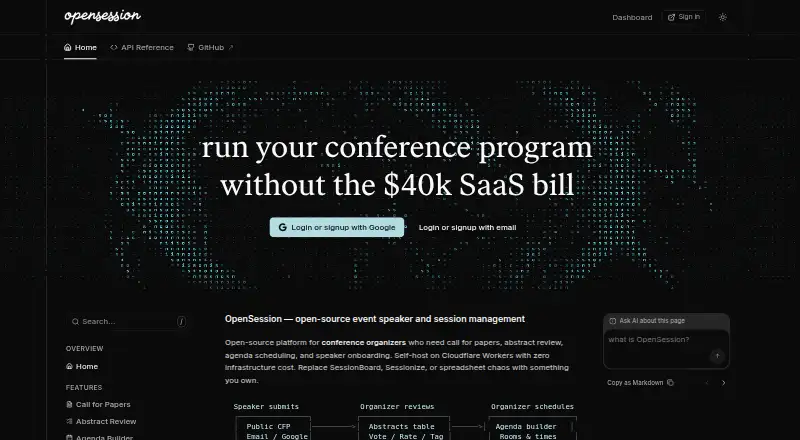
OpenSession is a free, MIT-licensed platform for running conference programs. Organizers can collect submissions, review abstracts, build agendas, manage speaker tasks, and publish schedules. It runs on the web or as a self-hosted Cloudflare Worker, with a public API and JSON or ICS feeds for connecting other systems.
Review
In a line
OpenSession is open-source software for managing a conference program from the call for papers through speaker onboarding.
It is available as a web application or as a self-hosted deployment on Cloudflare Workers.
What it does
Organizers create call-for-papers forms with MDX, conditional fields, file uploads, and support for multiple speakers. Speakers can save drafts and submit up to three talks per event. Submitted answers stay linked to the exact form version used.
Reviewers can vote, comment, and view combined scores without administrator access. Accepted sessions move into an agenda builder with list, week, room, and conflict views.
A speaker portal covers profiles, submissions, files, and onboarding tasks. Acceptance can create profile and session-material tasks, while organizers can add other form-based or manual tasks. Reminders go out three days before, one day before, and after a deadline.
How it connects
OpenSession has a public API secured with an event API key sent as a Bearer token. Its documented resources include events, schedules, sessions, speakers, tracks, formats, rooms, and reviews.
It publishes embeddable agendas and speaker galleries, along with JSON and ICS feeds. Calendar invitations use RFC 5545 ICS, and schedule changes send updates or cancellations to confirmed speakers.
Organizers and speakers can sign in with email or Google. Self-hosting uses Cloudflare D1 for the database, R2 for files, and the email binding.
Good fit
OpenSession suits conference teams that need one place for submissions, abstract review, scheduling, speaker files, and program publishing.
It is a fit for organizers comfortable running an open-source project on Cloudflare. The API, feeds, embeddable pages, and self-service speaker portal support programs that need to share schedule data with other tools.
Watch for
OpenSession focuses on conference program management. It does not include CRM, marketing pages, or payment processing.
Scheduling flags overlapping rooms and double-booked speakers, but conflicts are warnings that organizers can override rather than hard stops.
Self-hosting requires a Cloudflare account, Node.js 18 or newer, pnpm, and a domain pointed at Cloudflare. Google OAuth credentials are optional. The listed Cloudflare free-tier capacity is 100,000 Worker requests and 5 million D1 reads per day, with 5 GB of D1 storage and 10 GB of R2 storage.
Pricing
OpenSession is free. The listed plan is free forever and is self-hosted on your Cloudflare account under the MIT license.
Cloudflare's free tier covers the listed deployment limits: 100,000 Worker requests and 5 million D1 reads per day, plus 5 GB of D1 storage and 10 GB of R2 storage.
Verdict
Choose OpenSession if your event needs CFP forms, review, scheduling, speaker task tracking, and published agendas without a software fee. Its open-source license, API, feeds, and self-hosting option give technical teams control over deployment and connections.
Look elsewhere if you need built-in customer management, promotional pages, payment collection, or scheduling rules that block conflicting assignments. You also need to be ready to operate the Cloudflare-based setup when self-hosting.
Our take
OpenSession is a practical choice for conferences that want a free program-management system and can handle a Cloudflare deployment. It brings submissions, reviews, agendas, speaker files, reminders, and calendar updates into one workflow. The public API and feed formats make it easier to reuse schedule data elsewhere. Its boundaries are clear: there is no CRM, marketing site builder, or payment processing, and schedule conflicts can still be overridden. Teams that need those functions should consider another platform.
- Free forever under the MIT license
- CFP forms support conditional fields, uploads, and multiple speakers
- Agenda views flag room and speaker conflicts
- Public API plus JSON and ICS feeds
- Speaker portal includes tasks, files, and deadline reminders
- Self-hosting requires Cloudflare, Node.js 18+, pnpm, and a domain
- Conflict warnings can be overridden rather than blocked
- No CRM, marketing pages, or payment processing
- Cloudflare free-tier limits apply to the listed deployment
- Pick it ifConference teams managing submissions through speaker onboarding; Technical organizers wanting open-source, self-hosted software; Events that need API, JSON, or ICS schedule feeds
- Skip it ifYou need built-in CRM, marketing pages, or payment collection; You require scheduling conflicts to be impossible to override; You cannot operate a Cloudflare-based self-hosted setup
Pricing
OpenSession is free forever and self-hosted on your Cloudflare account. Cloudflare's listed free tier covers most conference workloads within its request, read, and storage limits.
- Freeself-hosted · Cloudflare Workers deployment · MIT licenseFree
- OpenSessionFree, forever · Self-hosted on your Cloudflare account · Cloudflare free tier covers most conference workloadsFree
As github.com lists them, checked 15 Oct 2026.
Questions
Is OpenSession free?
Yes. The listed OpenSession plan is free forever and self-hosted on your Cloudflare account under the MIT license.
What can OpenSession manage?
It handles calls for papers, abstract review, agenda scheduling, speaker profiles, onboarding tasks, file uploads, reminders, and calendar updates.
Can speakers submit more than one talk?
Yes. Each speaker can submit up to three talks per event, and drafts autosave.
Does OpenSession have an API?
Yes. The public API uses an event API key as a Bearer token and documents events, schedules, sessions, speakers, tracks, formats, rooms, and reviews.
How does scheduling handle conflicts?
The agenda builder checks overlapping rooms and double-booked speakers. It shows warnings, but organizers can override them.
What is required for self-hosting?
You need a Cloudflare account, Node.js 18 or newer, pnpm, and a domain pointed at Cloudflare. Google OAuth credentials are optional.