PlanbookEdu Lesson Planner Review
planbookedu.com · checked 15 Oct 2026
Cloud lesson planner for writing, sharing, scheduling, and exporting teachers’ plans.
How it plugs in
Signal on Lesson Planning Software6.6#3 of 23
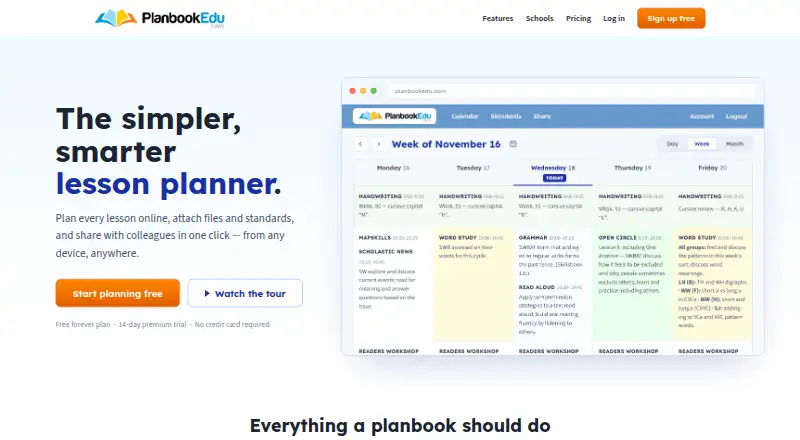
Teachers and school administrators can use PlanbookEdu to build lesson plans in the cloud. It handles weekly and rotating schedules, standards tags, reusable templates, file links, controlled sharing, and plan review. The service works through computers, tablets, and phones. Core planning is free; Premium adds attachments, standards, collaboration, search, spell check, and exports.
Review
In a line
PlanbookEdu helps teachers create, share, and print lesson plans online. Because plans reside in the cloud, users can open them on computers, tablets, or phones without installing software.
What it does
A word-processor editor lets teachers write plans, repeat lessons, and reuse templates. Weekly schedules can follow A/B days or rotations. Lessons support Common Core, state, and custom standards tags.
Each lesson may hold as many as five files, with a 50 MB limit per file. Google Drive material can be attached as a link rather than copied. Users may send plans to Google Calendar, though edits made afterward require another push because that calendar version is not live.
Selected plans can be shown to principals, colleagues, substitutes, parents, or administrators through controlled views. Premium account holders can edit together in real time, but each collaborator needs a PlanbookEdu account. School and district administrators can centrally manage teacher accounts, inspect submitted plans, and leave comments.
How it connects
School accounts can use Google Workspace for Education single sign-on. Lessons may point to Google Drive files, and plans can be pushed into Google Calendar; subsequent calendar changes are not automatic.
Premium supports browser printing and Word or PDF exports, including attached worksheets. PlanbookEdu is proprietary hosted web software; its published materials provide no public API, SDK, developer documentation section, or self-hosting instructions.
Good fit
PlanbookEdu fits teachers who organize weekly or rotating schedules, apply standards, reuse lesson templates, and share selected plans with school staff or families. Its administrator features suit schools seeking centralized account management and plan review.
The hosted format is useful when work moves among computers, tablets, and phones.
Watch for
A Google Calendar copy does not update itself, so schedule changes must be pushed again. Premium collaborators require individual PlanbookEdu accounts and cannot alter planbook settings.
The service terms disclaim error-free or uninterrupted availability and limit responsibility for interruptions or data loss. They also reserve each account for its individual subscriber; the website is limited to people aged 13 and older.
Verify that the standards you need are covered. One reviewer noted that some standards, including certain electives, were unavailable.
Pricing
PlanbookEdu offers a Free tier, Premium subscription, and 14-day trial. Free billing remains at $0 and includes unlimited weekly plans, A/B-day and rotation schedules, word-processor editing, and iPad and phone access.
Premium is priced at $30 per year. The upgrade adds file attachments, Common Core and state standards, sharing, collaboration, printing, Word and PDF output, search, and spell check.
Verdict
PlanbookEdu is worth considering when lesson schedules, standards, printable plans, and controlled sharing with a school community are central needs. Basic planning is available at no cost, while Premium targets attachment, export, sharing, and collaboration requirements.
Consider alternatives if you need a public developer interface, on-premises deployment instructions, live two-way calendar synchronization, or one login shared by multiple people. Check standards coverage and your school’s account policies before subscribing.
Our take
PlanbookEdu brings lesson planning, standards tags, schedule patterns, and school-level review together in a hosted service. Its Free tier supports recurring weekly planning, while Premium adds attachments, exports, sharing, and collaboration. It may not suit teams seeking a public API, self-hosted deployment, automatic calendar synchronization, or shared logins. Schools should verify required standards and note that availability is not guaranteed.
- Free tier offers unlimited weekly plans and rotation schedules
- Common Core, state, and custom standards tagging
- Controlled sharing plus real-time Premium collaboration
- Browser printing and Word/PDF output
- Integration with Google Workspace, Drive, and Calendar
- Google Calendar changes need a fresh manual push
- Collaborators must use separate PlanbookEdu accounts
- Published materials include no public API, SDK, or self-hosting instructions
- Some standards, including certain electives, may be missing
- Terms do not promise continuous service availability
- Pick it ifTeachers organizing recurring lessons and rotating schedules; Schools that centrally review and share plans; Users who need standards tags and printable exports
- Skip it ifYou need self-hosted deployment, open-source code, or a public developer API; You require live two-way Google Calendar synchronization; Your team must use one subscriber account
Pricing
The Free tier covers core scheduling and editing at no charge. Premium costs $30 per year and adds attachments, standards, collaboration, sharing, search, spell check, and Word/PDF export. A 14-day trial is offered.
- Freefree forever · Unlimited weekly plans · A/B day and rotation schedules · Word-processor editing · iPad and phone accessFree
- Premium$30/year · File attachments · Common Core and state standards · Sharing and collaboration · Print, Word and PDF export · Search and spell check$30/yr
As planbookedu.com lists them, checked 15 Oct 2026.
Questions
Is PlanbookEdu free?
Yes. The Free tier costs nothing and includes unlimited weekly plans, A/B-day and rotation schedules, word-processor editing, and iPad and phone access.
What does Premium cost?
Premium is $30 annually and adds file attachments, Common Core and state standards, sharing, collaboration, printing, Word and PDF export, search, and spell check.
Can PlanbookEdu connect to Google services?
School accounts can use Google Workspace for Education single sign-on. Lessons can point to Google Drive files, and plans can be pushed to Google Calendar.
Does Google Calendar stay synced?
No. Once a plan has been pushed, edits made in PlanbookEdu require another push because the calendar copy is not live.
Can administrators review teacher plans?
Yes. School and district administrators can centrally manage teacher accounts, review submitted plans, and leave comments.
Can I export lesson plans?
Premium permits browser printing and Word or PDF export, with attached worksheets included.
Is there a public API or self-hosting?
The published Help Center documents user workflows but contains no public API, SDK, or developer documentation section. Official product materials describe a hosted service and provide no self-hosting or on-premises deployment instructions; the software is proprietary.
Who can use a PlanbookEdu account?
The terms limit website use to individuals aged 13 or older, and each account is reserved for its individual subscriber rather than shared.