
Plot Website Builder: Features, Clinic Tools and Pricing
getplot.ai · checked 15 Oct 2026
AI website builder for small businesses, with clinic tools for booking, services and patient information.
How it plugs in
Signal on Photography Website Builders6.3#6 of 46
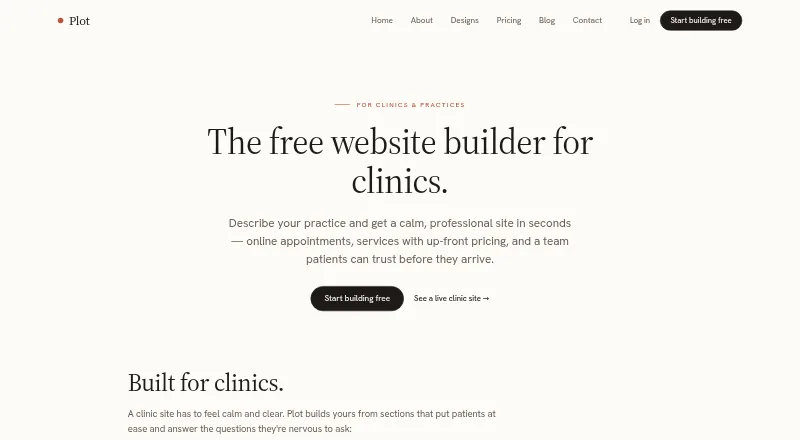
Plot creates a website from a business description and lets you revise sections in a live AI editor. Its clinic setup includes appointment requests, service prices, team profiles, first-visit guidance, policies, contact details, maps and hours. It runs on the web, offers a free build-and-preview option, and paid plans start at $19.99 a month.
Review
In a line
Plot is a web-based website builder for small businesses. You describe the business, then edit the generated site live with AI.
What it does
Plot offers starting points for businesses such as clinics, restaurants, salons, shops and studios. Its catalogue lists 168 designs, and each design supports sections such as bookings, menus, galleries and team profiles.
For clinics, pages can show appointment requests, indicative service prices, clinician profiles, first-visit steps, policies, contact details, a map and opening hours. Patients request a time and receive an email confirmation; the practice sets available days, hours and how far ahead requests may be made.
You can edit, replace or move individual sections without changing the others. Plot also says it can build a site from an Instagram profile, including the profile bio and photos. Published sites are offered in nine languages.
How it connects
Plot runs in a web browser and supports custom domains on its paid plans. It names Cloudflare for hosting, storage, its database and content delivery, and uses Google through Cloudflare services for AI text and image generation.
Plot says clinic sites support online booking and patient forms. It also describes built-in booking, ordering, gift cards and reviews with no commission. You can download your data and move your domain away later.
Content you choose to generate with AI is sent to Google through Cloudflare AI services. Plot says it uses one essential sign-in cookie, no advertising or cross-site tracking cookies, and processes personal data under the EU GDPR.
Good fit
Plot suits a small business that wants a designed site without starting from a blank page. Clinics and practices get patient-facing sections for requests, services, staff and first visits.
It can also fit owners who want to adjust separate sections in a live editor, import an Instagram profile, or publish in one of nine languages.
Watch for
Plot does not provide a freeform drag-and-drop editor, and its integrations are described as limited. Support is by email rather than around the clock.
AI-generated text and images may be wrong, so you are responsible for checking them. If you use all of a plan's AI allowance, you can still edit and publish but cannot create new AI content until the next billing cycle.
The service is provided as-is and does not promise uptime. Check the domain and site-count limits before choosing a plan.
Pricing
You can build and preview for free with all sections and themes, without a card; publishing is unavailable on this option. There is no free trial.
Starter costs $19.99 a month when billed monthly, or $191.88 a year when billed annually. It includes one published site on a Plot subdomain, limited monthly AI generations, regenerations and images, basic email support, and a Plot badge.
Business is $29.99 a month and adds one custom domain, higher AI allowances, unlimited bookings, email campaigns and priority email support with a response time under 24 hours. Studio is $49.99 a month for three custom-domain sites, pooled AI allowances, unlimited bookings and a 30-minute onboarding call.
Care costs $49 a month as an add-on for up to two update requests. Care+ is $79 a month for unlimited small updates one at a time. Done-for-you setup costs $149 once, followed by a normal plan.
Verdict
Choose Plot if you want a guided way to produce a small-business website and value editable sections over freeform layout control. Its clinic tools cover the information and appointment-request flow many practices need.
The free option is useful for preparing a site, but publishing requires a paid plan. Business is the first listed plan with a custom domain and unlimited bookings, while Studio targets several sites. Look elsewhere if you require broad integrations, drag-and-drop positioning, guaranteed uptime or phone and 24/7 support.
Our take
Plot is a practical choice for a clinic or other small business that wants to turn a description or Instagram profile into a publishable website. The clinic layout covers booking requests, services, staff, policies and first-visit details, while the live editor keeps section changes separate. Budget for a paid plan when you need publishing, a custom domain or higher AI allowances. Before signing up, decide whether limited integrations, email-only support, no uptime promise and AI review duties fit your needs.
- Free building and preview with all sections and themes
- Clinic pages include booking requests, services and team profiles
- Live editing can replace or rearrange individual sections
- Custom domains are available on paid plans
- Data and domains can be moved away from Plot
- No free publishing option
- No freeform drag-and-drop editor
- Integrations are described as limited
- AI output may be inaccurate and must be checked
- No uptime promise and no 24/7 support
- Pick it ifClinics and small businesses needing a guided website; Owners who want live AI editing and booking tools; Businesses starting from an Instagram profile
- Skip it ifYou need broad integrations or a freeform drag-and-drop editor; You require guaranteed uptime or around-the-clock support; You need to publish without paying
Pricing
Build and preview is free, but publishing needs a paid plan. Annual Starter is $191.88. Add-ons and one-time setup cost extra.
- StarterBilled monthly · 1 published site on Plot subdomain · 5 AI generations/month · 30 AI regenerations/month · 10 AI images/month · review requests by email · basic email support · Plot badge$19.99/mo
- BusinessBilled monthly · 1 custom domain · 15 AI generations/month · 100 AI regenerations/month · 50 AI images/month · unlimited bookings · email campaigns · no Plot badge · priority email support under 24 hours$29.99/mo
- StudioBilled monthly · 3 sites with custom domains · unlimited bookings on every site · 30 pooled AI generations/month · 300 AI regenerations/month · 200 AI images/month · 30-minute onboarding call$49.99/mo
- Free to build and previewFree to build and preview; pay when you publish. · Unlimited build and preview · all sections and themes · no card requiredFree
- Free build and previewUnlimited building and preview · all sections and themes · no card required · publishing unavailableFree
- Starter (monthly)Billed monthly · 1 published site on a Plot subdomain · 5 AI generations/month · 30 AI regenerations/month · 10 AI-generated images/month · basic email support$19.99/mo
- Business (monthly)Billed monthly · 1 custom domain · 15 AI generations/month · 100 AI regenerations/month · 50 AI-generated images/month · unlimited bookings · email marketing campaigns · priority email support (<24h)$29.99/mo
- CareAdded to any plan · Up to 2 update requests monthly · updates completed within two business days$49/mo
As getplot.ai lists them, checked 15 Oct 2026.
Questions
Can I build a Plot site for free?
Yes. The free build-and-preview option includes unlimited building, all sections and themes, and needs no card. Publishing is unavailable until you pay.
Does Plot support clinic appointment requests?
Yes. Patients request a time and receive an email confirmation. The practice sets available days, hours and how far ahead requests can open.
Can I use my own domain?
Yes. Business includes one custom domain, and Studio includes three sites with custom domains. Starter publishes on a Plot subdomain.
What happens when I use all AI generations?
You can keep editing and publishing, but cannot generate new AI content until the next billing cycle.
Does Plot have a drag-and-drop editor?
No. Plot lets you edit, replace or rearrange sections, but its Wix comparison says it does not offer freeform drag-and-drop editing.
How does Plot handle AI content data?
Content you choose to generate with AI is sent to Google through Cloudflare AI Gateway and Cloudflare Workers AI to create the result.
Is there phone or 24/7 support?
Support is email-based. Starter has basic email support; Business has priority email support with a stated response time under 24 hours.