Ramp Stack: AI Accounting Workflows for Review
ramp.com · checked 2 Oct 2026
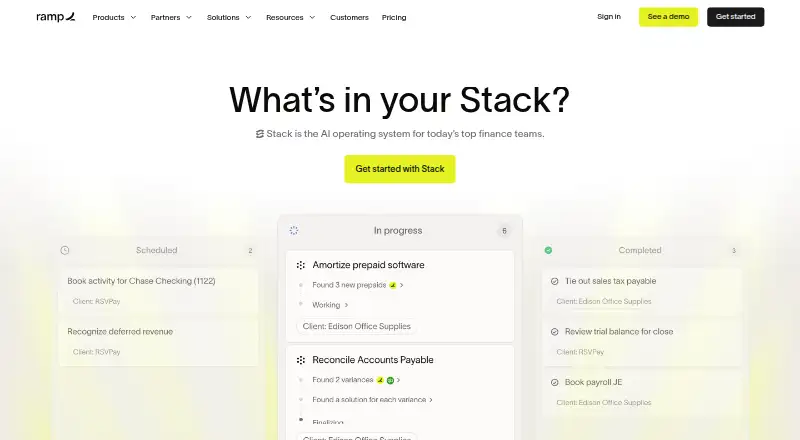
Ramp Stack applies AI to bookkeeping and finance work that teams can inspect.
How it plugs in
Signal on AI Accounting Software5.2#24 of 32
Accounting practices and internal finance groups can use Ramp Stack to assemble accounting work for human review and sign-off. Its built-in capabilities address reconciliations, journal entries, variance analysis, schedules, and accruals. It links with systems such as QuickBooks, NetSuite, Sage Intacct, spreadsheets, SharePoint, OneDrive, and, in specified setups, Outlook. The web-based service is paid, with pricing on request.
Review
In a line
Ramp describes Stack as an accounting operating system that completes work for people to check and approve before it posts.
The product targets client-focused accounting practices and finance departments responsible for their own ledgers. For a wider category view, see AI accounting software.
What it does
Its ready-made capabilities cover reconciliations, journal entries, variance analysis, schedules, and accruals. Stack also supports bookkeeping automation, bank reconciliation, close management, document capture, approval workflows, and multi-entity work.
Teams can configure Stack around preferences such as project spending, deferred revenue recognition, and vendor rules. They can inspect work and its sources, set guardrails, and approve items that require judgment.
How it connects
Stack can link with QuickBooks, NetSuite, Sage Intacct, spreadsheets, SharePoint, and OneDrive. Outlook is supported with a connected personal inbox and Agent search enabled; Microsoft Teams sources are not supported currently.
For bookkeeping, the current scope is QuickBooks Online businesses using straightforward processes; QuickBooks Desktop and multi-currency workflows fall outside it. The Session Audit Log captures sources, actions, and outputs.
Good fit
Stack is intended for client-serving accounting firms as well as finance departments maintaining their own books. Its workflow keeps people involved to review AI-prepared work.
Recurring work such as reconciliations, entries, schedules, accruals, and close tasks can be arranged, while sources and actions remain recorded.
Watch for
Check that your books are on QuickBooks Online and follow a straightforward process. Desktop editions of QuickBooks and multicurrency work are outside the current support.
Stack leaves existing QuickBooks Online transactions unchanged and does not mark them reconciled. Check that its connections and review controls suit your process before committing.
Ramp says Stack skills, processes, and client data are kept separate from other firms and excluded from model training. Contracts with the model providers specify zero data retention. Ramp says Stack is designed with SOC 2 controls and encrypts data in transit and at rest.
Pricing
Stack is paid software, with pricing on request. For questions about credits or usage plans, Ramp Help directs users to contact their Ramp representative.
Verdict
Consider Stack if your team wants AI-prepared accounting work to pass through human review, with source records and approval guardrails. It fits best with uncomplicated, single-currency QuickBooks Online bookkeeping and teams that can work through its available sources.
Look elsewhere if your process depends on QuickBooks Desktop, multi-currency processing, changing existing QuickBooks Online transactions, or Microsoft Teams data. Request a quote and ask how credits and usage plans apply to your workload.
Our take
Ramp Stack may suit accounting firms and in-house finance teams seeking repeatable bookkeeping preparation with human approval. Its fit is strongest for straightforward QuickBooks Online processes within the supported source and currency limits. Source review, guardrails, and the audit log provide ways to check the work. Ask Ramp about connections and usage plans, and consider whether leaving existing QuickBooks Online transactions unchanged works for your process. QuickBooks Desktop and multicurrency operations fall outside its supported use.
- Built-in capabilities for reconciliations, entries, variance analysis, schedules, and accruals
- Review, guardrails, approvals, and a Session Audit Log
- Links with QuickBooks, NetSuite, Sage Intacct, and spreadsheets
- Supports SharePoint, OneDrive, and Outlook with specified setup
- Ramp says Stack data is excluded from model training
- QuickBooks Desktop is outside the supported platforms
- The product does not handle multi-currency workflows
- Leaves existing QuickBooks Online transactions unchanged
- Does not mark QuickBooks Online transactions as reconciled
- Microsoft Teams sources are not supported
- Pricing is on request
- Pick it ifAccounting practices serving client accounts; Finance departments overseeing their own books; Businesses on QuickBooks Online with uncomplicated bookkeeping
- Skip it ifYour books require QuickBooks Desktop or multi-currency workflows; Your process requires editing existing QuickBooks Online transactions; Your source data depends on Microsoft Teams
Pricing
Paid software with pricing on request. Contact Ramp about Stack credits and usage plans.
Questions
What is Ramp Stack?
Ramp presents Stack as an accounting operating system that completes work for people to review and approve.
Which accounting systems does Stack support?
Stack connects with QuickBooks, NetSuite, Sage Intacct, and spreadsheets. Its bookkeeping coverage is currently for QuickBooks Online businesses with straightforward processes.
Does Stack support QuickBooks Desktop?
No. The Desktop edition of QuickBooks is not currently supported.
Can Stack handle multi-currency workflows?
No. Stack currently excludes workflows involving multiple currencies.
Does Stack change QuickBooks Online transactions?
No. Existing QuickBooks Online transactions are left as they are, and Stack does not mark them reconciled.
What other sources can Stack use?
Stack supports SharePoint and OneDrive. Outlook works with a connected personal inbox and Agent search enabled; Microsoft Teams sources are not currently supported.
How much does Ramp Stack cost?
Stack is paid software and Ramp provides pricing on request. Contact Ramp about credits or usage plans.