
Rawback photo storage and AI tools
rawback.app · checked 21 Oct 2026
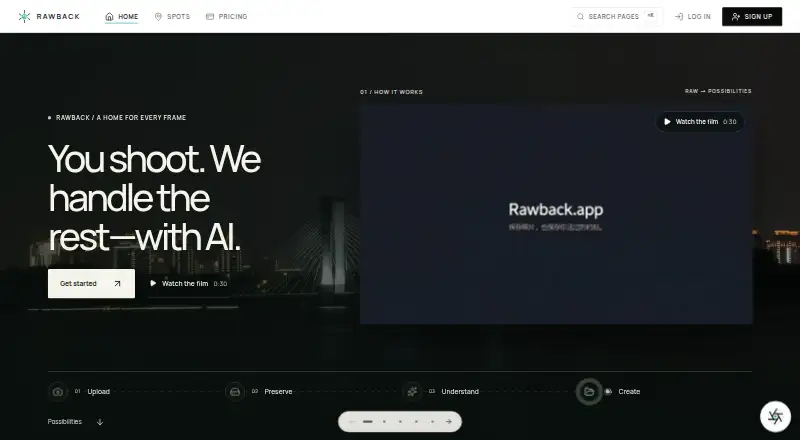
Rawback is a photo-library platform for preserving, organizing, and creating with photographs.
How it plugs in
Signal on Photo Backup Software6.7#5 of 25
Rawback combines photo storage and organization with AI tools for analyzing images, grouping faces, editing, and drafting stories. It runs on the web, Linux, macOS, and Windows, with an iPhone app listed as coming soon. A free plan provides 5 GB; paid plans offer more storage and usage capacity, plus an MCP connector for compatible clients.
Review
In a line
Rawback is a photo-library platform that combines photo storage and organization with AI tools for understanding and creating from photographs.
What it does
Upload photos to preserve, organize, tag, and share them. Rawback includes image analysis and ratings, face grouping, conversational editing, travel stories, and album-story drafts. It can also create Dream recaps.
Originals, including RAW files, remain stored by default as long as they fit within the account's storage allowance. Low-rated photos can be archived automatically, with optional deletion of archived files after 90, 180, 360, or 720 days.
How it connects
Paid plans include an MCP connector for linking Rawback with Claude, ChatGPT, or another MCP client. With approved permissions, it can search photos, create and curate albums, draft stories, and query video transcripts.
Photos can be uploaded through camera transfers using FTP, FTPS, or SFTP. Native desktop clients for Apple-silicon Macs and Windows 10/11 x64 monitor local photo libraries and handle background uploads. Rawback also provides a command-line tool for uploads, library searches, albums, Markdown stories, dreams, shares, usage inspection, and structured JSON output. Canon cameras can be controlled through the CLI over CCAPI.
The Core SDK can be downloaded publicly, but it is marked UNLICENSED; third-party use and production deployment require written approval from Rawback. Rawback is not open source.
Good fit
Rawback may suit photographers who want storage, photo organization, sharing, and AI features in one library, including people managing RAW images or local libraries from a desktop.
Its paid MCP connector may also appeal to people who want to search or organize their photos through Claude, ChatGPT, or another compatible client.
Watch for
The native iPhone app's App Store listing says coming soon, and the app requires iOS 26 or later. Rawback's macOS desktop downloads are signed and notarized, while its Windows installer is unsigned.
AI features start off and require explicit consent. Depending on enabled features and settings, AI processing may send images, thumbnails, or related content to OpenAI, Google Gemini, Tencent Cloud, Stripe's AI gateway, or a provider chosen by the user. Rawback says transmitted AI requests cannot be recalled; switching AI off does not remove existing results or provider-side copies.
Pricing
The free tier comes with 5 GB of storage, 200 AI credits and 500 face-recognition uses per month, along with public sharing. Lite is $4.99 monthly for 200 GB, 1,500 monthly AI credits and face-recognition uses, an MCP connector, and public and restricted sharing.
At $14.99 a month, Pro provides 600 GB, 5,000 monthly AI credits and face-recognition uses, an MCP connector, and public and restricted sharing. Max costs $44.99 monthly and bundles 3 TB, 20,000 monthly AI credits and face-recognition uses, an MCP connector, unlimited sharing, and priority processing.
Monthly extras are available for paid accounts: 100 GB of storage costs $1.99, while 1,000 AI credits cost $2.99. Add-ons require a paid plan.
Verdict
Consider Rawback if you want photo storage alongside AI-powered photo discovery, editing, face grouping, and story tools, and its included storage and monthly usage limits match your library. The MCP connector is a practical extra for paid users who already use compatible chat clients.
Look elsewhere if you need an iPhone app today, open-source software, or permission to build a third-party production service on the downloadable SDK without written approval. Before enabling AI, review which outside providers may receive image-related content and how turning AI off affects existing results.
Our take
Rawback is worth considering for photographers who want storage, organization, sharing, and AI features tied to one photo library. The free tier starts at 5 GB, while paid plans provide more storage and usage capacity. Paid users also get an MCP connector for compatible chat clients. It is a weaker match for people who need an iPhone app now, open-source software, or unrestricted third-party use of the SDK. Also weigh the AI data-sharing terms before enabling those features.
- Stores original RAW files while they fit within the plan's storage allowance.
- Offers AI image analysis, ratings, face grouping, editing, and story drafting.
- Paid plans include an MCP connector for compatible clients.
- Desktop clients support Apple-silicon Macs and Windows 10/11 x64.
- The free plan includes 5 GB of storage and public sharing.
- The iPhone app is listed as coming soon and requires iOS 26 or later.
- Third-party production use of the public SDK requires written approval.
- Enabled AI features may send image-related content to outside providers.
- The Windows installer is unsigned.
- Pick it ifPhotographers who want storage and AI organization in one library; Paid users who want photo tools through compatible chat clients
- Skip it ifYou need a native iPhone app today or open-source software.; You need unrestricted third-party production access to the SDK.
Pricing
Free includes 5 GB.
- Freeforever · 5 GB storage · 200 AI credits/month · 500 face-recognition/month · public sharingFree
- +100 GB storagemonthly add-on · Requires a paid plan$1.99/mo
- +1,000 AI creditsmonthly add-on · Requires a paid plan$2.99/mo
- Litemonthly · 200 GB storage · 1,500 AI credits/month · 1,500 face-recognition/month · MCP connector · public and restricted sharing$4.99/mo
- +500 GB storagemonthly add-on · Requires a paid plan$7.99/mo
- +5,000 AI creditsmonthly add-on · Requires a paid plan$11.99/mo
- Promonthly · 600 GB storage · 5,000 AI credits/month · 5,000 face-recognition/month · MCP connector · public and restricted sharing$14.99/mo
- +2 TB storagemonthly add-on · Requires a paid plan$24.99/mo
As rawback.app lists them, checked 21 Oct 2026.
Questions
Is Rawback free?
Yes. The free plan gives you 5 GB, 200 AI credits and 500 face-recognition uses each month, plus public sharing.
What are Rawback's plan prices?
Lite starts at $4.99 a month for 200 GB. Pro is $14.99 a month, and Max is $44.99 a month.
Can Rawback keep original RAW photos?
Yes. Originals remain stored by default while they fit within the account's storage allowance.
Does Rawback work with Claude or ChatGPT?
Its MCP connector supports Claude, ChatGPT, and other MCP clients, and comes with paid plans.
Is Rawback's iPhone app available?
The App Store listing says coming soon. The native app requires iOS 26 or later.
Does Rawback use photos for AI?
AI features remain off until users consent. When enabled, they may send images, thumbnails, or related content to outside providers, depending on the feature and settings.