Rendair: AI Rendering for Architects and Designers
rendair.ai · checked 21 Oct 2026
Browser-based AI rendering and image tools for architects and designers.
How it plugs in
Signal on AI Sketch-to-Image Generators5.9#12 of 29
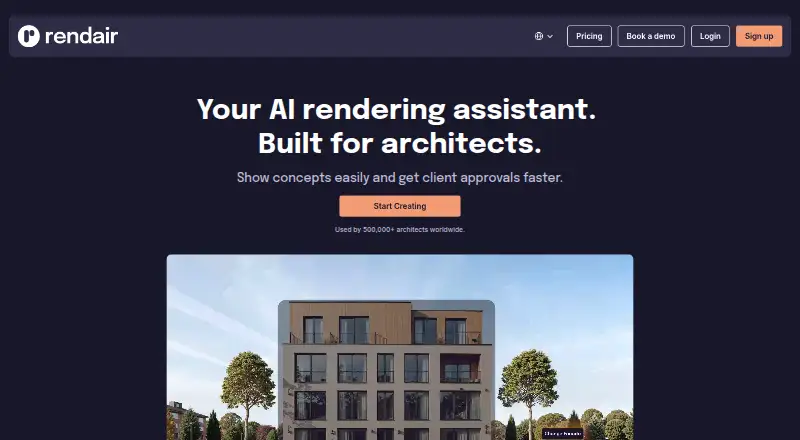
Rendair is a cloud service for turning text, sketches, floor plans, elevations, sections, CAD files, and 3D model images into architectural visuals. It also edits objects, materials, and colors, creates variations, enlarges images, and makes short videos. It runs in a browser, offers a limited trial, and reserves API access for approved partners.
Review
In a line
Rendair is a browser-based AI visualization platform for architects and designers. It creates, edits, enlarges, and animates architectural images.
What it does
You can generate renders from text, hand sketches, floor plans, elevations, sections, CAD documentation, or images of 3D models. The service also supports image-to-image work and dedicated elevation-to-render and section-to-render workflows.
Editing tools let you add or remove objects and change materials and colors. Rendair can produce alternate lighting, mood, and artistic treatments while keeping the composition, enlarge images to resolutions up to 8K depending on the plan, and turn still renders into short video clips. Rendair Chat handles natural-language generation, editing, and improvement of renders.
For related sketch-based tools, see AI Sketch-to-Image Generators.
How it connects
Rendair runs in the cloud through a standard web browser, so there is no desktop installation or offline mode. It accepts JPG, PNG, WEBP, TIFF, HEIC, AVIF, and single-page PDF uploads.
An API exists for approved official partners. Access requires a formal request, review, and commercial agreement; individual Student, Creator, Pro, and Team Pro subscribers cannot create API keys themselves.
The software is proprietary rather than open source. Paid subscriptions include commercial usage rights and watermark-free outputs. Pro and Team Pro generations are private by default, while Student and Creator images may be shown publicly. Rendair says it does not train its models on uploads or generated images.
Good fit
Rendair suits architects and designers who need quick visual concepts, presentation images, or client-approval material from existing drawings and models.
Team Pro adds a shared workspace for four additional team members, centralized billing, private mode, and commercial licensing. The service also offers support, personalized demonstrations, and training sessions on qualifying plans.
Watch for
There is no free plan. The free trial starts new users with 20 Chat credits, so ongoing work requires a paid subscription.
API use is not self-service and is limited to approved partners. Student and Creator plans do not include private mode, and an internet connection is required for all rendering.
Rendair's terms prohibit copying, reverse engineering, automated access, and redistribution. Check the privacy and visibility settings before sharing work.
Pricing
Rendair has a paid model with a free trial but no free plan. New users receive 20 free Chat credits.
Student costs €9.50 a month, or €7.60 a month with annual billing. It includes 250 credits, 250 image creations, 250 edits, 50 upscales, and 12 videos, with no private mode.
Creator costs $15 a year and includes 500 credits, 500 image creations, 500 edits, 100 upscales, and 25 videos. AI Creator costs €19 a month, or €15 a month annually, with the same 500-item allowances and no private mode.
Pro costs €49 a month, or €39.00 a month annually. It includes 1,500 credits, 1,500 creations, 1,500 edits, 300 upscales, 75 videos, private mode, commercial licensing, queue skipping, four simultaneous generations, personalized support, and one personal training session each month.
Team Pro costs €200 a month, or €169.00 a month annually. It includes 7,500 credits, 7,500 creations, 7,500 edits, 1,500 upscales, 375 videos, four extra team members, private mode, commercial licensing, queue skipping, four simultaneous generations, and two personal training sessions each month.
Verdict
Choose Rendair if your work starts with architectural drawings or models and you want browser-based generation, editing, upscaling, and animation in one service.
Pro is the practical starting point for commercial projects that need private outputs and usage rights. Team Pro fits groups sharing a workspace and billing. Student, Creator, and AI Creator cost less but leave images potentially public and do not provide those commercial controls.
Skip it if you need an offline tool, self-serve API keys, open-source software, or a no-cost ongoing plan.
Our take
Rendair covers a broad architectural workflow, from text and sketches to floor plans, CAD references, edits, upscaling, and short videos. Its browser delivery avoids local setup, while paid plans add commercial rights and, on higher tiers, private output and team collaboration. The main trade-offs are a paid-only model after the trial, internet dependence, and an API limited to approved partners. Lower-cost plans may expose images publicly, so they suit experimentation better than confidential client work. Pro and Team Pro are the clearer choices for professional commercial use.
- Turns sketches, plans, CAD references, and 3D model images into renders
- Edits objects, materials, and colors in generated images
- Upscales images and creates short animated videos
- Runs in a browser without desktop installation
- Paid plans include commercial rights and watermark-free outputs
- No free plan; only a trial with 20 Chat credits
- API access requires partner approval and a formal agreement
- Student and Creator outputs may be publicly visible
- No offline mode; an internet connection is required
- Proprietary terms restrict copying, reverse engineering, and redistribution
- Pick it ifArchitects creating concept visuals from drawings or models; Design teams needing shared billing and private commercial outputs; Users wanting browser-based render editing and animation
- Skip it ifYou need offline rendering or a desktop application; You require self-service API keys or open-source code; You need a free plan for ongoing use
Pricing
Rendair is paid, with a free trial that starts at 20 Chat credits. There is no free tier.
- Student Planmonthly; annual option €7.60/month · 250 credits · unlimited text-to-image · 250 image creations · 250 image edits · 50 upscales · 12 videos · chat support · no private mode€9.50/mo
- Creator PlanPay Yearly & Save 20% - $15.00 · 500 credits · 500 image creations · 500 image edits · 100 upscale · 25 videos · Chat support · No private mode$15/yr
- AI Creator Planmonthly; annual option €15.00/month · 500 credits · unlimited text-to-image · 500 image creations · 500 image edits · 100 upscales · 25 videos · chat support · no private mode€19/mo
- Creator Plan$19.00 /mo · 500 credits · 500 image creations · 500 image edits · 100 upscale · 25 videos · Chat support · No private mode$19/mo
- Pro Planmonthly; annual option €39.00/month · 1500 credits · unlimited text-to-image · 1500 image creations · 1500 image edits · 300 upscales · 75 videos · queue skip · 4 simultaneous generations · private mode · commercial license · personalized support · 1 personal training session/month€49/mo
- Team Pro Planmonthly; annual option €169.00/month · 7500 credits · unlimited text-to-image · 7500 image creations · 7500 image edits · 1500 upscales · 375 videos · 4 additional team members · queue skip · 4 simultaneous generations · private mode · commercial license · 2 personal training sessions/month€200/mo
As rendair.ai lists them, checked 21 Oct 2026.
Questions
Does Rendair have a free plan?
No. It offers a free trial with 20 Chat credits for new users, then requires a paid plan.
What files can I upload?
The browser app accepts JPG, PNG, WEBP, TIFF, HEIC, AVIF, and single-page PDF files.
Can Rendair turn sketches into renders?
Yes. It supports hand-sketch-to-render workflows, along with text, floor plan, elevation, section, CAD, and 3D model image inputs.
Does Rendair have an API?
Yes, but API access is reserved for approved official partners. Individuals on the listed subscription plans cannot issue their own API keys.
Are Rendair images private?
Private Mode is included with Pro and Team Pro. Student and Creator outputs may be publicly visible.
Can I use outputs commercially?
Active paid subscriptions provide commercial usage rights and watermark-free outputs.
Near it
All alternatives →- FFermat#11 on this board
- A
 ArchSynth#13 on this board
- RReviz#10 on this board
- F
 FashionAI#14 on this board
- TSTool67 Sketch to Image#9 on this board
- FAFashionDesign.ai#15 on this board
- RA
 ReRender AI#8 on this board
- LA
 LookX AI#16 on this board
- RA
 Raspberry AI Prints & Patterns#7 on this board
- MA
 mnml.ai#17 on this board