
ReRender AI: Architectural Rendering From Model Screenshots
rerenderai.com · checked 21 Oct 2026
Turn model screenshots into architectural renders, then refine scenes with staging, coloring, editing, and enhancement tools.
How it plugs in
Signal on AI Sketch-to-Image Generators6.3#8 of 29
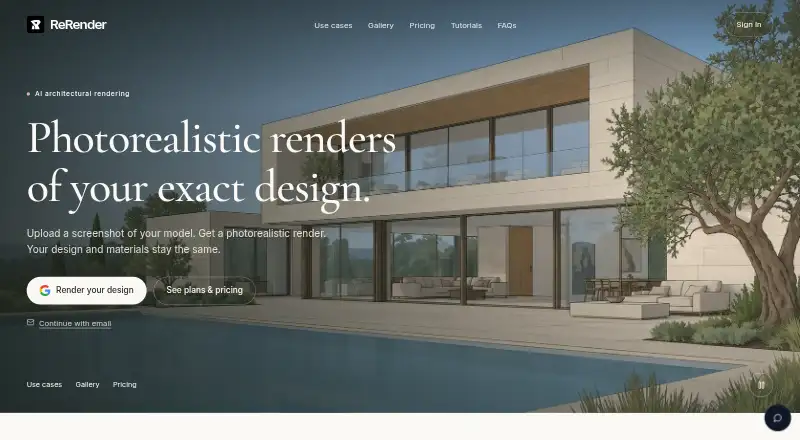
ReRender AI converts screenshots or exported design views into architectural renders while retaining the model’s geometry, arrangement, proportions, and materials. Access is available through a browser, extension, and listed API options. Architects and interior designers can also edit facades, add furniture, color drawings, insert people, and enhance images.
Review
In a line
ReRender AI produces photorealistic architectural imagery from screenshots, sketches, and other uploaded views. It is aimed at architects and interior designers.
What it does
Upload a model screenshot or exported view, run the rendering process, and download the resulting image. ReRender says the design’s proportions, arrangement, form, and materials stay unchanged.
Once an initial image exists, editing controls can adjust its materials and visual treatment. Virtual staging can furnish a scene, while facade and context controls modify surfaces and surroundings without altering the source model.
Moodboards gather materials, colors, and reference images for reuse in subsequent renders. Coloring turns plans, elevations, and 3D views into watercolor, marker, or realistic-material treatments. A people tool lets you set a generated figure’s frame, role, action, clothing, and identity.
The Enhance workflow takes JPG, JPEG, and PNG uploads. Prompt-driven customization and video-generation credits come with paid plans.
How it connects
Published workflows span SketchUp, Revit, ArchiCAD, AutoCAD, 3ds Max, Blender, Cinema 4D, Maya, Rhino, V-Ray, Twinmotion, Lumion, Enscape, Corona, D5 Render, and ChatGPT. Other workflows accept 3D models, sketches, uploaded images, or text prompts.
For SketchUp, upload an exported image; no plugin, V-Ray, Enscape, or extra software is required. A dedicated SketchUp plugin is being prepared, so the browser app is the interim option.
ReRender lists API access, with a reference description covering endpoints, request parameters, response formats, and a downloadable specification. The URL https://rerenderai.com/api returned 404 when checked, and a public documentation page was not found.
ReRender is not open source. According to the maker, uploads, prompts, references, project files, and generated outputs are excluded from training models it develops or controls. Its privacy policy still allows user content to go to external AI-model and infrastructure providers for processing.
Good fit
Architects and interior designers can use it to create renders from existing models without reconstructing geometry. It can support early design visuals, material changes, context edits, furniture staging, colored presentations, and higher-resolution outputs.
People already using SketchUp, Revit, Blender, or AutoCAD can follow the listed workflows without changing their source process.
Watch for
Free and trial outputs may be public or used in promotional display. Private rendering is paid where offered, so review the plan before submitting confidential work.
The company describes reasonable administrative, technical, and organizational safeguards but says absolute security cannot be guaranteed. Its terms also disclaim assurances of uninterrupted, error-free, secure operation or outputs meeting professional or regulatory requirements.
Purchases are final and non-refundable except where law or a separate agreement requires otherwise. Team features such as SSO, audit logs, retention controls, data isolation, and regional hosting vary by plan or agreement.
The dedicated SketchUp plugin is being prepared, and a public API documentation page was not found at the listed URL.
Pricing
Free Trial costs nothing and allows three renders each day for non-commercial use. It includes standard quality, watermarks, private-by-default handling, simple lighting effects, and theme-based rendering.
The Monthly Plan costs $45 per month. It includes unlimited renders, commercial rights, 4x upscaling, watermark-free and private-by-default output, advanced controls, prompt customization, SketchUp plugin support, and video-generation credits.
The Annual Plan is $450 for the first year as a one-time charge and lists the same features as the monthly option. Pricing also advertises plans from $38/mo with annual billing.
Verdict
Choose ReRender AI when you need architectural visuals from existing models and controls for materials, staging, people, or presentation styles. The free trial demonstrates the workflow, but non-commercial terms and possible public display restrict suitable projects.
Paid tiers better fit commercial work because they remove watermarks, provide commercial rights, raise image resolution, and add customization and video credits. Review privacy, refund, API, and SketchUp-plugin terms before committing, particularly for confidential projects or automation.
Our take
ReRender AI fits design professionals who want presentation images from existing model views while leaving the underlying geometry intact. Its browser workflow, broad design-tool coverage, editing controls, and paid commercial rights address common visualization needs. The trial permits only three non-commercial, watermarked renders per day. Before paying, verify privacy requirements, public-render conditions, API status, and the still-in-development SketchUp plugin; refunds are generally unavailable and service assurances are limited.
- Preserves the model’s form, proportions, arrangement, and materials
- Supports many listed architecture and rendering workflows
- Trial includes three renders per day
- Paid tiers provide commercial rights and output without watermarks
- Moodboards, staging, coloring, and people controls aid presentations
- Free and trial outputs can be public or promotional
- Trial use is non-commercial and watermarked
- The dedicated SketchUp plugin is being prepared
- No public API documentation page was found at the listed URL
- Purchases are usually final and non-refundable
- Pick it ifArchitects creating renders from existing model views; Interior designers exploring material and staging options; Teams needing commercial architectural images without watermarks
- Skip it ifYou require guaranteed privacy on a free or trial tier; You need a released SketchUp plugin immediately; You require verified public API documentation before integrating
Pricing
The trial allows three non-commercial renders per day.
- Free Trial3 renders daily · Non-commercial use · Standard image quality · Watermarked renders · Private by default · Simple lighting effects · Theme-based renderingFree
- Monthly Plan$45 total billed each month · Unlimited renders · Full commercial usage rights · 4x image upscaling · Watermark-free renders · Private by default · Advanced controls · Prompt customization · SketchUp plugin support · Video generation credits$45/mo
- Annual PlanOne-time charge of $450 for the first year · Unlimited renders · Full commercial usage rights · 4x image upscaling · Watermark-free renders · Private by default · Advanced controls · Prompt customization · SketchUp plugin support · Video generation credits$450/yr
As rerenderai.com lists them, checked 21 Oct 2026.
Questions
Does ReRender AI change the model geometry?
ReRender says the rendered result preserves the model’s form, proportions, arrangement, and materials.
Which files can I upload?
The Enhance workflow accepts JPG, JPEG, and PNG files. Other workflows accept model screenshots, sketches, 3D models, uploaded images, or text prompts.
Is there a free option?
Yes. Free Trial allows three renders per day for non-commercial use, with standard quality and watermarks.
Can I use renders commercially?
Commercial rights come with the Monthly and Annual plans; Free Trial use is non-commercial.
Is ReRender AI open source?
No. ReRender AI is not open source.
Is a SketchUp plugin available?
The dedicated plugin is being prepared. In the meantime, upload an exported image through the browser app; no plugin is required.
Does ReRender AI train its models on my files?
The maker says uploads, prompts, references, project files, and generated outputs are not used to train models it develops or controls. Outside providers may still process user content.
Are paid purchases refundable?
Under the terms, purchases are final and non-refundable unless applicable law or a separate agreement requires a refund.
Near it
All alternatives →- RA
 Raspberry AI Prints & Patterns#7 on this board
- TSTool67 Sketch to Image#9 on this board
- GGendo#6 on this board
- RReviz#10 on this board
- FFFLORA Fashion Studio#5 on this board
- FFermat#11 on this board
- SSparkStation#4 on this board
- RRendair#12 on this board
- NANeolocus AI#3 on this board
- A
 ArchSynth#13 on this board