Resanance Review
resanance.com · checked 15 Oct 2026
Free software that plays soundboard audio through microphone-enabled apps.
How it plugs in
Signal on Soundboard Software6.6#2 of 26
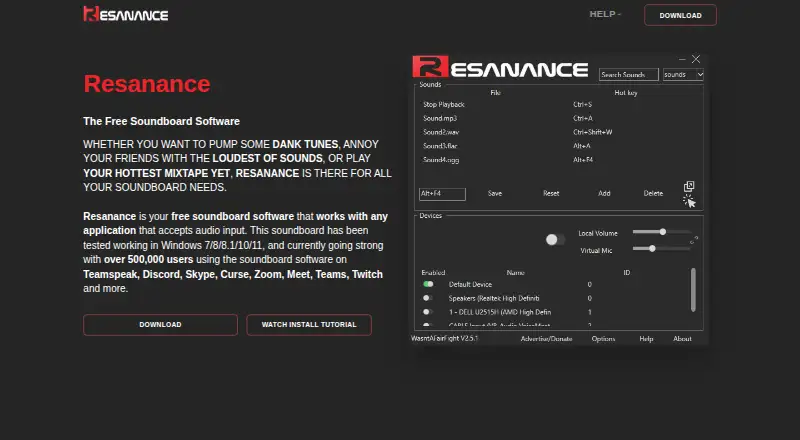
Resanance provides a no-cost soundboard for Windows, Android, and web use. It lets you fire sound effects into programs that receive microphone audio, without limits on sounds or hotkeys. Available controls include simultaneous device output, individual sound levels, MIDI, text to speech, and button styling. Windows setup uses VB-Cable, and some microphone configurations may need extra audio software.
Review
In a line
This no-cost soundboard feeds audio into programs that accept microphone input. It runs on Windows, Android, and the web.
What it does
Add as many sounds and hotkeys as needed, then trigger them while working in another application. Each sound and button can have its own volume setting.
Audio can play through several devices at once. You can adjust local playback and microphone levels independently. Buttons may be resized, bordered, and assigned new colours.
The feature list also includes MIDI soundboard support, text to speech, sound search, sorting by name, and a hotkey for playing a random sound.
How it connects
The software feeds audio into programs that receive microphone input. Examples named by the maker are TeamSpeak, Discord, Skype, Curse, Zoom, Google Meet, Microsoft Teams, and Twitch.
Windows distribution comes as a ZIP containing an MSI, and the installer asks for VB-Cable. Configuration involves setting CABLE Output as the recording device and enabling microphone listening in Windows.
Resanance's Android app acts as a remote controller. At present it works only with beta 2.6.3-or-later button profiles. Assistance is linked through Discord, Reddit, and a YouTube tutorial.
Good fit
Resanance suits people who want to trigger sound effects, music, or spoken text inside voice, meeting, streaming, and chat apps. Its unlimited sounds and hotkeys fit large sound collections.
It also fits users who need separate microphone and local volume controls, multiple audio outputs, or MIDI support. The maker reports testing on Windows 7, 8, 8.1, 10, and 11.
Watch for
Only 15 sounds can play simultaneously. Push-to-talk does not support some keys, including mouse buttons, and in-game hotkeys may work only after restarting as administrator.
Microphone problems may require installing and configuring Voicemeeter. The Android app has a 2.4 out of 5 Google Play rating from 46 reviews; one review described clipped interface elements and limited controls.
According to the privacy notice, collected data may include an IP address, device and usage details, and cookies. Personal information is not intended to remain for more than 90 days unless a longer period is allowed or required by law.
Pricing
Resanance is free. The plan provides unlimited sounds and hotkeys, and no trial is offered because the product itself costs nothing.
Its help FAQ says donations and advertising pay for servers, licences, certificates, developers, and support staff.
Verdict
Choose Resanance if you need a no-cost soundboard for apps that take microphone audio and you are comfortable configuring Windows audio devices. Its hotkey and sound options, multi-device output, MIDI, and text-to-speech features address many standard soundboard needs.
Check the 15-sound playback limit and the setup requirements before relying on it for live use. Users who need unrestricted simultaneous playback, simple microphone routing, or a more polished mobile controller may need to look elsewhere.
Our take
Resanance is a practical free option for adding triggered audio to chat, meeting, and streaming applications. Its unlimited library and hotkey capacity, independent volume handling, multi-device playback, MIDI, and text-to-speech support provide broad functionality without a subscription. The trade-offs are a 15-sound simultaneous playback cap, Windows audio setup involving VB-Cable, and possible Voicemeeter work for microphone issues. The Android controller is limited to certain beta profiles and has mixed user feedback. It fits users willing to configure audio rather than those seeking a plug-and-play mobile experience.
- No-cost plan allowing unlimited sounds and hotkeys
- Can send audio to several devices simultaneously
- Independent microphone and local volume controls
- MIDI and text-to-speech soundboard features
- Works with several voice, meeting, and streaming apps
- Playback tops out at 15 simultaneous sounds
- VB-Cable must be configured on Windows
- Some hotkey types are unsupported
- Microphone issues may require Voicemeeter
- Android controller works only with certain beta profiles
- Pick it ifPeople adding triggered audio to voice, meeting, or streaming apps; Windows users who need many sounds and custom hotkeys; Users needing multiple outputs or separate volume controls
- Skip it ifYou need more than 15 sounds playing simultaneously; You want microphone routing without audio-device configuration; You need a fully featured Android controller
Pricing
Resanance costs nothing and includes unlimited sounds and hotkeys. There is no separate trial period.
- Resanancefree soundboard · unlimited sounds and hotkeysFree
As resanance.com lists them, checked 15 Oct 2026.
Questions
What is Resanance?
Resanance is a free soundboard that feeds audio into programs able to receive microphone input.
Which apps work with Resanance?
The maker lists TeamSpeak, Discord, Skype, Curse, Zoom, Google Meet, Microsoft Teams, and Twitch among compatible applications.
How many sounds and hotkeys can I add?
There is no stated limit on sounds or hotkeys, although playback can reach only 15 simultaneous sounds.
What does Windows setup require?
The download is a ZIP containing an MSI and asks to install VB-Cable. Select CABLE Output as the recording device, then configure microphone listening in Windows.
Does Resanance have an Android app?
Yes. Its Android companion operates Resanance remotely, but supports only beta 2.6.3-or-later button profiles at present.
What audio controls are available?
Volume can be set for each sound and button, microphone and local levels can be adjusted independently, and playback can target multiple devices simultaneously.
Near it
All alternatives →- B
 Blerp#1 on this board
- SS
 Sound Show#3 on this board
- S
 Soundpad#4 on this board
- ES
 EXP Soundboard#5 on this board
- SSSoundTools Soundboard#6 on this board
- VAVoicemod AI Voice Cleaner#7 on this board
- SS
 Stadium Sound#8 on this board
- AS
 Amplitude Soundboard#9 on this board
- L
 LivePlay#10 on this board
- Uundb#11 on this board