
Soundpad review
leppsoft.com · checked 15 Oct 2026
Windows tool for routing sound clips through a microphone during voice chats.
How it plugs in
Signal on Soundboard Software6.3#4 of 26
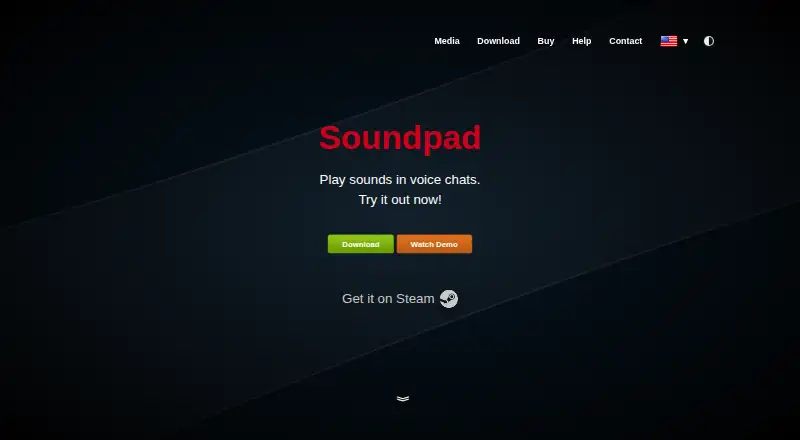
Soundpad is a Windows desktop soundboard for voice chats. It plays selected audio through a microphone, supports hotkeys for use during fullscreen games, and includes recording, trimming, search, and saved sound lists. It works with several listed voice apps and offers local remote control for plugins and companion tools. A free trial is limited; the full license costs €4.99 once.
Review
In a line
Soundpad is a Windows app that inserts chosen sounds into your microphone signal so people in voice chats can hear them.
What it does
You can assign hotkeys to sound files and trigger them while playing a fullscreen game. Sounds can go to headphones, the microphone, or both. A Block voice option can replace the microphone signal while a sound plays.
The built-in recorder captures audio from the computer or microphone. Its editor trims clips without another app. Instant search and saveable sound lists help organize playback. It supports AAC, FLAC, M4A, MP3, OGG, Opus, WAV, and WMA files.
How it connects
Discord, TeamSpeak, Mumble, Counter-Strike 2, Dota 2, Battle.net voice chat, and PUBG appear in the maker's list of compatible voice-related applications. Soundpad is not open source and runs as a locally installed Windows program.
A documented remote-control interface accepts command-line commands and local named-pipe messages for playing, seeking, stopping, and recording. Developers can use it for apps or plugins. The listed add-ons and companion options cover Overwolf, Stream Deck, Touch Portal, text-to-speech tools, and a web interface.
Good fit
Soundpad is aimed at Windows users who want effects, music, or recordings delivered into voice chats. Hotkeys make it useful during games, while recording and trimming support quick clip preparation.
The download page lists Windows 7, 8, 8.1, 10, and 11 in both 32-bit and 64-bit forms. A playback device, a recording device, and administrator rights are required.
Watch for
The application does not work on Linux, macOS, mobile systems, or Windows phones. Windows 7, 8, and 8.1 also require Windows Audio DRM validation to be disabled for the driver.
Installation and device-preference changes need administrator rights. The paid license allows installation on up to two customer computers. During a trial, each list can contain 10 sounds and playback is capped at 10 times per application restart.
Pricing
The free Trial version permits no more than 10 sounds in a list and 10 plays after each restart. A free trial is available.
Soundpad Full version costs €4.99 one-time, including VAT, with unlimited sound additions and playback. It uses serial activation, and volume licensing is available. The Steam edition costs $4.99 one-time and requires a Steam account and client.
Verdict
Choose Soundpad if you use Windows voice chat and want hotkey-triggered clips, microphone routing, and built-in recording and trimming. Its local remote-control channel can support companion tools and plugins.
Look elsewhere if you need macOS, Linux, mobile, or browser support, or if disabling Windows Audio DRM on older Windows versions is not acceptable. The trial is suitable for checking the 10-sound and 10-play limits before buying.
Our take
Soundpad is a focused choice for Windows gamers and voice-chat users who need clips sent through a microphone. The one-time full license is inexpensive, and the trial lets you check the basic workflow with clear limits. Recording, trimming, hotkeys, routing choices, and saved lists cover common soundboard tasks. Compatibility stops at Windows, with extra setup requirements on older versions. People seeking a browser, mobile, macOS, or Linux tool should choose another product. Its local control interface is useful when a plugin or external controller matters.
- Routes clips into microphone audio for voice chats
- Hotkeys work while fullscreen games are running
- Includes recording and clip trimming
- Supports many common audio formats
- Remote control supports plugins and companion tools
- Windows-only; no macOS, Linux, mobile, or browser app
- Older Windows versions require DRM validation changes
- Trial caps lists at 10 sounds and playback at 10 per restart
- Installation and device changes require administrator rights
- Paid license covers up to two computers
- Pick it ifWindows voice-chat users who trigger sounds during games; People needing recording, trimming, and microphone routing
- Skip it ifYou need macOS, Linux, mobile, or browser support; You require more than two licensed computers; You cannot change older Windows audio settings
Pricing
The free trial permits 10 sounds and 10 plays per restart. The full Windows version is €4.99 one-time; a Steam edition is $4.99 one-time and requires Steam.
- Trial versionmaximum 10 sounds in list · maximum 10 plays per restartFree
- Soundpad Full versionincl. VAT · unlimited sound additions and playback · serial activation · volume licensing available€4.99 one-time
- Steam editionSteam account and client required$4.99 one-time
As leppsoft.com lists them, checked 15 Oct 2026.
Questions
What is Soundpad used for?
It plays selected audio through your microphone so people in voice chats can hear it.
Which systems run Soundpad?
It runs on Windows 7, 8, 8.1, 10, and 11. The maker says its driver does not work on Linux, macOS, mobile systems, or Windows phones.
Does Soundpad have a free version?
Yes. The free Trial permits up to 10 sounds in a list and 10 plays per application restart.
How much does the full version cost?
Soundpad Full version costs €4.99 one-time, including VAT. The Steam edition costs $4.99 one-time and requires a Steam account and client.
Which voice apps are listed as compatible?
The compatibility examples include Discord, TeamSpeak, Mumble, Counter-Strike 2, Dota 2, Battle.net voice chat, and PUBG.
Can Soundpad be controlled by other tools?
Yes. Its documented local interface accepts command-line and named-pipe messages, while listed integrations cover Overwolf, Stream Deck, Touch Portal, text-to-speech tools, and a web interface.
Near it
All alternatives →- SS
 Sound Show#3 on this board
- ES
 EXP Soundboard#5 on this board
- RResanance#2 on this board
- SSSoundTools Soundboard#6 on this board
- B
 Blerp#1 on this board
- VAVoicemod AI Voice Cleaner#7 on this board
- SS
 Stadium Sound#8 on this board
- AS
 Amplitude Soundboard#9 on this board
- L
 LivePlay#10 on this board
- Uundb#11 on this board