
RomM: Self-Hosted ROM Library and Emulator Hub
romm.app · checked 15 Oct 2026
Self-hosted ROM library software for scanning, organizing, syncing, and playing emulator collections.
How it plugs in
Signal on Game Library Managers7.7#2 of 40
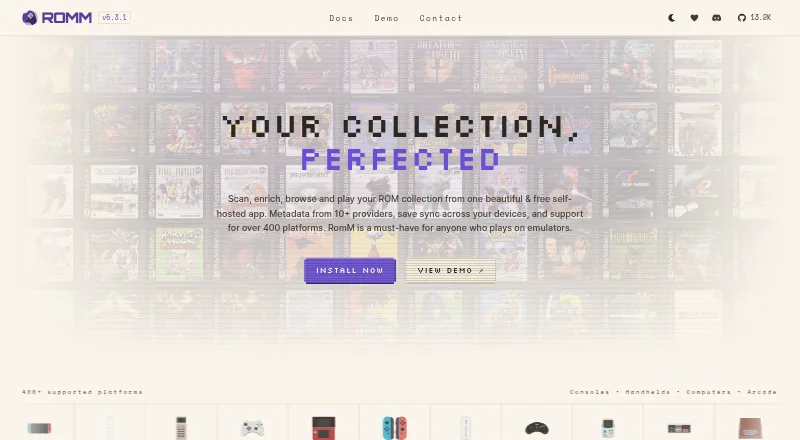
RomM is a self-hosted web app for managing personal ROM collections. It scans files, adds metadata and artwork, supports browser play, and syncs saves across devices. It is open source and free, with Android, iOS, Linux, macOS, Windows and web access. Setup uses Docker and requires organized folders plus a metadata-provider account.
Review
In a line
RomM is a self-hosted app for people who play games through emulators. It scans, organizes, enriches, downloads and plays a personal ROM collection.
What it does
The app builds a browsable library from your ROM folders and adds information from services such as IGDB, ScreenScraper, LaunchBox and MobyGames. It can also fetch artwork from SteamGridDB and track achievements through RetroAchievements.
RomM supports more than 400 platforms, including multi-disk games, downloadable content, mods, hacks and manuals. A built-in patcher applies romhacks and translations as you play.
You can play in a browser with EmulatorJS and Ruffle without extra setup. Saves and save states sync between devices with conflict handling, and offline mode is supported.
How it connects
RomM is open source under AGPL-3.0 and exposes an OpenAPI-based REST API. Documented sign-in methods include sessions, Basic authentication, OAuth2, client API tokens and OIDC single sign-on.
It can export to ES-DE and Pegasus, import from LaunchBox, and connect with community apps. Official clients include a Windows Playnite plugin, the Android Argosy launcher and the Linux Grout client. A native iOS app and other community projects are also listed; RomM says its team does not regularly review their source code.
The reference setup uses Docker Compose with MariaDB and Valkey, plus mounted library, assets, resources and configuration volumes. Documentation covers reverse proxies, Unraid, Synology, TrueNAS, Kubernetes, backups and troubleshooting. See game library managers and ROM management software for related categories.
Good fit
RomM suits emulator players who want one library available on desktop computers, phones and handhelds. It supports controllers, cloud save sync and multi-device access.
Its user controls include per-user permissions, parental controls and OIDC sign-on. Administration guidance covers Authelia, Authentik, Keycloak, PocketID, Zitadel and VoidAuth.
People already using LaunchBox can import that library, while ES-DE and Pegasus users can export to those front ends.
Watch for
This is not a plug-and-play option. Quick-start installation requires Docker, Docker Compose, organized ROM folders and credentials for at least one metadata provider. Remote access and maintenance are your responsibility on a self-hosted install.
One reported complaint described slow or incomplete scans, duplicate entries after removing files and unreliable search results. Check your scanning workflow before moving a large collection.
Community clients vary in oversight because the project says its team does not regularly review their source code.
Pricing
RomM is free forever under AGPL-3.0, with no paid features. The self-hosted plan is also free forever, with no tracking and data kept on your server.
A Hostinger hosted deployment starts at $6.49 a month. That indicative price includes deployment and infrastructure support handled by Hostinger. There is no free trial.
Verdict
Choose RomM if you are comfortable running Docker and want a central ROM library with metadata, browser play, save synchronization and user access controls. Its open code, REST API and exports make it suitable for connecting several devices and front ends.
Skip it if you need a maintenance-free setup or expect every scan and search result to be reliable without tuning. Community clients may also need extra checking, and hosted use adds a monthly infrastructure charge.
Our take
RomM is a sensible choice for emulator players who want their own server to hold one organized collection and make it available across computers, phones and handhelds. Browser play, save-state synchronization, metadata sources, artwork and achievements cover many everyday library tasks. The trade-off is administration: Docker-based installation, metadata credentials, storage management and troubleshooting remain with you. Reported scan and search problems mean large libraries deserve a trial run. The free AGPL software fits privacy-focused users, while Hostinger offers a paid hosted route for those who prefer outside infrastructure support.
- Free forever with no paid features
- Open-source AGPL-3.0 application
- Browser play and multi-device save synchronization
- Supports more than 400 platforms
- REST API plus ES-DE and Pegasus exports
- Docker and organized folders are required for quick-start setup
- Reports of slow or incomplete scans and unreliable search
- Self-hosted installs require ongoing maintenance
- Community client code is not regularly reviewed by the team
- Hostinger hosted deployment starts at $6.49 a month
- Pick it ifEmulator players managing a personal ROM collection; Households needing shared accounts and parental controls; Users connecting handhelds, desktops and browser play
- Skip it ifYou want plug-and-play emulation with no server setup; You cannot maintain Docker, storage and remote access; You need consistently reliable scans without troubleshooting
Pricing
The RomM application and self-hosted plan are free forever with no paid features. There is no free trial.
- RomMFree forever · AGPL-3.0 · no paid featuresFree
- RomM self-hostedfree forever · AGPL-3.0 · no tracking · no paid features · user-hosted dataFree
- Hostinger hosted deploymentstarting at $6.49/mo; indicative pricing · Deployment and infrastructure support handled by Hostinger$6.49/mo
As github.com lists them, checked 29 Sept 2026.
Questions
Is RomM free?
Yes. RomM is free forever under AGPL-3.0 and has no paid features. A Hostinger hosted deployment starts at $6.49 a month.
Where can RomM run?
RomM offers Android, iOS, Linux, macOS, Windows, web and self-hosted access. Its reference deployment uses Docker Compose.
Can RomM play games in a browser?
Yes. EmulatorJS and Ruffle provide browser play without extra setup.
Does RomM sync saves?
Yes. Saves and save states sync across devices and include conflict resolution.
What metadata services can RomM use?
Listed providers include IGDB, ScreenScraper, LaunchBox, MobyGames, SteamGridDB and RetroAchievements.
Does RomM have an API?
Yes. It provides an OpenAPI-based REST API with documented authentication, schemas and endpoint guidance.
What does installation require?
The quick start requires Docker, Docker Compose, organized ROM folders and credentials for at least one metadata provider.