Screencastify Review: Features, Integrations, and Pricing
screencastify.com · checked 28 Sept 2026
Browser-based screen recorder with webcam, audio, sharing, collaboration, and interactive video tools.
How it plugs in
Signal on Screen Recording Software7.4#6 of 131
Through a browser or desktop platform, Screencastify captures screens, webcams, microphone input, and system audio. Pro supports recordings up to 4K and 180 minutes. Videos can be shared by link, organized with team permissions, and connected to Google, Microsoft, YouTube, and learning platforms. Users on the free plan may make 10 recordings of up to 30 minutes each.
Review
In a line
Screencastify is a screen and webcam recording service from Screencastify LLC, a company founded in 2014 and based in Chicago, Illinois.
It runs in a browser, through Chrome and Edge extensions, and on Windows, macOS, and Linux.
What it does
You can capture your screen with webcam video, microphone sound, or system audio. Recordings can reach 4K quality, with a maximum recording length of 180 minutes on supported plans.
After recording, videos can be shared by link with privacy controls. Teams can also comment, collaborate, use shared folders, and apply granular permissions.
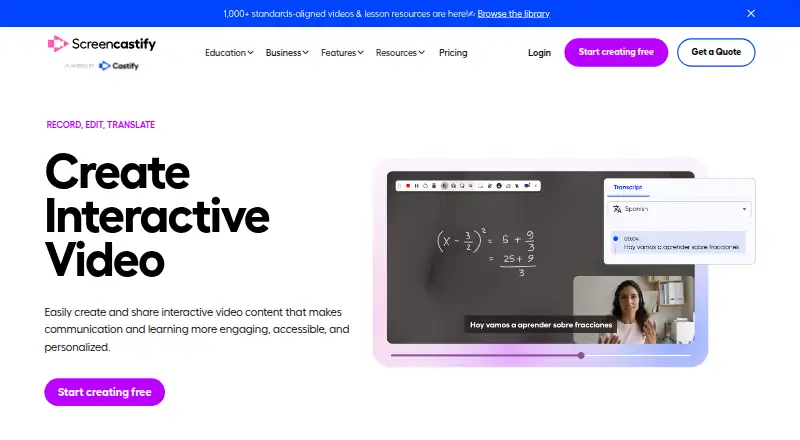
Questions, polls, assignments, and grading workflows are available through its interactive tools. On Pro, AI features include editing, captions, transcripts, translations, and voiceovers.
How it connects
Google Drive, Google Slides, Gmail, Outlook, YouTube, and learning management systems are among Screencastify's integrations. Chrome and Edge extensions provide another way to record.
Teams can share videos, comment, use shared folders, and set permissions. Enterprise and EDU plans add central administration, single sign-on, training, and support.
The service says it follows FERPA, COPPA, and CSPC requirements and holds SOC 2 Type II certification.
Good fit
Screencastify suits people who need quick screen recordings without installing a desktop app. Its browser access works for demonstrations, lessons, updates, and video messages.
Teams and schools may benefit from shared folders, comments, interactive assignments, grading workflows, and administrative controls.
Watch for
The free plan allows up to 10 recordings, each no longer than 30 minutes, and limits quality to 1080p. Starter and Pro are listed with annual, per-user pricing, while Enterprise and EDU terms are custom.
Starter records up to 60 minutes at 1080p, while Pro allows 180 minutes and up to 4K. Enterprise and EDU terms require a custom quote.
Check your required recording length, video quality, number of members, and integrations before choosing a plan.
Pricing
Screencastify has a free plan with no credit card required. It includes five members, 10 recordings, videos of up to 30 minutes, and 1080p quality. Free videos remain available to store, watch, and share indefinitely. Each of up to four invitations can add five bonus videos.
The annual Starter plan is $7 per user each month, with up to five members, 60-minute videos, and 1080p.
At $10 per user each month on annual billing, Pro permits five members, 180-minute videos, and up to 4K. Enterprise & EDU is quoted custom and includes unlimited members, custom recording length, and up to 4K.
Verdict
Choose Screencastify if you want browser-based recording with optional webcam and audio capture, link sharing, and team controls. It is also a fit for schools or organizations that need interactive video activities and administrative features.
The free plan is suitable for occasional, shorter recordings. Regular creators may need Starter or Pro for longer videos, higher resolution, and Pro’s AI tools.
Our take
Screencastify makes sense for individuals, teams, and schools that want recording to start in a browser and connect with common Google, Microsoft, YouTube, or learning tools. Its free tier gives a clear way to begin, while the listed paid plans raise the time and quality limits. Buyers should compare the 10-video free allowance with their expected volume and review the annual Starter and Pro terms or custom Enterprise terms. It is less suitable when you need pricing without an annual commitment or recording limits beyond the listed plans.
- Works in a browser plus Chrome and Edge extensions
- Captures webcam, microphone, and system audio
- Supports up to 4K video and 180-minute recordings
- Integrates with Google, Microsoft, YouTube, and LMS platforms
- Free videos can be stored and shared indefinitely
- Free plan limits users to 10 recordings
- Free videos can be only 30 minutes long
- Starter and Pro require annual billing
- Enterprise & EDU pricing is custom
- Pick it ifBrowser-based screen recording for individuals and teams; Schools using interactive video assignments; Organizations needing shared folders and permissions
- Skip it ifYou need recording beyond the listed time limits; You require a non-annual paid option; You need a published Enterprise & EDU price
Pricing
The no-cost plan includes up to 10 recordings. Starter is listed at $7 per user monthly with annual billing, while Pro is $10 per user monthly on annual billing. Enterprise & EDU uses custom pricing.
- FreeNo credit card required · Up to 5 members · Up to 10 recordings · 30 minutes per video · Up to 1080pFree
- Starterbilled annually · Up to 5 members · 60 minutes per video · Up to 1080p$7/mo
- Probilled annually · Up to 5 members · 180 minutes per video · Up to 4K$10/mo
- Enterprise & EDUUnlimited members · Custom recording length · Up to 4KOn request
As screencastify.com lists them, checked 28 Sept 2026.
Questions
Is Screencastify free?
Yes. No credit card is required for the free plan, which provides 10 recordings of up to 30 minutes each at up to 1080p.
What platforms does Screencastify support?
You can use it on the web, Windows, macOS, or Linux, with Chrome and Edge extensions also available.
How long can a Screencastify video be?
The free tier caps a video at 30 minutes; Starter raises that to 60, Pro to 180, and Enterprise & EDU uses a custom limit.
Can Screencastify record audio and webcams?
Yes. Webcam footage, microphone input, and system audio can all be captured.
What does Screencastify cost?
Starter is listed at $7 per user each month with annual billing, and Pro at $10 per user each month on the same schedule. Enterprise & EDU pricing is by request.
Does Screencastify connect to other apps?
Connections include Google Drive, Google Slides, Gmail, Outlook, YouTube, and learning management systems.
Can teams collaborate on Screencastify videos?
Yes. Collaboration includes video sharing, comments, shared folders, and granular permission settings.