SecureWipe Disk Erasure Review
github.com · checked 11 Oct 2026
Open-source disk erasure for Linux and Windows with verification and audit certificates.
How it plugs in
Signal on Disk Wiping Software6.0#8 of 28
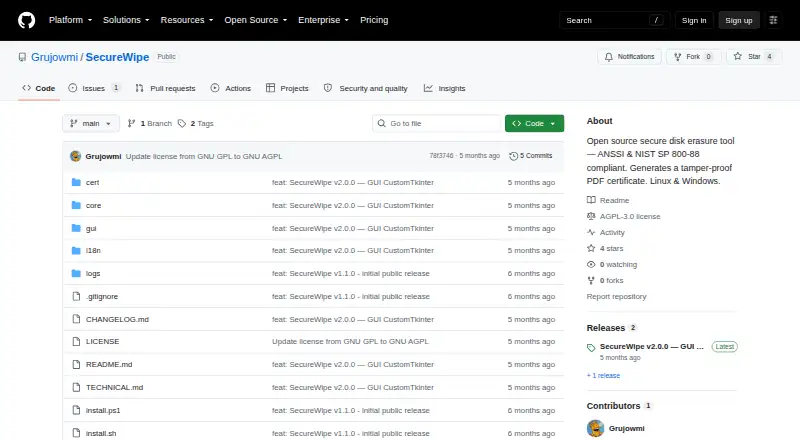
SecureWipe provides no-cost, open-source disk erasure on Linux and Windows. It recognizes HDD, SSD, and NVMe storage, detects encryption, and chooses applicable erase methods. Verification uses random samples before producing a timestamped PDF certificate and text log. Both graphical and terminal interfaces are available in French and English.
Review
In a line
On Linux and Windows, SecureWipe securely clears disks as an open-source utility. It supports HDD, SSD, NVMe, and removable storage.
What it does
The tool detects each drive's type, model, and serial number. It also checks for LUKS, BitLocker, and SED encryption, offering Crypto Erase first when available.
Available methods cover ANSSI Level 1 and 2, NIST Clear and Purge, Crypto Erase, and custom two- to seven-pass wipes for HDDs. For SSD and NVMe media, overwrite passes are unavailable because wear-leveling limits their effectiveness; firmware-level or crypto erase options are used instead.
After erasing, SecureWipe verifies the result through random sampling, using a 10% sample by default. It can handle multiple drives in one session.
How it connects
SecureWipe is open-source software under the GPL v3 license. It has a graphical interface and a terminal mode, with automatic locale detection for French or English.
Linux and Windows 10 or 11 are supported; Python 3.10 or newer is required, and the graphical interface depends on customtkinter. A timestamped PDF certificate records drive details, the method used, the verification result, a SHA-256 QR code, and a watermark, while a raw text log is also saved.
Good fit
SecureWipe suits people who need traceable disk erasure and records for audits or compliance files. Its maker describes use in healthcare settings subject to HDS, NIS2, and GDPR requirements.
It is also a fit for users who want both GUI and terminal operation, support for removable media, and certificates after each wipe. Data erasure software and disk wiping software are broader categories to explore.
Watch for
The tool blocks wiping the system disk. It also disables NIST Purge for USB or other removable drives.
You must install Python 3.10 or later, and customtkinter is needed for the GUI. The README says the software comes without a warranty.
Pricing
SecureWipe is free and open source. There is no paid plan listed.
Verdict
Choose SecureWipe if you need a no-cost erasure utility that identifies drives, selects encryption-aware methods, checks the result, and leaves a certificate and log. Its Linux and Windows support and terminal mode suit technical workflows, while the GUI serves desktop use.
Look elsewhere if you need to wipe the active system disk, rely on NIST Purge for removable drives, or cannot meet the Python and GUI dependencies.
Our take
SecureWipe is a sensible choice for organizations and individuals that need documented disk disposal without a license fee. Drive identification, encryption detection, verification sampling, and certificate creation cover the core steps from selection to record keeping. The main constraints are deliberate: the system disk cannot be wiped, NIST Purge is unavailable for removable media, and SSD or NVMe overwrite passes are not offered. Confirm that your operating system, Python version, and preferred interface fit before adopting it.
- Free and open source under GPL v3
- Detects HDD, SSD, NVMe, and removable drives
- Offers encryption-aware Crypto Erase
- Creates PDF certificates and raw text logs
- Supports GUI and terminal modes
- Cannot wipe the system disk
- NIST Purge is disabled for USB or removable drives
- Requires Python 3.10 or later
- No warranty is provided
- Pick it ifAuditable disk erasure in healthcare or other regulated work; Users needing certificates and logs at no cost; Linux and Windows users who want GUI or terminal control
- Skip it ifYou need to erase the currently running system disk; You require NIST Purge on removable media; You cannot install Python 3.10 or the GUI dependency
Pricing
SecureWipe costs nothing and is open source, with no paid tier listed.
Questions
Is SecureWipe free?
Yes. SecureWipe is available at no cost and uses the GPL v3 license.
Which systems can run SecureWipe?
Linux and Windows 10 or 11 can run it, with Python 3.10 or newer required.
Can it erase SSD and NVMe drives?
It recognizes SSD and NVMe media and provides firmware-level or crypto erase choices; overwrite passes are blocked because wear-leveling makes them ineffective.
Does SecureWipe create proof of erasure?
A timestamped PDF certificate is produced after wiping, listing drive details, the method, verification result, a SHA-256 QR code, and a watermark, alongside a text log.
Can it wipe USB drives?
Removable media is supported, although NIST Purge is turned off for USB and other removable drives.
Does it protect the system drive?
Yes. SecureWipe prevents the system disk from being wiped.
What languages are supported?
French and English are available in both interface modes, with the locale selected automatically.
Near it
All alternatives →- CECertus Erasure#7 on this board
- MEMultiDrive Erase Drive#9 on this board
- Nnwipe#6 on this board
- H
 HDShredder#10 on this board
- AKActive@ KillDisk#5 on this board
- SShredIt#11 on this board
- BD
 BitRaser Drive Eraser#4 on this board
- SShredOS#12 on this board
- SDStrix Disk Cleaner#3 on this board
- WWipeDrive#13 on this board