nwipe: Free Linux Disk-Wiping Software
github.com · checked 5 Oct 2026
Free Linux software for erasing whole drives, with command-line and ncurses interfaces.
How it plugs in
Signal on Disk Wiping Software6.2#6 of 28
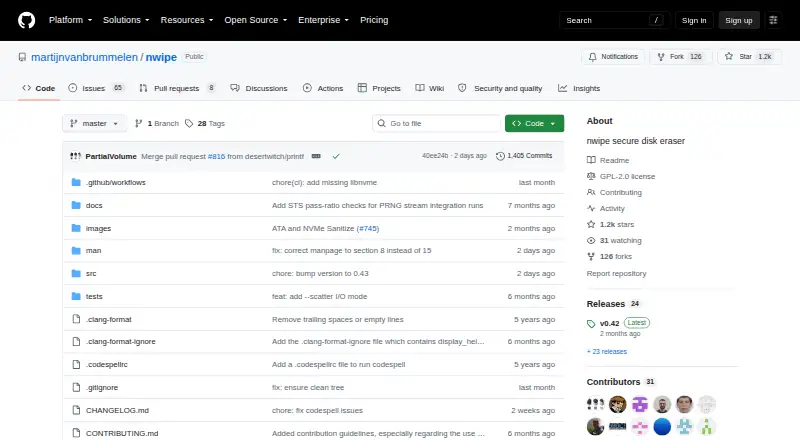
nwipe securely clears block devices on Linux, either one drive or several at once. It offers pattern wipes, verification, hardware erase options, certificates, and selectable random-number methods. The project is free, self-hosted, and GPL-2.0 licensed. It can run from a bootable ShredOS image or from Linux distributions that include it.
Review
In a line
nwipe is free, open-source software that securely erases entire disks. It runs on Linux and can work from the command line or an ncurses text-based interface.
What it does
The program wipes one drive or several drives in parallel. Erasure choices include zero and one fills, DoD and Gutmann patterns, verification passes, and BMB21-2019.
Its interface can request drive-native ATA or NVMe block erase, cryptographic erase, or pattern overwriting when supported. Random-pattern methods can use AES-256-CTR or ChaCha20 random generation.
nwipe can create a three-page PDF certificate. SMART details are included when the recommended supporting tools are installed.
How it connects
nwipe is self-hosted Linux software rather than a hosted service. Its code is released under GNU GPL version 2.0, and the project accepts issue reports, feature requests, and code contributions on GitHub.
The runtime requires hdparm. smartmontools and dmidecode are optional recommendations for SMART certificate information and detecting HPA or DCO settings. The project lists ShredOS, netboot.xyz, DiskDump, Parted Magic, SystemRescue, GParted Live, and Grml as distributions that include nwipe.
For broader comparisons, see data erasure software and disk wiping software.
Good fit
nwipe suits Linux administrators and people who need to sanitize disks, SSDs, or removable media. It supports bootable use and can process multiple drives together; the project shows six drives being erased in parallel.
It fits jobs that need selectable wipe standards, verification, or a certificate record. A bootable ShredOS image is available for x86_64 and i686 systems with legacy BIOS or UEFI support.
Watch for
Hardware sanitize controls are available only in the GUI and cannot be combined with automated multi-drive commands such as autonuke. The v0.43 release also says legacy ATA Secure Erase and its freeze-lock handling are unsupported.
Direct I/O is not always available: automatic mode falls back to cached I/O when needed. Check your drive support, Linux setup, and required tools before choosing a method.
Pricing
nwipe has one free plan and no free trial; the plan is GPL-2.0 software for Linux with command-line and ncurses interfaces.
Verdict
Choose nwipe if you need a no-cost Linux utility for clearing complete drives, including several at the same time, and you value verification or PDF records. Its bootable options make it practical for machines that cannot run a normal desktop system.
Look elsewhere if you need legacy ATA Secure Erase support, automated hardware-sanitize jobs, or a graphical tool that runs outside Linux. Users who prefer a simpler file-focused eraser may find a different category more suitable.
Our take
nwipe is a strong match for Linux-based disk disposal, refurbishment, and lab work where full-device wiping and repeatable methods matter. It handles HDDs, SSDs, and removable media, can work from bootable environments, and offers certificates for records. The trade-off is operational complexity: setup depends on Linux and supporting utilities, some hardware features require the GUI, and legacy ATA Secure Erase is not supported. Pick it when control and parallel processing outweigh convenience; avoid it for file-only deletion or non-Linux workflows.
- Free GPL-2.0 software with command-line and ncurses interfaces
- Wipes multiple drives in parallel
- Supports verification and PDF certificates
- Works with disks, SSDs, and removable media
- Offers hardware erase options for supported drives
- Requires Linux and hdparm at runtime
- Hardware sanitize is GUI-only
- Legacy ATA Secure Erase is unsupported
- Direct I/O may fall back to cached I/O
- Pick it ifLinux users sanitizing complete drives; Parallel wiping with verification records; Bootable disk-erasure work
- Skip it ifYou need file-only deletion rather than whole-disk wiping; You require legacy ATA Secure Erase support; You need automated hardware sanitize in batch commands
Pricing
The nwipe plan is free and has no free trial. It is GPL-2.0 software for Linux.
- nwipeGPL-2.0 · command-line and ncurses GUI · requires LinuxFree
As github.com lists them, checked 5 Oct 2026.
Questions
Is nwipe free?
Yes. nwipe has a free plan and no free trial.
What systems run nwipe?
It requires Linux and can be self-hosted. Bootable ShredOS images support x86_64 and i686 systems with legacy BIOS or UEFI.
Can nwipe erase several drives at once?
Yes. It can wipe multiple disks in parallel; the project shows six drives being erased together.
Does nwipe support SSDs and removable drives?
Yes. Its listed wipe scope is disk, with SSD and removable-media support.
What erase methods are available?
Options include zero and one fills, DoD, Gutmann, BMB21-2019, verification passes, and supported hardware erase or cryptographic erase.
Does nwipe create a report?
It can produce a three-page PDF certificate. SMART data is available when smartmontools and dmidecode are installed.
Can hardware sanitize run in batch mode?
No. Version 0.43 describes hardware sanitize as GUI-only and unavailable with automated multi-drive commands such as autonuke.
Near it
All alternatives →- AKActive@ KillDisk#5 on this board
- CECertus Erasure#7 on this board
- BD
 BitRaser Drive Eraser#4 on this board
- SSecureWipe#8 on this board
- SDStrix Disk Cleaner#3 on this board
- MEMultiDrive Erase Drive#9 on this board
- LLethe#2 on this board
- H
 HDShredder#10 on this board
- DDriveWipe#1 on this board
- SShredIt#11 on this board