Sniips text expansion software review
sniips.com · checked 15 Oct 2026
Text expansion with synced snippets, smart variables, and team sharing across desktop and web apps.
How it plugs in
Signal on Text Expansion Software6.7#3 of 31
Sniips stores shortcut-triggered text, emails, responses, and code, then expands them in browsers, mail, chat, and editors. Libraries sync across Mac, Windows, and browser extensions. It includes folders, tags, search, variables, imports, exports, backups, and team controls. A free plan is available, with paid plans adding capacity, sync, support, and sharing.
Review
In a line
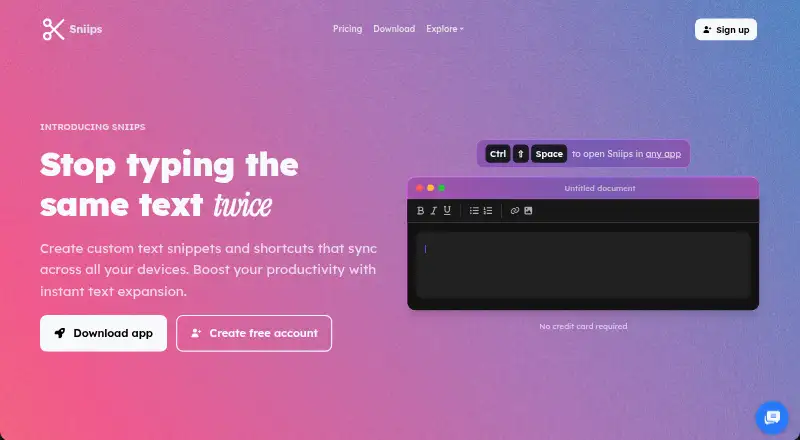
Sniips is a text-expansion tool. You assign shortcuts to reusable text or code, and Sniips inserts the saved content when you type those shortcuts.
What it does
Snippets can expand into emails, replies, rich text, multiline text, special characters, calculations, or code. Smart variables can add dates, clipboard contents, cursor positions, and fields you fill in.
You can organize entries with folders, tags, search, and favorites. Email templates work with Gmail, Outlook, Apple Mail, and other email clients. Developer templates include functions, classes, React scaffolds, API patterns, documentation blocks, and debugging snippets.
Libraries sync across Mac, Windows, and browser extensions. Team plans add shared folders, permissions, real-time updates, version history, and administrative controls.
How it connects
Sniips runs on Windows, macOS, Linux, the web, and a browser extension. The extension works independently of the desktop app. Mobile download pages list Android 8.0 and iOS 13, but mark those apps as coming soon.
It supports editors such as VS Code, IntelliJ, Sublime, and Vim, regardless of programming language. An MCP connection can link AI assistants, with setup instructions for Claude, Cursor, VS Code, Codex, and Gemini CLI.
The account page supplies a private API key for authenticated requests, but the published pages do not provide public API reference or SDK documentation. Sniips is closed source and describes cloud synchronization rather than self-hosting.
Snippets can be imported from TextExpander, aText, PhraseExpress, and most other text expanders. You can also export snippets and use backup options. Sniips lists PhraseExpress among its import sources.
Good fit
Sniips suits individuals, developers, and teams that repeat the same wording or code. It can reduce typing in support replies, email templates, documentation, and development work.
Teams that need shared snippet libraries can use shared folders, permission controls, immediate updates, version history, and administrative controls.
Watch for
Mobile apps are listed as coming soon, so Sniips is not currently a mobile option. Desktop minimums are Windows 10, macOS 10.15, or Ubuntu 18.04, with 2GB of RAM and 500MB of disk space.
There is no stated self-hosted deployment, and no public API reference or SDK documentation. If you downgrade below the free plan's limits, you can edit existing snippets but cannot create new ones until you are under the limit or upgrade.
Sniips says it uses end-to-end encryption and does not sell user data. Its terms limit claims to the amount paid and disclaim liability for downtime, data loss, and service changes.
Pricing
Sniips has a free Basic plan with 25 snippets and two devices. Plus costs $4 a month, billed $48 annually, for 200 snippets, unlimited device sync, and smart variables.
Pro costs $8 a month, billed $96 annually, for 1,000 snippets, unlimited device sync, and priority support. Max costs $16 a month, billed $192 annually, for unlimited snippets, unlimited device sync, team sharing, and custom branding.
Enterprise pricing is available on request and includes custom solutions, advanced security, and flexible pricing. A 14-day trial is available.
Verdict
Sniips is a fit if you want one shortcut library across desktop apps and browsers, with variables and imports for moving from another text expander. Its team plans add controls for shared content.
Check the platform list before buying if you need Android or iOS, since those apps are marked as coming soon. Buyers who require documented public API tools or self-hosting should also look for those capabilities elsewhere.
Our take
Choose Sniips when repeated text or code slows work across Windows, macOS, Linux, browsers, mail, chat, or editors. The free plan covers a small personal library, while higher plans raise snippet limits and add variables, priority support, team sharing, or branding. Teams should review the downgrade behavior and service liability terms before committing.
- Works in browsers, email clients, chat apps, and code editors.
- Smart variables can insert dates, clipboard text, cursor positions, and fields.
- Imports from TextExpander, aText, PhraseExpress, and other expanders.
- Team plans include shared folders, permissions, updates, and version history.
- Android and iOS apps are listed as coming soon.
- No public API reference or SDK documentation is provided.
- No self-hosted option is specified.
- Downgrading below limits blocks creation of new snippets.
- Pick it ifPeople reusing text or code across desktop apps; Teams sharing controlled snippet libraries; Developers using editor templates and shortcuts
- Skip it ifYou need mobile apps available now.; You require self-hosting or documented public API and SDK tools.; You need more than 25 snippets on a free two-device plan.
Pricing
Basic is free with 25 snippets and two devices. Plus is $4 a month, billed $48 annually; Pro is $8 a month, billed $96 annually; Max is $16 a month, billed $192 annually. Enterprise pricing is on request. A 14-day trial is available.
- Basic25 snippets · 2 devicesFree
- PlusBilled $48 annually · 200 snippets · unlimited device sync · smart variables$4/mo
- ProBilled $96 annually · 1,000 snippets · unlimited device sync · priority support$8/mo
- MaxBilled $192 annually · Unlimited snippets · unlimited device sync · team sharing · custom branding$16/mo
- EnterpriseCustom solutions · advanced security · flexible pricingOn request
As sniips.com lists them, checked 15 Oct 2026.
Questions
What is Sniips?
Sniips expands shortcut triggers into reusable text, emails, responses, and code across supported applications.
Which platforms does Sniips support?
It supports Windows, macOS, Linux, the web, and a browser extension. Android and iOS downloads are marked as coming soon.
Does Sniips have a free plan?
Yes. Basic is free and includes 25 snippets for two devices. A 14-day trial is also available.
Can Sniips import snippets from another tool?
Yes. It lists imports from TextExpander, aText, PhraseExpress, and most other text expanders.
Does Sniips offer an API?
The account page provides a private API key for authenticated requests, but published pages do not include public API reference or SDK documentation.
Can teams share Sniips snippets?
Yes. Team features include shared folders, permission controls, real-time updates, version history, and administrative controls.
What happens after downgrading?
If your library exceeds the lower plan's limit, you can access and edit existing snippets but cannot create new ones until under the limit or upgraded.