Sniper: A Free Proxy for Web Traffic Testing
github.com · checked 9 Oct 2026
Sniper is a free desktop proxy that lets users inspect and alter web traffic, with source code available under an open-source license.
How it plugs in
Signal on Web Debugging Proxies6.4#10 of 27
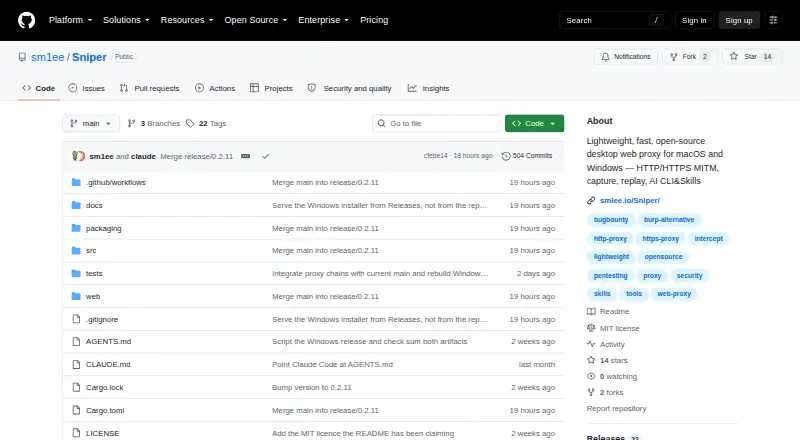
Sniper records HTTP activity and WebSocket connections, letting security testers and developers examine, modify, and resend requests. Replay, payload-driven fuzzing, and passive checks for common security issues are also included. GitHub Releases lists downloads for Windows and macOS. The project’s initial port targets Windows x64; Linux validation remains outstanding.
Review
In a line
Sniper is a no-cost, open-source desktop proxy for web application security work and API debugging. It intercepts, examines, and alters HTTP and HTTPS traffic.
What it does
Sniper logs HTTP activity alongside WebSocket connections. Users can hold requests for inspection, edit them, and send them again; payload-based fuzzing can probe application responses.
A passive scanner looks for exposed sensitive data, CORS problems, absent security headers, and JWT-related issues. Testing can be organized with isolated workspaces, host or wildcard scope filters, and a site map.
How it connects
The included sniper-cli supports JSON-oriented scripting, and the repository offers skill templates for Claude and Codex. Authenticated upstream HTTP and SOCKS5 proxies can be chained through Sniper. Its inbound listener handles HTTP proxy traffic and CONNECT, but does not accept SOCKS client connections.
The repository lists the project under the MIT license. GitHub Releases provides a Windows setup executable or ZIP, as well as a macOS DMG.
Good fit
The project names penetration testers, bug bounty hunters, security researchers, and developers who need to examine network traffic as its intended users. Its stated uses include web application security testing and API debugging.
Watch for
The README identifies Windows x64 as the first port, with Linux validation not yet complete. The Windows x64 portable ZIP depends on Microsoft Edge WebView2 Runtime. Releases are not code-signed, and Sniper has no in-app updater.
For remote clients, a headless UI listener bound beyond loopback requires authentication. The UI serves HTTP, not TLS, so account for that when configuring remote access.
Pricing
Sniper is free and open source, with an MIT license.
Verdict
Consider Sniper for a free desktop proxy to capture and alter web requests, run selected passive security checks, and script tasks using its bundled command-line tool. Request replay and scope features may also suit bug bounty and API debugging work.
Check platform status and installation requirements before adopting it. Windows x64 is the initial port, Linux validation remains pending, and releases are unsigned. Remote access to the headless UI warrants care because it uses HTTP rather than TLS.
Our take
Sniper may suit security testers and developers seeking a free desktop proxy with request editing, replay, WebSocket capture, and passive scanning. Command-line scripting and upstream proxy chaining support additional workflows. Check compatibility first: Windows x64 is the initial port, and Linux validation remains pending. Windows releases are unsigned, while the remote headless UI serves HTTP rather than TLS.
- Free, open source, and MIT licensed.
- Records HTTP activity and WebSocket sessions.
- Supports request editing, replay, and payload-based fuzzing.
- Passive checks look for sensitive data, CORS issues, missing headers, and JWT issues.
- Includes JSON-first scripting and authenticated upstream proxy chaining.
- Windows x64 is the initial port; Linux validation is pending.
- Windows releases are not code-signed.
- The Windows portable ZIP requires Microsoft Edge WebView2 Runtime.
- The headless UI uses HTTP rather than TLS.
- No in-app updater is available.
- Pick it ifSecurity testers assessing web traffic and applications; Developers debugging APIs and replaying requests; Bug bounty hunters and security researchers
- Skip it ifYou need validated Linux support now.; You require signed Windows releases or an in-app updater.; You need TLS for remote headless UI access.
Pricing
Sniper is free and open source under the MIT license; no paid plan is listed.
- SniperOpen-source desktop web proxyFree
As github.com lists them, checked 9 Oct 2026.
Questions
How much does Sniper cost?
Sniper is free and open source under the MIT license.
Which systems can run Sniper?
GitHub Releases lists Windows and macOS downloads. Windows x64 is the first port; Linux validation is still pending.
Can Sniper inspect WebSocket traffic?
Yes. It records WebSocket connections as well as HTTP activity.
Can I change and resend requests?
Yes. Sniper supports request interception, editing, and replay.
What does its passive scanner check?
It looks for sensitive data, CORS issues, missing security headers, and JWT issues.
Can Sniper use another proxy?
It can chain through authenticated upstream HTTP and SOCKS5 proxies. Its inbound listener accepts HTTP proxy traffic and CONNECT, not SOCKS client connections.
Is remote access encrypted?
The headless UI uses HTTP rather than TLS. A listener open to remote clients requires authentication.
Are Windows releases signed?
No. Releases are not yet code-signed; the install instructions recommend checking the SHA-256 file beside each installer.