ProxyHawk Review
proxyhawk.io · checked 15 Oct 2026
A Mac-based proxy debugger for capturing, inspecting, and changing app traffic.
How it plugs in
Signal on Web Debugging Proxies6.6#8 of 27
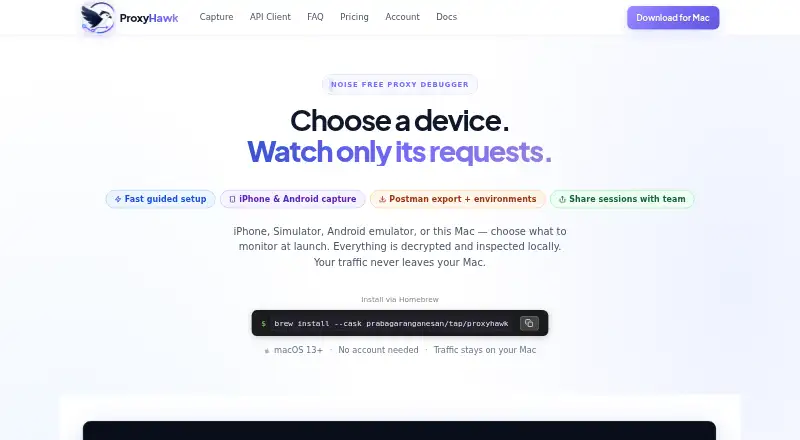
From Mac software to iPhones, the iOS Simulator, Android hardware, and emulators, ProxyHawk captures HTTP and HTTPS traffic. It supports inspection, replay, response edits, file mocks, network throttling, and exports. Capture is handled locally on the Mac. ProxyHawk has a free tier, paid plans, and a seven-day refund policy, but certificate pinning and platform requirements can limit suitability.
Review
In a line
As a native macOS application, ProxyHawk records and inspects application traffic. During debugging, it can also change requests and responses.
What it does
Traffic from Mac applications, iPhones, the iOS Simulator, Android phones, and Android emulators can pass through ProxyHawk. A built-in checklist walks through certificate, proxy, and device setup for each source.
Filters cover REST, GraphQL, errors, hosts, status, and body content. Breakpoints stop requests or responses for editing; block rules can discard matches or send errors instead.
The app can replay requests, return local files, redirect traffic to another host, edit headers or response content through scripts, and reproduce 3G, slow Wi-Fi, offline, or custom conditions. In detail views, exceptionally large bodies can be truncated, and binary content is displayed as hexadecimal.
How it connects
Collection and viewing take place on the Mac. ProxyHawk installs a self-signed local certificate authority and decrypts only hosts included in SSL proxying rules; iOS and Android connections pass through the Mac.
Its API Client lets you compose, edit, import cURL, replay, and send HTTP requests, then export captured requests as Postman collections with environment variables. HAR files support export, import, comparison, redaction, and replay, while captured production traffic can produce an OpenAPI 3 specification.
API Guard looks for removed fields, type changes, and missing array items in API responses and can send Slack or email alerts. Before shared sessions are uploaded, authorization headers, cookies, and tokens are stripped on the client, and each link expires after seven days.
Good fit
ProxyHawk fits developers who debug mobile or Mac applications, inspect API behavior, reproduce network faults, or test changes without modifying application configuration.
It is useful for local inspection, request and response editing, HAR operations, response mocks, and controlled bandwidth. Teams also get shared device capacity, team alerts, and priority email support on the Team plan.
Watch for
The application runs on macOS 13 Ventura and newer. Windows and Linux are not supported, and mobile connections use the Mac as their route.
Certificate- or public-key-pinned apps will reject ProxyHawk interception unless pinning is turned off in a debug build or bypassed in a test environment. Automatic system-proxy changes additionally require approval for a privileged macOS helper.
Capture databases and exported material may include passwords, OAuth tokens, cookies, personal information, and proprietary APIs. Security guidance advises sanitizing exports and calls out risks from trusted certificates, broad proxy rules, and stored captures.
Published Free-tier figures do not match: pricing lists 200 other requests daily, whereas the limitations guide allows up to 500. Pricing also shows SSL/TLS decryption in Free, while the limitations guide reserves it for Pro or Lifetime. Confirm the current terms before selecting a plan.
Pricing
ProxyHawk has a free tier and a trial. The Free plan is ₹0 and lists traffic capture and filters, the API Client, HAR export, pinned-host support, and traffic search, though its request and SSL/TLS allowances are described differently on the pricing and limitations pages.
Monthly billing is ₹417. The three-month package is ₹1,250, and the yearly package is ₹3,750. These paid choices provide unlimited traffic, three devices, breakpoints, block and map tools, mocks, scripting, throttling, iPhone and Android capture, and Postman export.
Team is ₹2,417 per month or ₹19,917 per year. It allows up to five developer seats and 10 devices across the team, with unlimited requests, API Guard team alerts, and priority email support. Purchases include a seven-day refund guarantee.
Verdict
ProxyHawk makes sense when your work is Mac-centered and you want a single place to inspect, modify, replay, or simulate traffic from mobile and desktop applications.
Before committing, verify your operating system, pinning arrangement, data-handling requirements, and the current Free limits. Teams should weigh the additional seats, devices, alerts, and support against their debugging workload.
Our take
ProxyHawk is a practical choice for Mac-based teams that need detailed control over HTTP and HTTPS traffic from several device types. Its local capture model can reduce the need to send traffic content to a vendor cloud, while tools such as breakpoints, mappings, scripts, HAR handling, and API Guard cover varied debugging tasks. The product is less suitable for Windows or Linux users, apps protected by certificate pinning, or workflows that cannot safely handle sensitive capture files. Conflicting statements about free limits and SSL/TLS access deserve clarification before purchase.
- Captures traffic from Mac apps, iPhones, the iOS Simulator, Android devices, and emulators
- Collection and viewing are handled on the Mac
- Provides breakpoints, mappings, scripts, mocks, and throttling
- API Guard supports Slack and email alerts
- Can export Postman collections and OpenAPI specifications
- There is no Windows or Linux support
- Pinned apps need a debug-build setting or test bypass
- Detail views can truncate exceptionally large response bodies
- Published Free-plan limits are inconsistent
- Captured material may contain credentials and personal information
- Pick it ifMac developers working on mobile and desktop application traffic; Teams that need request editing, replay, mocks, or API change alerts
- Skip it ifYou require a Windows or Linux proxy debugger; Your application cannot bypass certificate pinning in a debug or test setup; You cannot securely manage sensitive captured traffic
Pricing
Three-month and yearly packages are also offered, while Team adds seats, devices, alerts, and priority support. Because published Free limits conflict, verify them before purchase.
- Team MonthlyCancel anytime · Up to 5 developer seats · 10 devices across team · Unlimited requests₹2,417/mo
- Team YearlySave 31% · Up to 5 developer seats · 10 devices across team · Unlimited requests₹19,917/yr
- Free plan₹0 /month · Traffic capture & filters · API Client & HAR export · SSL/TLS decryption (unlimited hosts) · 200 other requests/day · pinned hosts & traffic search · no account requiredFree
- Monthly₹417 /month · Everything in Free · unlimited traffic · 3 devices · breakpoints, block, map, mocks · scripting & network throttling · iPhone & Android capture · Postman export₹417/mo
- 3 Months₹1,250 /3 months · Everything in Free · unlimited traffic · 3 devices · breakpoints, block, map, mocks · scripting & network throttling · iPhone & Android capture · Postman export₹1,250 one-time
- Team₹2,417 /month; ₹19,917/year option · Everything in Pro · up to 5 developer seats · 10 devices across team · unlimited requests · API Guard team alerts · priority email support₹2,417/mo
- Yearly₹3,750 /year (shown against ₹5,000/year) · Everything in Free · unlimited traffic · 3 devices · breakpoints, block, map, mocks · scripting & network throttling · iPhone & Android capture · Postman export₹3,750/yr
As proxyhawk.io lists them, checked 20 Sept 2026.
Questions
What devices can ProxyHawk capture?
Supported sources include Mac apps, iPhones, the iOS Simulator, Android devices, and Android emulators. Mobile connections pass through the Mac.
Does ProxyHawk upload captured traffic?
Core collection and display run on the Mac without requiring HTTP content to be sent to a vendor cloud. For shared sessions, authorization headers, cookies, and tokens are removed before upload.
Can it edit requests and responses?
Yes. Breakpoints allow edits while traffic is paused, scripts can modify headers or response bodies, and block rules can discard requests or return errors.
What does the free plan include?
The Free plan lists capture, filters, the API Client, HAR export, pinned-host support, and traffic search. Its published request and SSL/TLS allowances differ between the pricing and limitations pages.
How much do paid plans cost?
Monthly billing is ₹417, the three-month package is ₹1,250, yearly billing is ₹3,750, and Team is ₹2,417 per month.
Does ProxyHawk run on Windows?
No. ProxyHawk is a macOS application for macOS 13 Ventura or later, and it has no Windows or Linux version.