Thumbn: AI thumbnails from your videos
thumbn.so · checked 15 Oct 2026
AI thumbnail maker that analyzes videos, writes concepts, and renders platform-sized images.
How it plugs in
Signal on AI Thumbnail Generators6.3#1 of 29
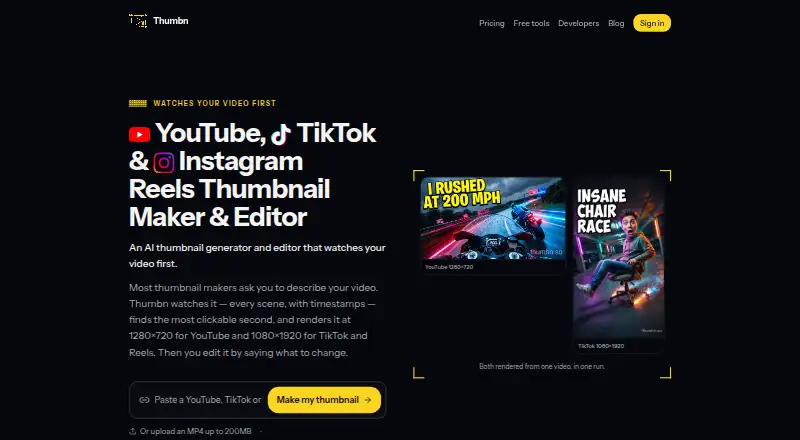
Thumbn analyzes a linked or uploaded video scene by scene, chooses a likely strong moment, creates a thumbnail concept, and renders images for YouTube, TikTok, and Instagram Reels. You can refine images in plain language, keep earlier versions, attach reference images, and download PNG files. It runs on the web and through an API or MCP server.
Review
In a line
Thumbn is a video-thumbnail service. It studies footage, proposes a concept, and creates images sized for several video platforms.
What it does
Provide a YouTube, TikTok, or Reels URL, or upload an MP4 file no larger than 200MB. Thumbn examines scenes with timestamps instead of requiring a manual description, then picks a likely high-interest moment and generates thumbnails.
From one concept, it can render a 1280×720 YouTube image and a 1080×1920 image for TikTok and Instagram Reels. Supported destinations also include YouTube Shorts and podcast cover art.
You can select an image and request changes such as larger text, a new background, or an arrow in plain language. Each edit makes a new version, so earlier images remain available. Attach a reference image showing a face, logo, or desired look.
Each render receives a score against the chosen style rubric, with re-edits continuing until the stated threshold is met. Listed styles include MrBeast, cinematic, minimal, documentary, clickbait, and aesthetic presets. Versions download as PNG files.
How it connects
Thumbn runs on the web and offers an HTTP API plus a Streamable HTTP MCP server. The developer documentation lists clients such as Claude, Codex, and Cursor. Its API exposes POST /jobs to start work and GET /jobs/{id} to check results.
API requests use an x-api-key or bearer token. MCP uses OAuth 2.1 with authorization-code PKCE and refresh tokens. Documented tools include creating and checking jobs, listing jobs and image models, estimating cost, and viewing the account.
Thumbnail generation through the API or MCP draws from the web app's subscription and credit balance. If you use your own Google, OpenAI, or Anthropic key, rendering charges go to that provider account instead of Thumbn credits.
Good fit
Thumbn suits creators who need thumbnails from existing video links or MP4 files, especially when one source needs both landscape and vertical artwork.
It is useful for people who want conversational revisions, style presets, reference images, and a version history rather than replacing one file repeatedly. Teams or tools that need automation can connect through the API or MCP server.
Watch for
The upload limit is 200MB, and the listed input links are YouTube, TikTok, and Reels. Check that your source and destination are supported before starting.
Generated images are not guaranteed to be usable, accurate, unique, or to improve click-through rate. Thumbn also has no brand kit. Automatic grading follows a selected style rubric, so results still need review.
API and MCP use require a subscription. Video analysis costs 2 credits per job, while image costs vary by model, such as 1 credit for Nano Banana Pro and 2 for GPT Image 2.
Pricing
A free preview provides one watermarked cover per day without an account. A free account removes the watermark and allows actual Reel uploads, variants, and chat refinement.
Pro costs $19 a month, billed monthly, and includes 60 credits a month, both image models, no watermark, four concepts per run, and the full agent studio.
Studio costs $49 a month, billed monthly, with 175 credits a month, everything in Pro, the highest monthly allowance, non-expiring credit packs, and priority rendering. Subscriptions can be canceled from the billing page; access continues through the paid period.
Verdict
Choose Thumbn if you want an automated way to turn video footage into platform-specific thumbnails and refine them through plain-language requests. Its API and MCP options also suit workflows that need thumbnail jobs started and tracked from other clients.
The free preview is a low-commitment way to make one watermarked cover daily. Paid plans add credits and remove that restriction, but usage depends on model credit rates. Skip it if you need a brand kit, guaranteed performance, or a destination outside its supported platforms.
Our take
Thumbn is a practical choice for creators who want one tool to analyze video scenes, generate landscape and vertical thumbnails, and revise them without editing software. The free preview lets you try a daily watermarked cover, while a free account adds Reel uploads and refinements. Pro and Studio provide monthly credits and more production features. Automation users can connect through the HTTP API or MCP server, but those routes require a subscription. Consider another option if brand-kit controls, guaranteed results, or unsupported destinations are essential.
- Analyzes linked or uploaded video scene by scene
- Creates YouTube and vertical TikTok/Reels sizes in one run
- Plain-language edits keep earlier versions available
- Access includes the web app, HTTP API, and MCP server
- Free preview and free account options
- MP4 uploads are limited to 200MB
- No brand kit is listed
- API and MCP creation require a subscription
- Results are not guaranteed to be usable or improve click-through rate
- Credit use varies by image model
- Pick it ifCreators producing thumbnails for YouTube, TikTok, or Reels; Workflows that need API or MCP thumbnail jobs; Users who want conversational edits and version history
- Skip it ifYou need brand-kit controls; You require guaranteed accuracy or click-through improvement; Your video source or destination is not supported
Pricing
You can start with a free preview or free account. Pro is $19 a month for 60 credits, and Studio is $49 a month for 175 credits. The API and MCP draw on the web app's subscription and credit balance.
- Free previewone watermarked cover per day without an account · free account removes watermark and allows actual Reel uploads, variants and chat refinementFree
- Promonthly · 60 credits/month · both image models · no watermark · 4 concepts/run · full agent studio$19/mo
- Studiomonthly · 175 credits/month · everything in Pro · highest monthly allowance · non-expiring credit packs · priority rendering$49/mo
As thumbn.so lists them, checked 15 Oct 2026.
Questions
What video sources can Thumbn use?
For source material, submit a YouTube, TikTok, or Reels URL, or upload an MP4 file up to 200MB.
Which image sizes does it create?
It renders YouTube images at 1280×720 and TikTok or Instagram Reels images at 1080×1920. One run can produce both formats.
Can I revise a generated thumbnail?
Yes. Select an image and describe changes such as larger text, a different background, or an arrow. Each edit creates a new version while earlier ones remain available.
Does Thumbn have an API?
Yes. It offers a public HTTP API and a Streamable HTTP MCP server, with documented connections for Claude, Codex, Cursor, and other compatible clients.
Is there a free option?
The free preview gives one watermarked cover per day without an account. A free account removes the watermark and adds Reel uploads, variants, and chat refinement.
How much do paid plans cost?
Pro is $19 a month with 60 credits. Studio is $49 a month with 175 credits and added allowances. Both are billed monthly.
What happens to my data after closing an account?
Thumbn says projects, uploads, and generated images are deleted within 30 days. Invoices are retained for six years for tax purposes.