ThumbnailGo: AI YouTube Thumbnail Generator
thumbnailgo.com · checked 15 Oct 2026
AI YouTube thumbnail maker with prompt-based designs, style presets, 4K output, and optional API access.
How it plugs in
Signal on AI Thumbnail Generators6.3#4 of 29
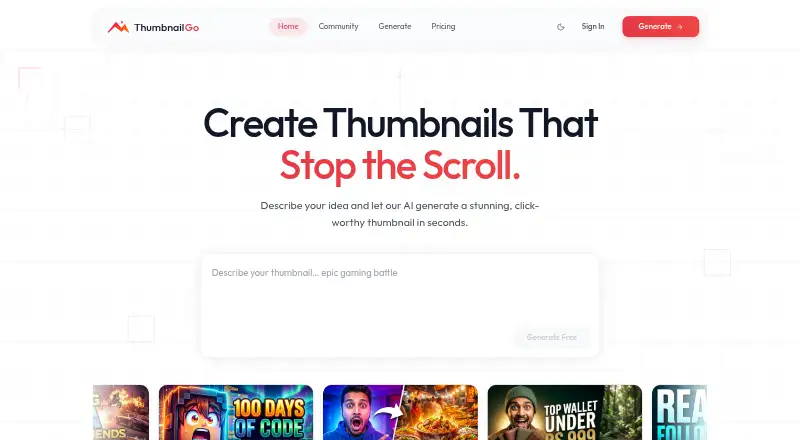
ThumbnailGo creates YouTube thumbnails from a text prompt and style preset. It can blend an uploaded selfie, make instant variations, upscale results to 4K, and export or publish them to a creator gallery. A free plan is available, while paid tiers add more styles, ratios, editing tools, downloads, support, and API access.
Review
In a line
ThumbnailGo is a web-based AI generator for YouTube thumbnails. You describe a design, choose a style preset, and receive generated images.
What it does
The service turns prompts and style choices into thumbnails, with the maker advertising sub-second creation and multiple instant variations. Each result is automatically upscaled to 4K.
You can upload a selfie for blending into a generated scene on Pro. Pro also adds tools to recreate and modify thumbnails. Results can be exported or posted to the creator gallery.
How it connects
ThumbnailGo runs on the web and offers an API only on Ultra. No open-source license, downloadable installation, or accessible public API reference and SDK are listed.
Full generator operation requires registration through Google OAuth. Uploaded content is used to provide the service, not to train models, and is not shared publicly without permission. SSL/TLS protects data in transit; payments are handled by Stripe, which means ThumbnailGo does not store complete card details.
You keep ownership, copyright, and distribution rights, including commercial use. Publishing to the community gallery gives ThumbnailGo a worldwide, non-exclusive, royalty-free display license.
Good fit
ThumbnailGo suits creators who need YouTube video thumbnails from prompts rather than manual design work. Free users get basic presets, two aspect ratios, and a limited number of generations.
Pro is aimed at people who need more ratios, image blending, editing, higher quality, and watermark-free downloads. Ultra is for heavier use or projects that need API access, commercial licensing, and priority support.
Watch for
The published limits do not fully agree. The pricing page says Free allows five generations per month, while the privacy policy mentions a 10-generation cap. Terms list Pro at $19 monthly or $15 monthly with annual billing, conflicting with the pricing page's $9 monthly figure.
The service requires Google OAuth for full use and does not publish self-hosting options or a public API reference. Terms disclaim warranties and uninterrupted access, and provide the service as-is.
Deleting an account and associated visuals can be requested, with GDPR or CCPA rights depending on where you live. An initial subscription may qualify for a refund within 14 days if fewer than 15 generation requests were made in that billing cycle.
Pricing
Free costs $0 forever and includes five generations per month, standard quality, 16:9 and 1:1 ratios, community-gallery access, and basic presets.
Pro is listed at $9 a month, billed monthly. It includes 100 generations, HD and Ultra quality, five ratios, image upload and blending, recreate and modify tools, and watermark-free downloads.
Ultra costs $29 a month, billed monthly, for 500 generations, Ultra quality, API access, priority support, and a commercial licence. The terms show a different Pro price, so confirm the amount before paying.
Verdict
ThumbnailGo is a reasonable fit if you want prompt-driven YouTube thumbnail creation with quick variations and automatic 4K output. The free tier lets you try the workflow, while Pro adds practical editing and download options.
Check the conflicting generation and Pro pricing details before subscribing. Choose Ultra only when its API, larger allowance, priority support, or stated commercial licence matches your needs. If you need self-hosting, open-source code, or documented API tools, this service does not present those options.
Our take
Choose ThumbnailGo if you want to create YouTube thumbnails from prompts, try several variations quickly, and receive 4K files without building a design workflow yourself. Free is suitable for occasional use, while Pro covers regular creation and selfie blending. Ultra is relevant only for high-volume work or API needs. Verify the actual Pro price and Free allowance first because the published pages conflict. Avoid it if you require a self-hosted product, open-source code, or detailed public API documentation.
- Prompt-based thumbnail generation with instant variations
- Automatic 4K upscaling and export
- Pro supports selfie blending and thumbnail editing
- Free plan available with two aspect ratios
- Users retain commercial ownership rights
- Published Free generation limits conflict
- Pro pricing differs between terms and pricing page
- Full use requires Google OAuth registration
- API access is limited to Ultra
- No public API reference or self-hosting option listed
- Pick it ifYouTube creators making prompt-based thumbnails; Users who want quick 4K variations; Teams needing Ultra's API access
- Skip it ifYou need self-hosting or open-source code; You require a documented public API on a lower plan; You cannot accept unclear pricing or usage limits
Pricing
A free tier is available. Paid plans are listed at $9/month for Pro and $29/month for Ultra, both billed monthly, but the terms show a different Pro price. Published Free generation limits also conflict.
- Freeforever · 5 generations/month · Standard quality · 16:9 and 1:1 ratios · Community gallery · Basic presetsFree
- Promonthly · 100 generations/month · HD and Ultra quality · All five ratios · Image upload/blending · Recreate/modify · Watermark-free downloads$9/mo
- Ultramonthly · 500 generations/month · Ultra quality · API access · Priority support · Commercial licence$29/mo
As thumbnailgo.com lists them, checked 15 Oct 2026.
Questions
What is ThumbnailGo?
ThumbnailGo is a web-based AI tool that creates YouTube thumbnails from a text prompt and style preset.
Does ThumbnailGo have a free plan?
Yes. The Free plan is listed as free forever, with standard quality, basic presets, 16:9 and 1:1 ratios, and a monthly generation allowance.
Can I use my face in a thumbnail?
Image upload and selfie blending are included on Pro.
Does ThumbnailGo offer an API?
API access is advertised only with Ultra. The official navigation does not provide public API reference, SDK, endpoint, webhook, rate-limit, or authentication documentation.
Who owns thumbnails made with ThumbnailGo?
The terms say users retain ownership, copyright, and distribution rights, including commercial use. Gallery publishing grants ThumbnailGo a display license.
Are uploaded images used to train the AI?
The privacy policy says uploaded content is used to provide the service and is not used to train models or shared publicly without permission.
What are some alternatives to ThumbnailGo?
The provided product information does not specify alternatives.