UrBackup: Self-Hosted File and Disk-Image Backup
urbackup.org · checked 21 Oct 2026
Self-hosted backup software for files, disk images, computers, mobile devices and servers.
How it plugs in
Signal on Backup software7.8#2 of 151
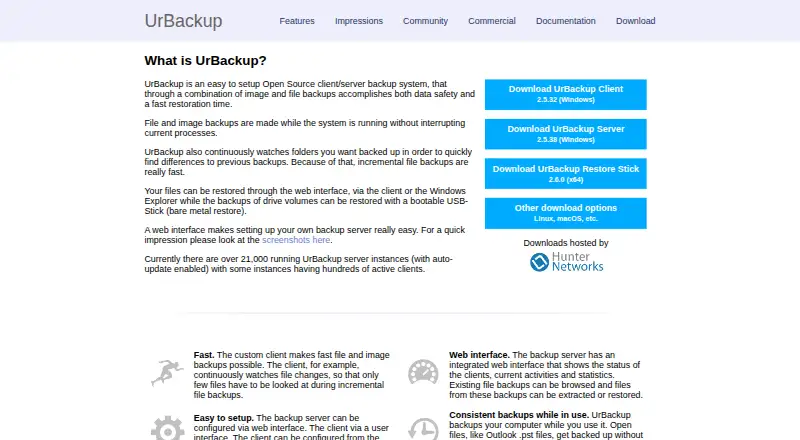
UrBackup is an open-source, self-hosted client/server backup system. It combines file and disk-image backups, with full and incremental jobs for selected folders or whole partitions. Windows, Linux, macOS and Android clients are supported. A web interface handles status, browsing and file restores, while volume images use bootable restore media.
Review
In a line
UrBackup is a self-hosted backup system that combines file backups with disk-image backups. It can protect computers, mobile devices and servers.
What it does
You can back up selected directories or whole partitions using full or incremental file and image jobs. Incremental file backups send changed files, while incremental image jobs send changed used disk sectors. Jobs can run while Windows or Linux systems remain in use.
Identical files on different computers are stored once through file-level deduplication. Files can be restored from the web interface, a client or Windows Explorer. Volume images require bootable restore media.
The web interface shows client status, activity and statistics, and lets you browse or restore file backups. Email alerts can warn when a machine has missed backups for a configured period.
How it connects
UrBackup is open source under AGPLv3 or later. Official clients are available for Windows, Linux and macOS, with additional FreeBSD client support listed in its documentation. The server runs on GNU/Linux, Windows and FreeBSD, with packages or images for several NAS platforms and Docker.
Backups can go to your own server when a client is outside the local network. A community Python package provides authenticated access to status, usage, settings, users, backups, actions and installer downloads through an API.
Images can be written as VHD or VHDX files, or as raw images on btrfs, ZFS, ReFS and XFS. The Infscape appliance adds cloud or S3 archival, cached RAID, encryption, compression, replication and change-block tracking.
Good fit
UrBackup suits people who want to run their own backup server instead of using a hosted service. It covers mixed file and image backup needs across Windows, Linux, macOS and Android.
It can fit households, offices or administrators managing several machines, with deduplication, remote backup, web monitoring and email warnings.
Watch for
Backup storage needs hard links and symbolic links. FAT and ReFS are unsuitable for backup storage, and compression depends on the underlying filesystem.
Windows image backups require NTFS and primary MBR or GPT partitions. Dynamic volumes are not officially supported. The web interface has been criticized by reviewers as dated, minimally responsive and weak on graphs.
Change-block tracking for Windows is a separate paid driver. A paid Hyper-V client is also separate and supports Hyper-V 2016 or later.
Pricing
UrBackup has a free plan and a free trial. The open-source server and clients are free, with unlimited clients and self-hosting. The UrBackup core plan has no listed price.
Change-block tracking costs €15.50 a month per Windows client, or €15.50 one-time per client for the listed Windows client plan; the terms differ by plan. The Hyper-V client has no listed price.
Infscape Community Edition is free for up to 10 clients and 20TB of storage. Infscape AWS/Azure appliance storage is $0.01 a month, with usage billed at about $0.012-$0.023 per GB/month after deduplication and compression, plus a one-month appliance trial.
Verdict
Choose UrBackup if you need open-source, self-hosted protection for mixed file and disk-image backups, and you can manage storage and restore media yourself.
Look elsewhere if you require a polished, highly responsive dashboard, officially supported dynamic-volume images or a fully hosted service. Windows change-block tracking and Hyper-V support add separate licensing considerations.
Our take
UrBackup is a practical choice for people who want control over where backups live and need both file and whole-disk recovery. Its free open-source core can cover unlimited clients, while the supported client and server platforms span common desktop and server systems. The trade-offs are storage requirements, Windows image restrictions and a dated web interface. Budget separately for Windows change-block tracking or the Hyper-V client if those features matter. It is less suitable for buyers seeking a managed cloud backup service or a modern dashboard without storage administration.
- Open-source server and clients are free
- Supports file and disk-image backups
- Windows, Linux, macOS and Android clients
- Remote backups and email missed-backup alerts
- File-level deduplication stores identical files once
- Backup storage cannot use FAT or ReFS
- Windows image backups exclude dynamic volumes
- Change-block tracking for Windows costs extra
- Web interface is dated and weak on graphs
- Volume-image restores require bootable media
- Pick it ifSelf-hosted backups across mixed operating systems; People needing both file and full-image restores; Administrators comfortable managing storage
- Skip it ifYou need a fully hosted backup service; You require dynamic-volume Windows image backups; You expect a modern, highly responsive dashboard
Pricing
The open-source core and clients are free.
- UrBackup coreAGPLv3+ open-source software · File and image backups · Self-hosted serverOn request
- Change block tracking for UrBackup Client on Windows15.50€ excl. VAT per Client · Speeds up incremental image and file backups · Includes 2.x updates · Works with UrBackup Server 2.x€15.50/mo
- UrBackup Client for Microsoft Hyper-V 2.xSupports Microsoft Hyper-V 2016 or later · Backs up VM disks as images · Restores images to VHD/VHDXOn request
- Infscape virtual appliance community editionmaximum 10 clients · maximum 20TB storage · commercial use allowedFree
- UrBackup open-source server and clientsfile and image backups · unlimited clients · self-hostedFree
- Infscape AWS/Azure appliance storageabout $0.012-$0.023 per GB/month after deduplication and compression · AWS or Azure appliance · S3 or Azure Blob storage · one-month appliance trial$0.01/mo
- Change block tracking for Windows client15.50€ excl. VAT per client · per-client license · includes UrBackup 2.x updates€15.50 one-time
As urbackup.org lists them, checked 20 Sept 2026.
Questions
Is UrBackup free?
Yes. The open-source server and clients are free, with unlimited clients and self-hosting. A separate Windows change-block-tracking driver and other options cost extra.
Which systems can UrBackup back up?
Supported client platforms are Windows, macOS, Linux and Android. The server runs on GNU/Linux, Windows and FreeBSD.
Can UrBackup back up while a computer is being used?
Yes. File and image backups can run while Windows or Linux systems remain in use.
How are UrBackup backups restored?
Files can be restored through the web interface, a client or Windows Explorer. Volume images require bootable restore media.
Does UrBackup work outside the local network?
Yes. It supports backups to the operator's own server when a client is outside the local network.
Does UrBackup have an API?
A community Python package provides authenticated API methods for status, usage, settings, users, backups, actions and installer downloads.
What storage restrictions apply?
Backup storage requires hard links and symbolic links. FAT and ReFS are unsuitable, and compression depends on the filesystem.