VivaDesigner Review: Features, Pricing and Limits
viva.systems · checked 15 Oct 2026
AI-assisted desktop and web publishing for layouts, typography, illustration and print-ready documents.
How it plugs in
Signal on Desktop Publishing Software6.7#4 of 30
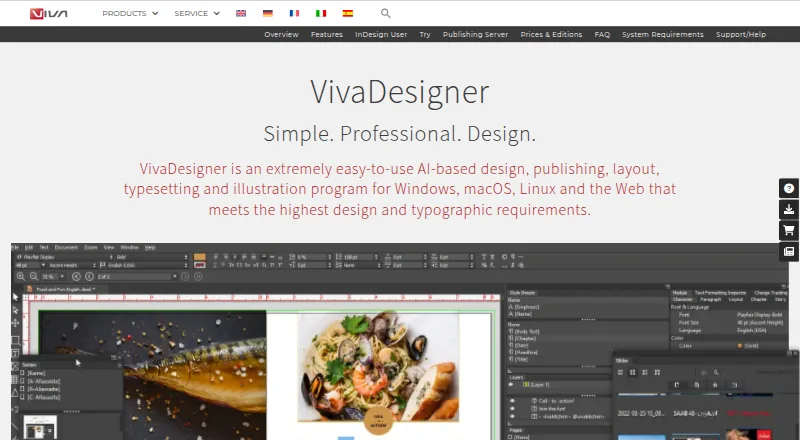
For Windows, macOS, Linux and browsers, VivaDesigner combines AI assistance with design and publishing tools. It handles layouts such as books, brochures, magazines, catalogs and social ads. Native InDesign documents can be imported; multilingual typography, AI translation, image clipping and exports such as PDF, XML, PNG and JPG are included.
Review
In a line
VivaDesigner is an AI-assisted program for design, publishing, page layout, typesetting and illustration. It runs as desktop software or in a web browser.
What it does
Books, brochures, flyers, newspapers, magazines, catalogs, business cards, resumes, logos and social media ads are among the projects it supports. Its toolkit includes typography, structured text, styles, tables, paths and barcodes, covering all languages and writing directions.
AI can translate text into more than 30 languages and clip images automatically. Finished documents may be printed or produced as PDF, XML, PNG, JPG and other file types. Collections can combine layouts into a magazine, journal or book.
Teams can work online or offline, add text notes and track visual changes. Access rights, passwords and protected areas can limit editing.
How it connects
Native InDesign documents are supported, and both VivaDesigner and InDesign files can be edited in a browser. The web edition can be embedded in websites or other software with design guidelines and rule sets.
VivaDesigner Server offers an HTTP/HTTPS public API, documented through an OpenAPI specification. It accepts files or web addresses from applications and can run on a customer's own data center. A hosted option uses a German data center with automatic backup.
The software is proprietary, not open source. Nextcloud is the single named third-party integration.
Good fit
It suits people producing multilingual print or digital publications across desktop and browser workflows. InDesign import, PDF and EPUB export, master pages, preflight tools and color management support publication work.
It also fits teams that need notes, change tracking, access controls or a server they can host themselves. Windows, macOS and Linux installers are available, alongside the browser edition.
Watch for
The permanent free edition can open, edit, save and print documents but has licensing-based feature restrictions. According to the FAQ, it has no hyphenation, spell check or PDF export. Free Edition Plus provides nearly commercial functionality for 30 days, then becomes the limited Free Edition unless licensed.
Desktop requirements include a 64-bit operating system, 1 GB of free disk space, at least 1 GB of RAM, a 1 GB video card and a 1920×1080 display. The browser edition needs at least 20 Mbit/s internet access; 50 Mbit/s is recommended.
Version 11.5 runs on Apple silicon Macs through Rosetta, while native support was still in development for later 2026. The license limits use to one computer at a time and forbids modification or reverse engineering.
Pricing
VivaDesigner has free editions and a 30-day trial. The lifetime Free Edition permits private or commercial use with limited functionality. Free Edition Plus provides 30 days at no cost, after which it continues as the limited Free Edition.
Desktop editions include EDUCATION at $89 one-time, PERSONAL at $139 one-time, NPO/NGO at $159 one-time, GOVERNMENT at $329 one-time and COMMERCIAL at $399 one-time, each billed per user. Eligibility and permitted use vary by edition.
VIVA SaaS / IaaS is priced at €299 per month, net plus VAT, under a one-year contract. The package provides one commercial desktop license, one concurrent web user, 10 GB storage, a German data center and automatic backup; each additional concurrent user is 39 €/month. Desktop licenses can also be rented monthly or yearly with upgrades.
Verdict
Choose VivaDesigner if you need one tool for page layout, illustration and typesetting on desktop and the web, especially with multilingual documents or imported InDesign files. Its API and on-premises server option suit organizations embedding publishing into their own software or keeping deployment in-house.
Check which features the free edition omits before relying on it for production. Buyers should also match the desktop license to their use, confirm hardware and browser requirements, and review the Apple silicon limitation. If those conditions fit, it covers both individual publishing and team workflows.
Our take
VivaDesigner makes sense for publishers and design teams that need desktop and browser access, multilingual typography, InDesign import and structured collaboration. The API, embedded web edition and self-hosting option add value for organizations building publishing into their own systems. The free edition is useful for basic opening, editing, saving and printing, but it omits important production features such as PDF export, hyphenation and spell check. Before paying, check the license type, one-computer rule, hardware needs and Apple silicon status. Choose another tool if those limits or the paid plans do not fit your workflow.
- Desktop apps are available for Windows, macOS and Linux, with browser access too
- Native InDesign documents can be brought in for editing
- AI-based translation handles over 30 languages
- An API and on-premises server deployment are available
- Output options include PDF, XML, PNG, JPG and other formats
- The free edition omits PDF export, hyphenation and spell checking
- Use is licensed to one computer at a time
- Version 11.5 uses Rosetta on Apple silicon Macs
- The browser edition needs at least 20 Mbit/s internet access
- The commercial SaaS offering has a one-year contract
- Pick it ifMultilingual books, magazines and other structured publications; Teams needing browser editing, notes and change tracking; Organizations embedding publishing through an API
- Skip it ifYou need full PDF export and spell checking at no cost; You require native Apple silicon support in version 11.5; You cannot accept one-computer licensing or paid plans
Pricing
A lifetime free edition covers basic document work, while the 30-day Plus trial adds nearly commercial functionality before reverting to limited Free Edition. SaaS / IaaS is €299 a month on a one-year contract, plus 39 €/month per extra concurrent web user.
- FREE Edition (Desktop)per user · Permanent free edition · limited licensing functionalityFree
- Free EditionLifetime free · private or commercial use · limited functionality · opens, edits, saves and prints documentsFree
- Free Edition Plus trial30 days · Full-feature trial · continues as limited Free Edition after trialFree
- EDUCATION Edition (Desktop)per user · Desktop edition · education eligibility$89 one-time
- PERSONAL Edition (Desktop)per user · Private/noncommercial use$139 one-time
- NPO/NGO Edition (Desktop)per user · Nonprofit organizations$159 one-time
- VIVA SaaS / IaaSNet price plus VAT per month for a one-year contract period · One desktop Commercial Edition license · one concurrent Web Edition user · 10 GB storage · German data center · automatic backup · additional concurrent users 39 €/month€299/mo
- GOVERNMENT Edition (Desktop)per user · Government use$329 one-time
As getapp.com lists them, checked 15 Oct 2026.
Questions
Is there a no-cost VivaDesigner edition?
Yes. The lifetime Free Edition permits private or commercial use and supports opening, editing, saving and printing documents with limited functionality.
What happens when the 30-day trial ends?
Free Edition Plus runs for 30 days with nearly commercial functionality, then converts to the limited Free Edition unless you license the product.
Can InDesign documents be brought into VivaDesigner?
Yes. Native InDesign documents can be imported for offline or browser-based editing.
Does it offer an API?
Yes. VivaDesigner Publishing Server exposes an HTTP/HTTPS API documented with an OpenAPI specification.
Which operating systems and environments are supported?
Official desktop installers support Windows, macOS and Linux. A browser edition is also available.
Which features are absent from the free edition?
The FAQ lists no hyphenation, spell check or PDF export in the free edition.
What is the price of VIVA SaaS / IaaS?
VIVA SaaS / IaaS costs €299 a month, billed net plus VAT for a one-year contract. Extra concurrent users cost 39 €/month.