Voicebox: Local Voice Studio for Speech and Cloning
voicebox.sh · checked 14 Oct 2026
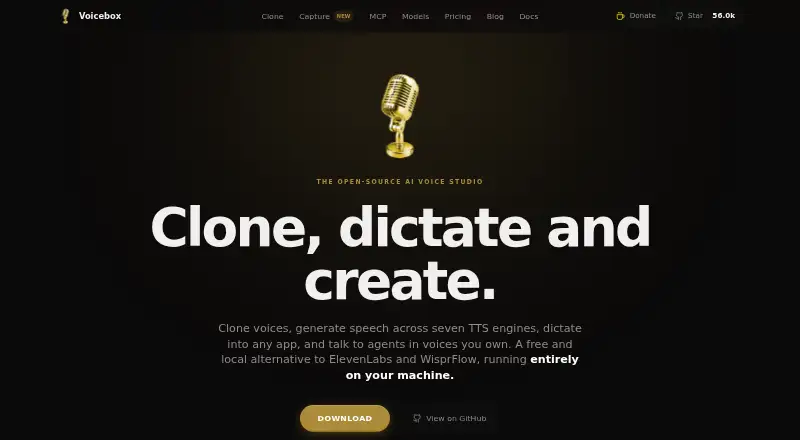
Voicebox is an open-source voice studio for cloning, speech generation, dictation, and agent voices.
How it plugs in
Signal on Text-to-Speech Software8.9#3 of 223
Voicebox runs as a local desktop voice studio for cloning voices, creating speech, dictating text, and producing speech for AI agents. It includes seven speech engines, audio editing tools, and local transcription in 99 languages. The app works offline without an account. A free local plan is available; paid cloud plans are announced but not yet available.
Review
In a line
Voicebox is an open-source desktop studio for voice cloning, speech generation, dictation, and speech for AI agents. Its local app can work offline without an account.
What it does
Voicebox can make a voice copy from a short audio sample, record speech for dictation, and turn text into speech. Seven built-in speech engines offer voice and delivery options. Models download on first use and stay on the device; their listed sizes range from about 300 MB to 8 GB.
A timeline editor lets users arrange and trim clips, mix conversations, and build multi-voice stories. It also includes sound effects such as pitch shift, reverb, and delay, with presets and a live preview. Local Whisper models handle speech-to-text in 99 languages, with optional local AI refinement.
How it connects
The app supports Claude Code, Cursor, Cline, Windsurf, and other compatible AI agents through MCP, a way for apps to call Voicebox tools. A local REST API provides speech generation, voice profiles, model status, history, and other controls without API keys or usage fees.
Voicebox is open source under the MIT license, which allows commercial use subject to its notice requirement. Its backend can run on the same computer or on a separate machine through Docker or a direct installation. The app lists macOS, Windows, and Linux support, though Linux builds are not yet available through the installation guide.
Good fit
Voicebox may suit people making game dialogue, audiobooks, podcast intros, accessibility readouts, or voice output for apps and AI agents. It can also help with dictation and editing multi-speaker audio.
It is a practical option for people who want local processing, offline use, or the ability to modify open-source software. Commercial use is allowed under the stated license terms.
Watch for
Voicebox needs local storage and computing capacity. Minimum requirements include 8 GB of memory, 5 GB of free storage, and a modern multi-core processor; 16 GB of memory and a CUDA graphics card are recommended. Speech models can take up several gigabytes.
Linux installation is still blocked, and mobile sync depends on the coming-soon cloud service. The local API listens on the computer without authentication, so remote access needs careful setup. Planned remote protections include API keys, accounts, rate limiting, and HTTPS.
Pricing
The Local plan is free forever, requires no account, and includes the speech engines, voice cloning, dictation, agent features, and unlimited local generations.
Cloud is listed at $12 a year as a launch price, but it is coming soon. Studio is listed at $48 a year as a placeholder, with final pricing still to be set. Both cloud plans are not yet available.
Verdict
Choose Voicebox if you want a free, local tool for making speech, copying voices, dictating, or giving compatible AI agents a voice. Its editing tools and open-source license add flexibility for personal and commercial projects.
Look elsewhere if you need a ready-to-use Linux installer, mobile sync today, or a cloud service with finalized terms. Voicebox’s strongest fit is someone willing to run speech models on their own computer and work within the current desktop offering.
Our take
Voicebox is worth considering if you want voice cloning, speech creation, dictation, and agent speech in one free local app. Its offline use, open-source license, editing timeline, and local API give it range without requiring an account or per-generation fees. The trade-off is that speech models take disk space and local computing resources, Linux builds are not ready, and cloud sync is still pending. Choose it for desktop work you can run locally; do not count on mobile sync or finalized cloud pricing yet.
- Free local plan with unlimited local generations and no account requirement
- Seven speech engines and voice cloning from a short recording
- Local dictation and transcription in 99 languages
- Open-source MIT license permits commercial use
- Local API and support for compatible AI agents
- Speech models range from about 300 MB to 8 GB
- Linux builds are not currently available through the installation guide
- Cloud sync and mobile support are marked coming soon
- The local API has no authentication
- Pick it ifPeople who want offline voice creation and cloning; Creators making multi-voice stories, audiobooks, or game dialogue; Users connecting voice output to compatible AI agents
- Skip it ifYou need Linux installation available now; You need mobile sync or cloud backup today; You cannot meet the local storage and computing requirements
Pricing
Local use is free forever. Cloud is advertised at $12 a year but is coming soon; Studio's $48 a year is a placeholder, with final pricing TBD.
- Localfree forever · No account required · all TTS engines · voice cloning · dictation and capture · MCP/personality features · unlimited local generationsFree
- Cloudlaunch price; coming soon · End-to-end encrypted backup · 25 GB storage · up to 5 devices · 30-day version history · sync across desktop and mobile$12/yr
- Studioplaceholder; pricing TBD; coming soon · 250 GB encrypted storage · unlimited devices · one-year version history · priority support$48/yr
As voicebox.sh lists them, checked 14 Oct 2026.
Questions
Is Voicebox free?
Yes. Its Local plan is free forever, includes unlimited local generations, and does not require an account.
Can Voicebox run offline?
The desktop app can work offline. It downloads speech models on first use and caches them locally.
Does Voicebox have an API?
Yes. Its local REST API offers speech generation and controls without API keys or usage fees.
Can Voicebox work with AI agents?
Yes. Its MCP support lets Claude Code, Cursor, Cline, Windsurf, and other compatible clients call its speech tools.
Is Voicebox available for Linux?
Linux is listed, but the installation guide says builds are coming soon and currently blocked.
How much does Voicebox Cloud cost?
Cloud is listed at $12 a year as a launch price, but it is coming soon and its limits are not final.