
Remodeling Contractor Software
Workhand Review: Construction Software for Small Crews
workhand.app · checked 15 Oct 2026
Mobile-first construction management for estimates, invoices, crew communication, costs, time and payments.
How it plugs in
Signal on Remodeling Contractor Software6.6#3 of 27
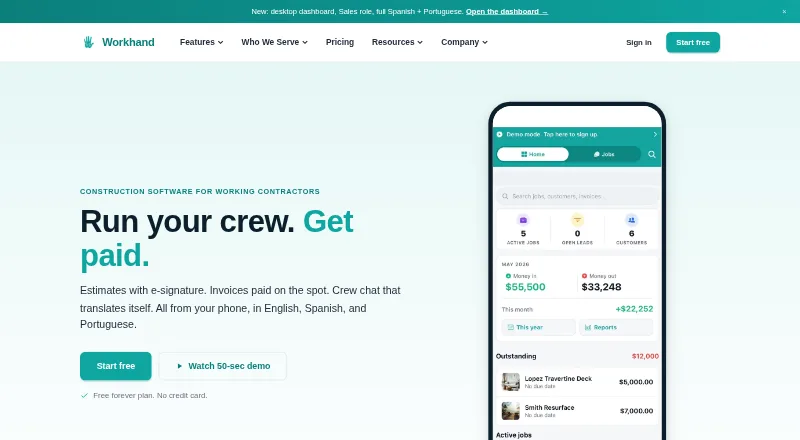
Workhand puts phone-based job operations in reach of solo contractors and small construction crews. Its toolkit covers estimates, signatures, invoicing, payments, job chat, time and mileage, daily logs, punch lists, receipt capture and customer updates. Apps for Android and iOS accompany a web version, with free and subscription options.
Review
In a line
Construction contractors can use Workhand as a field-operations app designed around mobile work. It brings estimating, invoicing, crew messaging, job records and payments into one service.
What it does
Create line-item estimates, collect signatures on a phone and turn accepted estimates into invoices. Customers can pay by card or ACH through Stripe. Each job can have chat, photos, notes, daily logs, punch lists, selections and payment details.
The app also tracks time, mileage, costs, subcontractor insurance certificates and leads. A customer portal shows job status, progress photos and balances through a link that needs no login.
How it connects
With the Team plan, customers, jobs, invoices and payments move both ways between Workhand and QuickBooks Online. QuickBooks Desktop is unavailable, while vendor and inventory synchronization remain roadmap items.
Workhand has no public API. CSV exports and requested import scripts are the documented alternatives. It is a hosted service, with no published open-source license or self-hosting package.
Android, iOS and web versions are available. Records loaded earlier can still be opened without connectivity; photos, notes, time, mileage and chat are held locally and synchronized afterward. Fully offline creation of a new job is unsupported.
Good fit
Workhand describes its users as solo operators and crews of up to 15 people. The company names general contractors, remodelers, HVAC and plumbing installers, landscapers, concrete crews and pool builders among its audience.
It suits teams that want estimates, invoices, crew chat, payment collection and field records in one phone-centered workspace. The app, customer estimates and invoices are available in English, Spanish and Brazilian Portuguese.
Watch for
On the free tier, only one active job and one teammate are allowed. Paid plans cap participation at five teammates on Pro and 15 on Team, so larger companies may outgrow it.
Workhand does not support AIA progress billing, and its bid manager is simpler than enterprise construction suites. Service-only shops should note that route optimization and recurring-service dispatch are not available yet.
Phone support is not offered. Support is by email, usually within one business day, with priority response for Team customers. Stripe processing costs 2.9% plus $0.30 for cards in the US, or 0.8% for ACH capped at $5.
Pricing
At $0, Free provides one active job, one teammate, unlimited customers, three estimates and three invoices per month, along with chat, photos, punch lists, daily logs and subcontractor certificate tracking.
Pro costs $34.99 a month after a 14-day free trial. It adds unlimited active jobs, up to five teammates, recurring invoices, time and mileage, an AI receipt scanner, a review funnel, public profile and pool chemical logs.
Team costs $89.99 a month after a 14-day free trial. The plan allows as many as 15 teammates and adds cost and profit tracking, sales commissions, yearly ledger and 1099 exports, QuickBooks Online sync, a CRM pipeline, customer portal and priority support.
Verdict
Choose Workhand if your construction business has one to 15 people and needs estimates, invoices, payments and field communication together. The free plan can cover very small operations, while Pro and Team add capacity and accounting links.
Look elsewhere if you need enterprise billing such as AIA progress billing, a public API, QuickBooks Desktop, full offline job creation or dispatch tools for recurring service work.
Our take
Workhand is a practical option for small construction companies that want one place for estimates, invoices, crew communication, records and payments. Its free tier gives a solo operator a way to start, while Pro and Team add more jobs, teammates, tracking and QuickBooks Online synchronization. The main boundaries are scale, limited offline creation, no public API, no QuickBooks Desktop support and no AIA billing. Service businesses built around recurring dispatch should also look beyond Workhand. Payment processing fees apply through Stripe even though Workhand adds no markup.
- Free tier provides one job, one teammate and core field tools
- Available on Android, iOS and the web
- Team includes QuickBooks Online synchronization
- Photos, notes, time, mileage and chat can wait offline for reconnection
- English, Spanish and Brazilian Portuguese are supported
- Free plan limits estimates and invoices to three each per month
- Team plan is capped at 15 teammates
- No public API or QuickBooks Desktop support
- No AIA progress billing or recurring-service dispatch
- Phone support is not available
- Pick it ifSolo contractors and small construction crews; Teams needing estimates, invoices and job chat in one app; Businesses using QuickBooks Online
- Skip it ifYou need enterprise-scale billing or more than 15 teammates; Your work requires QuickBooks Desktop or a public API; You run recurring service dispatch or need full offline job creation
Pricing
A free plan is available. Pro is $34.99 a month and Team is $89.99 a month; both paid plans include a 14-day free trial. Stripe payment fees are separate: 2.9% plus $0.30 for US cards, or 0.8% for ACH capped at $5.
- Free$0 /month · 1 active job · 1 teammate · unlimited customers · 3 estimates/month · 3 invoices/month · chat, photos, punch list, daily logs · unlimited subcontractors with COI trackingFree
- Pro$34.99 /month · 14-day free trial · unlimited active jobs · up to 5 teammates · recurring invoices · time tracking and mileage · AI receipt scanner · review funnel · public profile · pool chemical logs$34.99/mo
- Team$89.99 /month · 14-day free trial · up to 15 teammates · cost tracking · per-job profit · sales commissions · yearly ledger and 1099 exports · QuickBooks Online sync · CRM pipeline · customer portal · priority support$89.99/mo
As workhand.app lists them, checked 15 Oct 2026.
Questions
Does Workhand have a free plan?
Yes. The Free tier permits one active job and one teammate, with unlimited customers, three estimates and three invoices monthly, plus core job communication and records.
How much do Workhand's paid plans cost?
Pro is $34.99 a month. Team is $89.99 a month. Each includes a 14-day free trial.
Does Workhand connect to QuickBooks?
Team syncs customers, jobs, invoices and payments both ways with QuickBooks Online. QuickBooks Desktop integration is unavailable.
Can Workhand work without internet?
Records loaded earlier remain viewable offline. Photos, notes, time, mileage and chat wait in a local queue until reconnection, while fully offline creation of new jobs is unsupported.
Does Workhand have an API?
No public API is offered. CSV exports and requested import scripts are the documented alternatives.
What payment fees apply?
Stripe card payments cost 2.9% plus $0.30 per US transaction. ACH costs 0.8%, capped at $5. Workhand says it adds no payment markup.
Which languages does Workhand support?
English, Spanish and Brazilian Portuguese are available in the interface and in customer estimates and invoices.