
Do these 3 things before closing this tab:
1Fix the driver behind crashes, sound loss and screen glitches2Clear out junk files and repair common Windows errors3Scan for outdated or missing drivers - takes under a minuteInferse is reader-supported. When you buy through links on our site, we may earn an affiliate commission. As an Amazon Associate I earn from qualifying purchases. Learn more
For a purpose-built AI podcast outro, start with InsMelo Podcast Music Generator: it specifically offers podcast outro music and lets you download finished tracks as MP3, WAV, or MIDI. If you want an outro song with lyrics, compare DeepSong AI; if your priority is a short branded sting or transition, consider BeatJam. The options below are ranked by how directly their stated features fit an outro. Check each vendor’s site for prompt controls, genres, platform support, and any details not established here.
What Makes Podcast Outro Music Work
An outro has a short job: signal the episode is ending, sit beneath the host’s final words, and leave a recognizable sonic sign-off. That usually calls for a clear ending and a mix that leaves room for speech. Those are creative goals, not verified features of any tool listed here.
Before generating, decide whether you need a brief instrumental sting, a longer music bed, or a sung show sign-off. Write down the mood, energy, approximate duration, and whether the track should resolve cleanly or loop. If a service accepts text prompts, you could adapt: “Podcast outro, warm and upbeat, light percussion and soft synth, instrumental, leave space for a final spoken sentence, then resolve with a short clean ending.” Treat those details as directions for your brief, not promises about a tool’s controls or output.
Recommended Free Tools
Best AI Podcast Outro Music Tools
1. InsMelo Podcast Music Generator — Best Purpose-Built Outro Option
InsMelo Podcast Music Generator is the most directly matched pick: it says it creates custom podcast intro and outro music. It offers finished tracks for download in MP3, WAV, or MIDI, and describes free podcast music MP3 previews and downloads for YouTube videos, social media, and personal projects. Its page also says to use podcast music under InsMelo’s licensing terms. Those terms should guide any planned use; check them before publishing.
Shopping ad

- The new generation of the songwriter's interface: Plug in your mic and guitar and let Scarlett Solo 4th Gen bring big studio sound to wherever you make music
- Studio-quality sound: With a huge 120dB dynamic range, the newest generation of Scarlett uses the same converters as Focusrite’s flagship interfaces, found in the world's biggest studios
- Find your signature sound: Scarlett 4th Gen's improved Air mode lifts vocals and guitars to the front of the mix, adding musical presence and rich harmonic drive to your recordings
- All you need to record, mix and master your music: Includes industry-leading recording software and a full collection of record-making plugins
- Everything in the box: Includes Pro Tools Intro+, Ableton Live Lite, Cubase LE, and Hitmaker Expansion: a suite of essential effects, powerful software instruments, and easy-to-use mastering tools
For an outro, give the generator a brief that describes the show’s mood and the ending you need. If you plan to edit the track around a spoken sign-off, check whether the result gives you enough room and a clean ending; the listed facts do not establish specific editing controls or prompt settings.
2. DeepSong AI — Best Stated Fit For An Outro Song
DeepSong AI explicitly lists AI-generated outro songs and music, alongside podcast songs, intros, segment breaks, and background music. It says you can view lyrics and download the completed track as a high-quality MP3. That makes it a relevant option if you want to explore a sung sign-off, though the available facts do not establish specific voice, genre, or duration controls.
Shopping ad
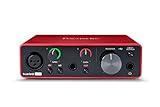
- Pro performance with great pre-amps - Achieve a brighter recording thanks to the high performing mic pre-amps of the Scarlett 3rd Gen. A switchable Air mode will add extra clarity to your acoustic instruments when recording with your Solo 3rd Gen
- Get the perfect guitar and vocal take with - With two high-headroom instrument inputs to plug in your guitar or bass so that they shine through. Capture your voice and instruments without any unwanted clipping or distortion thanks to our Gain Halos
- Studio quality recording for your music & podcasts - Achieve pro sounding recordings with Scarlett 3rd Gen’s high-performance converters enabling you to record and mix at up to 24-bit/192kHz. Your recordings will retain all of their sonic qualities
- Low-noise for crystal clear listening - 2 low-noise balanced outputs provide clean audio playback with 3rd Gen. Hear all the nuances of your tracks or music from Spotify, Apple & Amazon Music. Plug-in headphones for private listening in high-fidelity
- Everything in the box: Includes Pro Tools Intro+, Ableton Live Lite, Cubase LE, and Hitmaker Expansion: a suite of essential effects, powerful software instruments, and easy-to-use mastering tools
DeepSong says its music can be used commercially for podcasts, YouTube, and ads, describing this as full copyright freedom. Check the vendor’s current terms for your use case, especially if you add a real person’s voice, a cover, or a sample: get any needed consent and confirm the applicable platform and service terms.
3. BeatJam — Best For A Short Podcast Sting
BeatJam lists intro, outro, and background music for podcasts, so it fits a compact sonic sign-off as well as a longer bed. It says every track is generated fresh and royalty-free. Each account gets three free track generations per week without a credit card; paid plans start at A$8 per month for 40 tracks, with commercial rights included.
Shopping ad

- The new generation of the artist's interface: Connect your mic to Scarlett's 4th Gen mic pres. Plug in your guitar. Fire up the included software. Start making your first big hit
- Studio-quality sound: With a huge 120dB dynamic range, the newest generation of Scarlett uses the same converters as Focusrite’s flagship interfaces, found in the world's biggest studios
- Never lose a great take: Scarlett 4th Gen's Auto Gain sets the perfect level for your mic or guitar, and Clip Safe prevents clipping, so you can focus on the music
- Find your signature sound: Air mode lifts vocals and guitars to the front of the mix, adding musical presence and rich harmonic drive to your recordings
- With Scarlett 4th Gen, you have all you need to record, mix and master your music: Includes industry-leading recording software and a full collection of record-making plugins
BeatJam says paid plans include commercial rights for podcasts and other listed uses, with no claims or attribution. Confirm the current plan terms before publishing. If your outro uses a voice, cover, or sample, check consent and the service’s terms for that material too.
4. Niew.ai — Best For An Outro That May Need To Run Longer
Niew.ai describes original background music for videos, intros, and outros, and specifically mentions podcast jingles, transition music, and background tracks. It says it can generate full songs up to eight minutes long. That stated length may suit a show that wants more than a brief closing sting, though the facts do not establish a dedicated outro-duration control.
Shopping ad

- EVERYTHING IN ONE DESK UNIT: 4 XLR mic inputs, headphone outs, sound pads and effects, no separate interface or PC mixer needed
- STUDIO SOUND, ZERO EXPERTISE: APHEX audio processing presets make voices broadcast-ready with one tap
- PODCAST, STREAM OR RECORD: multitrack to computer, microSD or USB drive, works standalone without a computer
- SHOW CONTROL: 8 customizable SMART pads trigger music, sound effects and mix-minus phone calls live
- IN THE BOX: RØDECaster Pro II console, power supply and USB-C cable, add your microphones
Niew.ai says VIP subscribers are guaranteed commercial rights without copyright restrictions. Check the vendor’s terms for the plan you would use and for any voice, cover, or sample you add; get the relevant consent.
The Tool Desk
Outbyte PC Repair FREEClear out junk files and repair common Windows errorsFree Scan →Outbyte Driver Updater FREEScan for outdated or missing drivers - takes under a minuteDriver Scan →5. Loudly — Best If You Also Need Broader Music Tools
Loudly says podcasters can create outros, intros, transitions, loops, and short-form music beds. It also offers remixing, separated-stem exports, mastering, effects, and distribution tools, making it the broadest toolkit in this roundup. Its free generated tracks are limited to 30 seconds, and it is available through the web rather than native desktop software.
Shopping ad
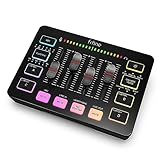
- [XLR Mic Input] One XLR microphone input interface is set on the gaming audio mixer, which is great to up your audio quality with your XLR setup. The XLR mixer is a stepping stone to upgrade your live streaming. Audio mixer offered built-in 48V phantom power which opens up more choices for mics. Directly use it with your condenser microphone but do not solve added peripherals. (NOT available for USB mic)
- [Individual Channel Control] Gaming audio mixer for one mic recording with smooth volume slider fader take your streaming recording to a whole new level with full pleasure. Four independent channels set on the DJ mixer give audio volume of the MICROPHONE, LINE IN, HEADPHONE, and LINE OUT channels individual control. Configurable on the PC audio mixer instead of just operating on your game or streaming software.
- [Mute and Monitor] The front mute and monitor buttons but not at the back, make it easier to get the audio interface use. Ability to mute audio, the audio mixer for streaming prevents background noise from damaging your live broadcast. Real-time feedback between speaking and hearing will not distract your attention, which encourage you to speak more confidently. The sturdy-built control button allow you to operate freely and easily during live streaming.
- [Sound Effects] The computer sound mixer supports four pre-recorded customized button that can be recorded and activated at the press of button to post production. 6 kinds of voice changing modes change your output style. 12 auto tune changes the tone of your voice. The podcast mixer being able to add different and fun effects is a huge bonus for your streaming or game voice.
- [Controllable Vibrant RGB] RGB button on the audio mixer DJ meets different live streaming themes. Lights on the video mixer is vibrant but not harsh on your eyes. Flowing or frozen RGB color rotation in a decent pace presents a greatly strong impression as a "light show" to your audience. Even a streaming equipment accessory will not be dull looking when video production.
Loudly describes its generated music as original, royalty-free, and commercially licensed, while its directory listing says paid licensing rights depend on plan terms. Check the current terms for the plan and use you have in mind. For voice, cover, or sample material, confirm consent and the applicable terms as well.
Quick Recap
A Simple Outro Workflow
- Choose the form: a brief sting, a bed under the closing words, or a sung sign-off.
- Write a compact creative brief with mood, energy, instrumentation, and the kind of ending you want. For example: “Calm technology show outro, restrained electronic pulse, instrumental, leave space for the host’s last sentence, finish with a gentle resolved chord.”
- Generate options only where the service supports the controls you need. The listed facts do not establish which tools accept detailed text prompts or offer specific genre, voice, or duration controls.
- Listen alongside a real episode ending. Check that the music leaves the host audible and that the ending feels intentional; adjust the brief or edit the track if needed.
- Before publishing, confirm the applicable license and get consent for any voice or other material you did not create yourself.
At A Glance
| Tool | Outro Fit | Stated Download Or Length | Free Or Paid Details | Rights Detail Stated |
|---|---|---|---|---|
| InsMelo Podcast Music Generator | Custom podcast outro music | MP3, WAV, or MIDI | Free podcast music MP3 preview and download stated | Use under InsMelo’s licensing terms |
| DeepSong AI | AI-generated outro song and music | High-quality MP3; length not stated | Not stated | Commercial podcast use stated; check vendor terms |
| BeatJam | Podcast outro and background music | Not stated | Three free generations weekly; paid plans start at A$8/month for 40 tracks | Paid plans include commercial rights |
| Niew.ai | Outro, jingle, transition, and background music | Full songs up to eight minutes | VIP subscription mentioned; price and free tier not stated | VIP commercial rights stated |
| Loudly | Outros, transitions, loops, and short-form beds | WAV or MP3; free generated tracks limited to 30 seconds | Free plan; paid plan details vary | Commercial licensing stated; paid rights depend on plan terms |
Product prices and availability are accurate as of the date/time indicated and are subject to change. Any price and availability information displayed on Amazon at the time of purchase will apply.





