
What’s actually slowing this PC down?
Pick the symptom - the matching free tool is one click away.
Inferse is reader-supported. When you buy through links on our site, we may earn an affiliate commission. As an Amazon Associate I earn from qualifying purchases. Learn more
Choosing a VPN for streaming is a compatibility decision, not a permanent search for one provider that works everywhere. Start with the exact service, catalogue country, playback devices, network and budget you use. Then verify a candidate’s app or router path, sustained playback, privacy controls, simultaneous-device limit and refund window. A VPN encrypts traffic between your device and its server and replaces your IP address with the server’s, so a streaming service sees the VPN server’s address instead of yours; services can still identify and block VPN address ranges. The practical answer to “what is the best VPN for streaming?” is therefore the service that works for your particular catalogue and setup when you test it lawfully, with a refund option available.
The shortlist below is alphabetical, not ranked. Prices and limits change by country, billing term, tax and purchase channel; the dated figures shown were checked in November 2026. Follow every streaming service’s terms and applicable law.
At a glance
| Name | Best for | Free plan or trial | Starting price information | Platforms and device path | Checked |
|---|---|---|---|---|---|
| CyberGhost VPN | Readers who need to investigate a broad device and server offering before subscribing | Confirm the current offer and limits | Confirm current billing term and renewal price | Check native apps, router support and simultaneous connections | November 2026 |
| ExpressVPN | Households wanting a straightforward app and a stated refund window | 30-day money-back guarantee for new users | Price varies by plan and term; see the provider page | 10 simultaneous devices on the shown Basic offer; native apps and router route should be verified | November 2026 |
| IPVanish | Users comparing device coverage and home-network deployment | Confirm the current offer and limits | Confirm current billing term and renewal price | Check app availability, router firmware and connection limit | November 2026 |
| Mullvad VPN | Privacy-focused users who place transparent account practices ahead of catalogue promises | Confirm whether a trial or refund applies to your purchase channel | Confirm the current flat or term price | Check support for each TV, computer, phone or router you will use | November 2026 |
| Proton VPN | Readers who want a free privacy tier for general browsing and a paid tier for streaming | Free tier is not intended for streaming; paid Plus and Unlimited tiers are listed as streaming-capable | Plus displayed at $9.99 monthly, $3.99 on 12 months or $2.99 on 24 months | Dated comparison data lists 145 countries and 10 devices on paid plans; verify current app and router support | November 2026 |
Prices checked November 2026.
Plan details are snapshots, not guarantees of catalogue access. A monthly-equivalent figure can require a large upfront payment, and renewal pricing may differ.
What should you check before paying for a streaming VPN?
Write down the service, the country catalogue you need, every playback device and the network where you will watch. Shortlist two or three providers with a documented route for that exact setup, read their privacy terms, purchase through a refund-eligible channel, and test the real service before the refund period ends.
Shopping ad

- Wi-Fi 6 Speeds: Up to 2402 Mbps on 5 GHz and 574 Mbps on 2.4 GHz bands ensure smoother streaming and faster downloads; support VPN server and VPN client¹. Actual speeds cannot exceed your internet plan and vary based on conditions, distance, & obstacles.
- A More Responsive Experience: Enjoy smooth gaming, video streaming, and live feeds simultaneously. OFDMA makes your Wi-Fi stronger by allowing multiple clients to share one band at the same time, cutting latency and jitter.²
- Expanded Wi-Fi Coverage: 4 high-gain external antennas and Beamforming technology combine to extend strong, reliable, Wi-Fi throughout your home.
- Improved Battery Life: Target Wake Time helps your devices to communicate efficiently while consuming less power.
- Improved Cooling Design: No heat ups, no throttles. A larger heat sink and redefined case design cools the WiFi 6 system and enables your network to stay at top speeds in more versatile environments.
1. Confirm the exact service and country
Server-count headlines are only a rough proxy. A provider can list many countries yet have no currently usable address for the one catalogue you need. Streaming companies change detection systems and can block an address range without notice. Look for current provider documentation or support guidance for your service and country, but treat “works with everything” claims as unreliable.
2. Test sustained playback
Run the test at the time and location you normally watch. Try at least two plausible servers, start the quality you actually want, and keep the video playing long enough to expose buffering. Note startup delay, quality drops, pauses, audio synchronisation and whether changing servers helps. ISP capacity, Wi-Fi congestion, distance, protocol, server load and the streaming service all affect the result; an “up to” speed badge cannot predict your stream.
3. Map the device path
Laptops and phones usually have the simplest native-app route. A smart TV, console or streaming stick may need supported router firmware, a compatible VPN router or a provider’s smart-DNS/media feature. Smart DNS can change how a service locates a device but is not the same as an encrypted VPN tunnel. Count active household devices rather than assuming unlimited connections are necessary.
4. Separate privacy evidence from unblocking
Encryption and an altered IP address do not prove that a provider keeps no logs or handles account data well. Read the logging policy, look for independent audits where available, check for a kill switch and review supported protocols. Split tunnelling can leave a banking or local-casting app outside the tunnel while the player uses it. Obfuscation may help on a network that blocks VPN traffic, but neither feature guarantees catalogue access.
5. Calculate the whole contract
Record the amount charged today, the number of months included, the renewal amount and frequency, taxes or currency conversion and the refund conditions. Long-term promotions can show a low monthly equivalent while charging the full term up front. A dated pricing comparison illustrates the issue: an offer displayed as $2.99 per month can still require a larger initial bill for two years or more. Turn off auto-renewal after purchase if you want to reassess at term end, while following the provider’s cancellation and refund rules.
Which VPN products should you investigate?
Each entry explains the user it may suit and the questions to answer before purchase. None is a universal recommendation; catalogue access can change by service, country, server, device and date.
Shopping ad

- 【Five Gigabit Ports】1 Gigabit WAN Port plus 2 Gigabit WAN/LAN Ports plus 2 Gigabit LAN Port. Up to 3 WAN ports optimize bandwidth usage through one device.
- 【One USB WAN Port】Mobile broadband via 4G/3G modem is supported for WAN backup by connecting to the USB port. For complete list of compatible 4G/3G modems, please visit TP-Link website.
- 【Abundant Security Features】Advanced firewall policies, DoS defense, IP/MAC/URL filtering, speed test and more security functions protect your network and data.
- 【Highly Secure VPN】Supports up to 20× LAN-to-LAN IPsec, 16× OpenVPN, 16× L2TP, and 16× PPTP VPN connections.
- Security - SPI Firewall, VPN Pass through, FTP/H.323/PPTP/SIP/IPsec ALG, DoS Defence, Ping of Death and Local Management. Standards and Protocols IEEE 802.3, 802.3u, 802.3ab, IEEE 802.3x, IEEE 802.1q
1. CyberGhost VPN: who it is for
Investigate CyberGhost VPN if you want to compare a large consumer VPN service and need to check coverage for several household devices. The decision should depend on whether its current apps or router instructions support your television, stick or console, not on a country-count headline.
Free plan or trial: Confirm the current trial or refund terms for the device and purchase channel you will use. App-store subscriptions can have different cancellation rules from a direct purchase.
Paid plans and upgrade point: Compare the monthly bill with the full amount due on any multi-month term, then record the renewal price. Upgrade only when the service you need plays reliably on your actual network and the extra device or router support justifies the cost.
2. ExpressVPN: who it is for
ExpressVPN suits readers who value a simple app workflow and a clearly stated refund window. Its pricing page shows a 30-day money-back guarantee for new users, and the displayed Basic offer supports 10 simultaneous devices. Confirm the exact tier, country, billing currency and purchase channel before paying on the ExpressVPN plan page.
Free plan or trial: The relevant risk-free period is the 30-day money-back guarantee rather than a permanent free streaming tier. Check eligibility and the deadline in the receipt and account area.
Windows Errors? Fix Them Before They Spread
Repair common Windows errors and clear accumulated junk for a smoother, more stable PC - no reinstall needed.Free scan · no reinstallOutdated Drivers Are Slowing You Down
One free scan finds every outdated or missing driver and matches the right update for your exact hardware.Free scan · exact hardware matchPaid plans and upgrade point: The amount depends on term and promotion, so do not treat a monthly-equivalent badge as the amount charged today. Upgrade when the 10-device allowance covers your active household and the app or router route works for your target service; otherwise, use the refund window and reassess.
Shopping ad

- 𝐒𝐞𝐜𝐮𝐫𝐞 𝐖𝐢-𝐅𝐢 𝐎𝐧-𝐓𝐡𝐞-𝐆𝐨 - Roam 6 connects to public Wi-Fi and creates a private network for multiple devices at once, ideal for hotels, cafes, airports, and homes. VPN enables secure work. Not eSIM/SIM card compatible. Requires external internet source.
- 𝐑𝐨𝐚𝐦 𝟔 𝐀𝐗𝟏𝟓𝟎𝟎 𝐝𝐮𝐚𝐥-𝐛𝐚𝐧𝐝 𝐬𝐩𝐞𝐞𝐝𝐬 - Wi-Fi 6 Speeds up to 1,201 Mbps (5 GHz) and 300 Mbps (2.4 GHz) for up to 60 devices simultaneously. Actual Wi-Fi speeds vary based on source bandwidth, environment, distance to devices, and obstacles. ◇§
- 𝐏𝐨𝐫𝐭𝐚𝐛𝐥𝐞 𝐚𝐧𝐝 𝐝𝐮𝐫𝐚𝐛𝐥𝐞 𝐝𝐞𝐬𝐢𝐠𝐧 - A portable travel router compactly designed for trips and adventures, featuring a 1 Gbps WAN/LAN port and a 1 Gbps LAN port for reliable wired connectivity.
- 𝐌𝐮𝐥𝐭𝐢𝐩𝐥𝐞 𝐰𝐚𝐲𝐬 𝐭𝐨 𝐜𝐨𝐧𝐧𝐞𝐜𝐭 - (1) Router Mode: Connects to public Wi-Fi, ISP, or phone (USB tethering). (2) AP/RE/Client Mode: Adds WiFi to wired setups, extends WiFi, or connects wired devices wirelessly.
- 𝐎𝐮𝐫 𝐜𝐲𝐛𝐞𝐫𝐬𝐞𝐜𝐮𝐫𝐢𝐭𝐲 𝐜𝐨𝐦𝐦𝐢𝐭𝐦𝐞𝐧𝐭 - TP-Link is a signatory of the U.S. Cybersecurity and Infrastructure Security Agency’s (CISA) Secure-by-Design pledge. Advanced security is integrated into the device’s design, development, and ongoing maintenance.
3. IPVanish: who it is for
IPVanish is worth putting on a comparison sheet when several people will watch on computers, phones and living-room hardware. Verify its current simultaneous-connection rule, native-TV options and supported router firmware before assuming one subscription covers every device.
Free plan or trial: Confirm whether a trial or money-back period applies to the plan and channel you select, and note whether mobile-store billing changes the process.
Paid plans and upgrade point: Write down the first-term charge and renewal amount rather than relying on a headline monthly equivalent. Upgrade only if the connection limit and device path solve a documented need; a cheaper plan is preferable when only one or two devices are active.
Free tools Windows power users keep installed
One-click scans. No signup required.
4. Mullvad VPN: who it is for
Mullvad VPN fits readers who put privacy transparency and a straightforward account model ahead of a promise that every streaming catalogue will work. Treat streaming access as a question to validate for the exact service and country, because a privacy-oriented design cannot compel a service to accept a VPN address.
Free plan or trial: Check the current refund or trial terms before purchase and make sure they cover the platform you will test. Do not infer a free streaming allowance without a current provider statement.
Paid plans and upgrade point: Compare the total term cost with your privacy requirements and the number of devices you actually use. Upgrade when the provider’s supported apps, router path and connection policy fit your setup; do not pay more solely for a larger server-count claim.
Shopping ad

- 【AC1200 Dual-band Wireless Router】Simultaneous dual-band with wireless speed up to 300 Mbps (2.4GHz) + 867 Mbps (5GHz). 2.4GHz band can handles some simple tasks like emails or web browsing while bandwidth intensive tasks such as gaming or 4K video streaming can be handled by the 5GHz band.*Speed tests are conducted on a local network. Real-world speeds may differ depending on your network configuration.*
- 【Easy Setup】Please refer to the User Manual and the Unboxing & Setup video guide on Amazon for detailed setup instructions and methods for connecting to the Internet.
- 【Pocket-friendly】Lightweight design(145g) which designed for your next trip or adventure. Alongside its portable, compact design makes it easy to take with you on the go.
- 【Full Gigabit Ports】Gigabit Wireless Internet Router with 2 Gigabit LAN ports and 1 Gigabit WAN ports, ideal for lots of internet plan and allow you to connect your wired devices directly.
- 【Keep your Internet Safe】IPv6 supported. OpenVPN & WireGuard pre-installed, compatible with 30+ VPN service providers. Cloudflare encryption supported to protect the privacy.
5. Proton VPN: who it is for
Proton VPN is a useful two-stage option: its free tier is not intended for streaming, while the paid Plus and Unlimited tiers are listed as available for streaming in a TechRadar comparison. Dated comparison data lists 145 countries and 10 devices on paid plans; verify the current figures and your target server before subscribing.
The Tool Desk
Outbyte PC Repair FREERepair Windows errors before they cause bigger problemsFix Now →Outbyte Driver Updater FREEFix the driver behind crashes, sound loss and screen glitchesFind Drivers →Free plan or trial: The free tier can be suitable for privacy on ordinary browsing, but it should not be treated as a heavy-streaming plan. If streaming is the goal, evaluate a paid tier and its refund conditions instead.
Paid plans and upgrade point: The displayed Plus pricing was $9.99 monthly, $3.99 on 12 months or $2.99 on 24 months. A long-term equivalent normally means an upfront commitment; confirm the exact checkout total, renewal amount, taxes and currency on the Proton VPN pricing page. Upgrade when the paid tier’s streaming availability, device allowance and privacy controls match your actual use.
How do you test a VPN without mistaking one good session for a guarantee?
Use a repeatable, lawful checklist during the refund period. It produces evidence about your setup rather than a permanent promise about the provider.
- Define the target: Record the service, account region, catalogue country, desired resolution and playback device.
- Check the route: Install the native app where possible. For a TV or console without an app, verify router firmware, throughput and return terms before buying hardware. Treat smart DNS as a location feature, not equivalent VPN encryption.
- Choose two servers: Use documented locations in the target country, then a second location in that country or a nearby alternative. Record the protocol and time.
- Play continuously: Watch long enough to reveal buffering. Note startup time, resolution changes, pauses, audio sync and error messages.
- Repeat on another device: Test the second device your household actually uses. A device outside the VPN is not protected by its tunnel.
- Check local services: Split tunnelling may keep banking, printers or casting discovery on the local connection. Confirm that those apps still work.
- Read the error: A proxy or unblocker message may mean the service detected the address. Trying another documented server or contacting support is reasonable; disabling the VPN may be the only permitted option.
- Decide before renewal: Save the renewal date and price, then keep the plan only if the measured setup meets your needs.
Why does a VPN keep buffering while ordinary internet works?
Buffering usually indicates that the end-to-end path cannot sustain the chosen stream, not that encryption automatically makes video unusable. Compare the VPN and non-VPN connection at the same time, lower quality briefly, try a nearer or less busy server and test another protocol offered by the app.
- Use wired Ethernet or a less congested Wi-Fi band for the TV or streaming stick.
- Check whether another household device is saturating the connection.
- Try a different server in the same country; an address can be blocked or overloaded.
- Measure only your own connection if you have the tools, and do not present the result as a provider-wide benchmark.
- If playback is stable without the VPN but fails consistently with it, contact support or use the refund policy rather than assuming a faster marketing tier will solve it.
Can one VPN cover a smart TV, phone and laptop?
Only if the provider offers a supported path for each device and your connection limit covers simultaneous use. Phones and laptops can usually run native apps; TVs and consoles may require a router or smart-DNS setup. Confirm firmware compatibility, router throughput, casting behaviour and the exact number of active connections before buying.
Shopping ad
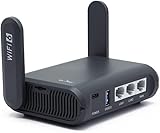
- 【AXT1800 WiFi 6 Wireless Router】Slate AX offers powerful Wi-Fi 6 network connection with a dual-band combined Wi-Fi speed of 1800 Mbps (600 Mbps for 2.4GHz and 1200 Mbps for 5GHz). Enhance Wi-Fi performance with MU-MIMO, OFDMA, BSS color and able to connect to up to 120 devices simultaneously.
- 【Fast and Secure Browsing】IPv6 supported; OpenVPN & WireGuard pre-installed, compatible with 30+ VPN service providers, OpenVPN speed up to 500 Mbps; WireGuard speed up to 550 Mbps. Cloudflare encryption supported to protect the privacy.
- 【Easy File Sharing】Our NAS feature supports SAMBA and WebDav protocol. By plugging an external USB hard disc into the router, you can create a private network to store and share your documents.
- 【Runs on OpenWrt 21.02】Slate AX runs on the latest OpenWrt 21.02 operating system (Kernel version 4.4.60), with mass device connection capabilities, and significantly reduced signal interference. You can customize the router and install applications based on your preferences.
- 【Repeater for Public, Hotel WiFi】Convert a public network(wired/wireless) to a private network(wired/wireless) for secure surfing. Work with Captive Portal. (Note: Most of the Free Public Wi-Fi hotspot set a time limit for users, which will disconnect your devices once the time is over. To deal with this situation, please reconnect your router to the wifi.)
What privacy features matter for streaming?
Prioritise a clear logging policy, transparent company information, modern protocols, a kill switch and independent audits where available. Split tunnelling and obfuscation solve specific network or app problems, but neither makes a catalogue universally available. Review account, payment and diagnostic-data handling separately from the streaming feature list.
How can you avoid an unexpected VPN renewal bill?
Save the checkout receipt, note the term end date and record the renewal amount shown in the account portal. A low monthly equivalent may represent a large prepaid term, and taxes or currency conversion can change the final bill. Disable auto-renewal after purchase if you intend to reassess, and request any refund before the provider’s stated deadline.
What should you do if a streaming service shows a VPN error?
Confirm that the account and catalogue are available in the country you selected, then try another provider-documented server and check for an app update. If the service still reports a proxy or unblocker, contact the VPN’s support team or disable the VPN as the service requires; do not treat circumvention as a guaranteed or lawful feature.
Do these 3 things before closing this tab:
1Clear out junk files and repair common Windows errors2Fix the driver behind crashes, sound loss and screen glitches3Repair Windows errors before they cause bigger problemsHow we picked the shortlist
The criteria are compatibility with the exact service and country, sustained playback that can be checked on the reader’s network, privacy evidence, app/router coverage, simultaneous-device capacity, usability and total first-term, renewal and refund economics. Dated provider figures are presented as snapshots, not rankings or performance guarantees. For general selection guidance, see Kaspersky’s VPN checklist and the compatibility and speed workflow from iTechGuides.
Frequently Asked Questions
Will a VPN let me watch every country’s catalogue?
No. Streaming services can block VPN address ranges, and catalogue rights depend on the account, country and service. Validate the exact catalogue and device during the provider’s refund period instead of relying on a universal-access claim.
Is a free VPN enough for watching live sports or 4K video?
Usually not without careful current verification. Free tiers may restrict locations, speed, data or streaming access; a paid plan with a refund window gives you a more realistic way to test sustained playback.
Should I install a VPN on my router for a smart TV?
Use a router only when the TV or streaming device lacks a supported native app and the provider documents compatible firmware. Check throughput, simultaneous-device limits, casting behaviour and the router’s return policy before purchase.
Quick wins for a faster PC:
Clear out junk files and repair common Windows errorsFree Scan →Fix the driver behind crashes, sound loss and screen glitchesFind Drivers →Does smart DNS protect the rest of my internet traffic?
No. Smart DNS can alter location handling for supported services, but it is not the same as an encrypted VPN tunnel. Use the provider’s documentation to understand which traffic is covered.
Can I use split tunnelling while streaming?
Yes, when the app supports it. You can send the player through the VPN while leaving banking, printers or local casting on the ordinary connection; test each app because behaviour differs by platform.
Quick Recap
Product prices and availability are accurate as of the date/time indicated and are subject to change. Any price and availability information displayed on Amazon at the time of purchase will apply.





