
2short.ai: AI Video Clips from YouTube Videos
2short.ai · checked 21 Oct 2026
2short.ai turns captioned YouTube videos into short clips for Shorts, TikTok, and Reels.
How it plugs in
Signal on AI Video Repurposing Tools6.3#12 of 50
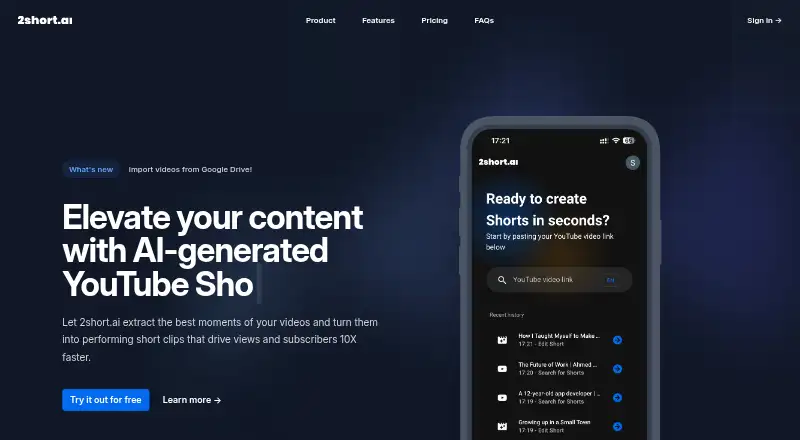
2short.ai finds highlights in longer videos and converts them into short-form clips. You paste a YouTube link, then can add animated subtitles, automatic speaker framing, crops, logos, and overlays. The browser-based service handles multiple languages and advertises 1080p exports without watermarks in vertical, square, or horizontal formats.
Review
In a line
This web app pulls selected moments from long videos and formats them as clips for YouTube Shorts, TikTok, and Instagram Reels.
What it does
Paste a YouTube video link and the service analyzes it for potential highlights. The resulting clips can have one-click animated subtitles and automatic facial tracking that keeps active speakers centered.
Cropping and other editing controls let you refine the framing, while brand presets add logos and overlays. Clips come in vertical, square, or horizontal layouts, and the service advertises 1080p output without watermarks.
Suitable material named in the FAQ includes podcasts, educational videos, commentary, product reviews, and motivational speeches. Videos must include captions before processing; the site notes that YouTube generates them automatically for most videos. The FAQ lists 26 supported languages, including English, Spanish, French, German, Japanese, Korean, Portuguese, Russian, Turkish, and Ukrainian.
How it connects
2short.ai runs on the web. The standard workflow starts with a public YouTube link. Google Drive files and public URL imports are available on the Lite tier and above.
There is no confirmed public API, open-source code, official GitHub repository, or verified developer SDK. The privacy policy says personal information is stored on secure servers in the European Union, access-controlled, and not sold or shared except as needed to provide the service.
Good fit
This suits creators and teams that need several short social clips from longer, captioned videos without building each edit from scratch. It is useful for podcasts, lessons, reviews, commentary, speeches, and similar talking-head content.
Automatic highlight detection, speaker framing, subtitles, brand presets, and multiple aspect ratios cover common short-video workflows.
Watch for
The AI may misunderstand context and select weak or irrelevant moments. Generated subtitles can be inaccurate, transitions may feel abrupt, and cinematic footage has limited support.
The editor focuses on captions and quick adjustments rather than a full timeline editor for professional production. Clip generation can also stall for more than ten minutes. Each plan sets a monthly analysis quota, so none provides unlimited clip generation.
The Starter allowance is not presented consistently: the plan card lists 30 minutes of monthly analysis, whereas the footer lists 15 minutes. Check the current allowance before relying on it.
Pricing
2short.ai has a free Starter plan and paid plans from $9.90 a month. There is no free trial. All plans include the full feature set; the main difference is analysis time and related limits.
Starter costs nothing and provides 30 minutes of AI video analysis each month, along with viewing and exporting of generated clips. At $9.90 monthly, Lite provides 5 hours of analysis, 60 minutes of fast server-side exports, Google Drive and public URL imports, and no ads.
The Pro tier is $19.90 per month for 15 hours of analysis and unlimited fast server-side exports. Premium is $49.90 monthly and includes 50 hours of analysis, priority support, and the newest beta features.
Verdict
Choose 2short.ai if your source material is captioned and you want an automated first pass for social clips. Its framing, subtitles, branding, and aspect-ratio options cover the routine work of adapting talking videos.
Look elsewhere if you need precise control over every edit, unlimited monthly processing, or a developer connection. Budget users should verify the Starter quota because the site shows two different limits, while heavier users should compare the paid analysis caps with their monthly video volume.
Our take
2short.ai is a practical shortcut for turning captioned YouTube material into social-ready clips. It offers automatic highlight selection, speaker framing, subtitles, branding, and common output shapes from a browser-based workflow. The trade-offs are meaningful: highlight choices can miss context, the editor is not a full production timeline, processing may stall, and every plan caps analysis time. The conflicting Starter quota also deserves confirmation. It fits creators repurposing podcasts, lessons, reviews, or commentary; it is a poor match for cinematic editing, unlimited production, or API-based workflows.
- Free Starter plan with clip viewing and exporting
- Automatic speaker framing and animated subtitles
- Advertised 1080p output without watermarks across three aspect ratios
- Logo and overlay presets for branding
- Supports 26 listed languages
- AI can choose weak or irrelevant highlights
- Monthly analysis limits apply to every plan
- Editor is not a full professional timeline
- Generated subtitles may be inaccurate
- No confirmed public API or SDK
- Pick it ifCreators repurposing captioned YouTube videos; Podcasts, lessons, reviews, and commentary; Teams needing branded clips in several aspect ratios
- Skip it ifYou need unlimited monthly clip generation; You require detailed timeline editing; You need a public API or open-source software
Pricing
Paid tiers mainly add analysis hours and export capacity; Premium adds priority support and beta features. The Starter allowance is listed as both 30 and 15 minutes per month, so confirm the current limit.
- Starter30 minutes AI video analysis/month · view and export generated clips · all featuresFree
- Lite$9.90 /mo · 5 hours AI video analysis/month · 60 minutes fast server-side exports/month · Google Drive and public URL imports · no ads$9.90/mo
- Pro$19.90 /mo · 15 hours AI video analysis/month · unlimited fast server-side exports$19.90/mo
- Premium$49.90 /mo · 50 hours AI video analysis/month · priority support · newest beta features$49.90/mo
As 2short.ai lists them, checked 21 Oct 2026.
Questions
Does 2short.ai work with TikTok and Reels?
Yes. Longer videos can be adapted into short clips for YouTube Shorts, TikTok, and Reels.
What input does 2short.ai use?
The getting-started workflow is to paste a YouTube video link. Google Drive files and public URL imports are also available on Lite and higher tiers.
Do videos need captions?
Yes. Captions are required for processing, and the site says YouTube generates them automatically for most videos.
Is there a free plan?
Yes. Starter is free and includes monthly AI video analysis plus viewing and exporting generated clips. The site shows conflicting Starter limits of 30 and 15 minutes.
Does 2short.ai have an API?
No confirmed public API, official GitHub repository, or verified developer SDK is listed.
What export formats are supported?
Clips support vertical, square, and horizontal aspect ratios, with the service advertising 1080p quality without watermarks.