Apache OpenMeetings
openmeetings.apache.org · checked 10 Oct 2026
Self-hosted collaboration with video, chat, whiteboards, files, and calendars.
How it plugs in
Signal on Video Conferencing Software6.7#7 of 43
Apache OpenMeetings is free, open-source groupware for video conferencing, messaging, whiteboards, document work, file sharing, and calendars. It works through web, mobile, and desktop platforms, while deployment takes place on your server. The server setup depends on Java 21 and Kurento Media Server, with extra components supporting some document, image, and recording features.
Review
In a line
Apache OpenMeetings is free, open-source software for online meetings and group work. Its self-hosted environment combines video calls, messaging, whiteboards, shared documents, files, and calendars.
What it does
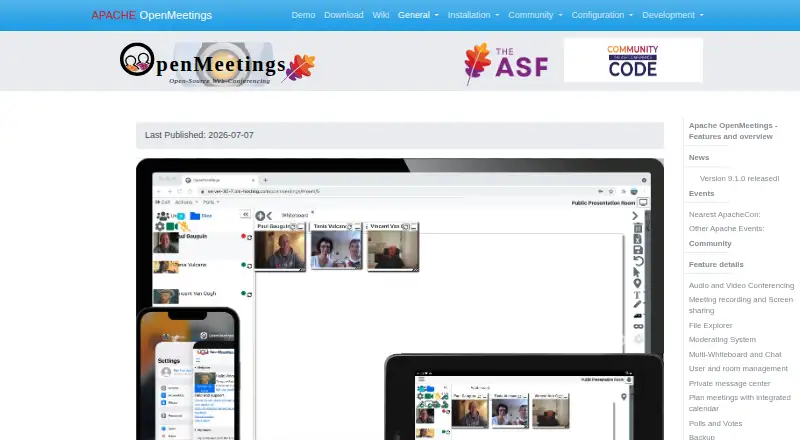
Participants can select combined audio and video, audio without video, video without audio, or picture-only participation. Controls include quality, camera resolution, and input devices. Sessions may be recorded for MP4 download, and a desktop or individual window can be shared.
The multi-whiteboard handles drawing, writing, images, and clip art, and can import PDF, DOC, ODT, and PPT files. Every room has a shared public drive, and each user gets a private drive.
An integrated calendar schedules meetings, invites internal or outside attendees by email, and lets users share calendars with contacts.
How it connects
The project documents REST and SOAP interfaces, LDAP/ADS connectors, and VoIP/Asterisk integration modules. Its downloads page directs users to Moodle, Drupal, and Joomla plugins, some of which are non-ASF downloads.
OpenMeetings can be obtained as source or binary ZIP and TAR.GZ packages. User-created data, including uploaded files, can be backed up as a ZIP archive and imported into another installation. It supports web, Android, iOS, Windows, macOS, and Linux access, with installation on your own server.
Good fit
It suits organizations that want to run their own video conferencing software alongside messaging, shared files, calendars, and collaborative whiteboard software.
One instance can administer users and multiple organizations, assigning rooms to everyone or to selected groups. Commercial providers listed by the project offer hosting, code support, development, integration, and bug fixing, with dedicated-server packages for 100, 200, or 400 concurrent users and elastic private-cloud options for 800, 1,600, or more users.
Watch for
OpenMeetings is installed on a server. The setup uses Java 21 and Kurento Media Server, while release 9.1.0 specifies KMS 7.3.0 or newer. Minimum guidance lists a 2 GHz CPU and 4 GB RAM without document converters, recording, or upload functions, while 8 GB RAM is recommended.
ImageMagick, Ghostscript, OpenOffice or LibreOffice, FFmpeg, and SoX may be added for image uploads, document imports, or recording. Tutorials cover Windows, macOS, and several Linux distributions, and Windows startup scripts are included.
The security page says CVE-2026-49488, an arbitrary file-read vulnerability affecting versions from 5.0.0 up to but not including 9.1.0, was fixed in 9.1.0. Downloads should be checked with the project's code-signing keys.
Pricing
OpenMeetings has a free, open-source pricing model. The available plan information lists no paid plan or usage limit, and there is no free trial.
Verdict
Choose OpenMeetings if your organization can manage a server and wants one open-source system for meetings, chat, whiteboards, files, and scheduling. Its APIs, directory connectors, plugins, and data export help it fit existing systems.
Look elsewhere if you need a hosted service without server administration, or if your team cannot provide Java, Kurento, and the optional tools needed for specific features. Check the 9.1.0 security fix and your server capacity before deployment.
Our take
Apache OpenMeetings suits teams that want hosting control and several collaboration functions without a license fee. It handles meetings, shared workspaces, scheduling, and organization management, while APIs and connectors support integration work. The tradeoff is operational: your team must install and maintain the server, Java, Kurento, and any optional converters or media tools. Organizations seeking a ready-to-use hosted meeting product, or those without server administration resources, should consider another service.
- Free and open-source
- One system for video, messaging, whiteboards, files, and calendars
- REST, SOAP, LDAP/ADS, and VoIP/Asterisk integration options
- Available through web, mobile, Windows, macOS, and Linux
- ZIP backup and import between installations
- Requires self-hosting and server administration
- Java 21 and Kurento Media Server are required
- Extra components are needed for some imports and recording
- Some listed plugins are non-ASF downloads
- No paid plans or free trial are listed
- Pick it ifOrganizations wanting self-hosted meetings and groupware; Teams that need whiteboards, files, calendars, and APIs together; Administrators able to run Java and Kurento on a server
- Skip it ifYou need a hosted meeting service with no server setup; Your team cannot maintain Java, Kurento, or optional media tools; You need features beyond the listed integrations and platforms
Pricing
OpenMeetings uses a free, open-source model. The listed plan information shows no paid plans or stated usage limits, and no trial is offered.
- Apache OpenMeetingsNo paid plans or usage limits stated on the opened pages; source and binary downloads availableFree
As openmeetings.apache.org lists them, checked 10 Oct 2026.
Questions
Is Apache OpenMeetings free?
Yes. The available plan information describes it as free and open source, without paid plans or stated usage limits.
Where can OpenMeetings run?
It offers web and mobile access and supports Windows, macOS, Linux, Android, and iOS. Installation takes place on your own server.
What server software does it require?
The installation uses Java 21 together with Kurento Media Server. For OpenMeetings 9.1.0, KMS 7.3.0 or a newer release is specified.
Can it record meetings?
Yes. Sessions may be recorded and downloaded in MP4 format; FFmpeg and SoX are listed as optional recording components.
Can it import documents to a whiteboard?
Yes. PDF, DOC, ODT, and PPT files can be imported to the whiteboard, with OpenOffice or LibreOffice listed as optional components.
Does it connect to other systems?
The project documents REST and SOAP APIs, LDAP/ADS connectors, VoIP/Asterisk modules, and Moodle, Drupal, and Joomla plugins.
What security issue should users know about?
The project says CVE-2026-49488, an arbitrary file-read vulnerability in versions from 5.0.0 through before 9.1.0, was fixed in 9.1.0.