Contact Center Workforce Management Software
Webex App: Team Messaging and Video Meetings
webex.com · checked 28 Sept 2026
Webex App pairs messaging with video meetings and offers a free tier across desktop and mobile apps.
How it plugs in
Signal on Contact Center Workforce Management Software6.7#1 of 33
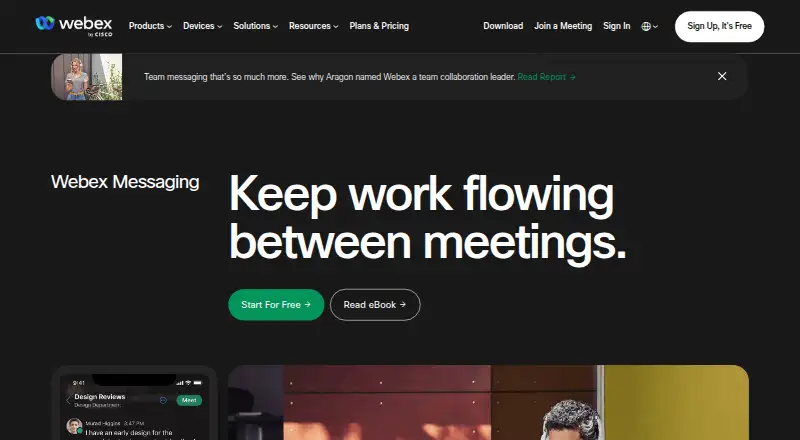
Webex App brings team messaging and video meetings together. Colleagues can exchange files, develop content collaboratively, and bring external participants into a space. Access it on the web or with apps for Windows, macOS, iOS, and Android. On the free plan, meetings can run for up to 40 minutes with as many as 100 attendees; paid plan prices require an inquiry.
Review
In a line
Webex App combines team chat and video meetings, accessible on the web and via apps for Windows, macOS, iOS, and Android.
What it does
Teams can exchange files, build content together, and manage discussions using mentions, flags, pins, forwarded messages, and threads. To work with an external collaborator, put their email address in a space.
Meetings include screen sharing, recording, and breakout rooms. Free meetings allow up to 100 participants and last no more than 40 minutes; paid plans list longer sessions, and Enterprise supports as many as 1,000 attendees.
How it connects
You can open Webex in a browser, but the app is required for the complete feature set, including calls to standard phone numbers. Connections include Box, Salesforce, Google Workspace, Microsoft, Slack, Miro, and Calendly.
End-to-end encryption is included in the messaging feature list. Enterprise includes FedRAMP-authorized security.
Good fit
Webex could work for teams seeking one place for messages and meetings, external collaboration, or connections to apps they already use. Its plans range from free through Enterprise, whose attendee limit is 1,000.
Watch for
The free tier limits meetings to 40 minutes and 100 participants. Certain capabilities, including calls to regular phone numbers, depend on the app, so browser-only use may fall short for some teams.
Review the price and included features of each plan before deciding.
Pricing
Webex Free costs $0 per user per year and allows unlimited meetings, each with a 40-minute maximum and up to 100 attendees. It includes local recording and basic support, and signup does not ask for payment details.
Prices for Webex Meet, Webex Suite, and Webex Enterprise are available on request. Meet lists up to 200 attendees, 24-hour meetings, and 10 GB of cloud recording; Suite lists 200 attendees and 24-hour meetings; Enterprise lists up to 1,000 attendees. Paid plans can be canceled or moved to free through account management at any time. The switch to Webex Free happens when the current billing period concludes.
Verdict
Consider Webex if your team wants messaging and video meetings and its browser, mobile, and desktop options suit your workflow. The free tier lets you begin without providing payment details, though its time and attendee limits may be restrictive. Teams needing longer sessions, cloud recording, or larger meetings should compare paid plans and request prices before committing.
Our take
Webex is a candidate for teams looking to pair messaging with video meetings, particularly when the free plan's 40-minute and 100-attendee ceilings are sufficient. Its integrations and web, desktop, and mobile access may suit teams using varied tools and devices. For longer meetings, cloud recording, or more attendees, compare paid tiers and request pricing. Some capabilities require the app, so browser access alone may not meet every need.
- No payment details are required to sign up for the free plan.
- Free meetings support up to 100 attendees and last up to 40 minutes.
- Messaging includes file sharing, co-creation, and threaded conversations.
- Web access and apps are available for Windows, macOS, iOS, and Android.
- Meetings include screen sharing, recording, and breakout rooms.
- Free meetings cannot exceed 40 minutes.
- The free tier has a 100-attendee meeting limit.
- Some features, including calls to regular phone numbers, require the app.
- Paid plan prices are available on request.
- Pick it ifTeams looking to combine messaging and video meetings; Organizations already using Webex's listed app connections
- Skip it ifYou need meetings longer than 40 minutes without paying for a plan; You need every feature to work in a browser
Pricing
Webex Free costs $0 per user per year and allows meetings of up to 40 minutes with up to 100 attendees. Prices for Meet, Suite, and Enterprise are available on request; check costs before selecting a paid tier.
- Webex Freebilled monthly · 100 attendees · 40 minutes per meetingFree
- Webex Meet200 attendees · 24 hours per meeting · 10 GB cloud recordingOn request
- Webex Meet200 attendees · 24 hours per meeting · 10 GB cloud recordingOn request
- Webex Suite200 attendees · 24 hours per meetingOn request
- Webex Suite200 attendees · 24 hours per meetingOn request
- Webex Enterprise1,000 attendeesOn request
- Webex Enterprise1,000 attendeesOn request
As pricing.webex.com lists them, checked 28 Sept 2026.
Questions
Is Webex App free?
Yes. Webex Free is $0 per user per year, with meetings lasting up to 40 minutes and accommodating up to 100 attendees. You can sign up without payment details.
Which devices can run Webex?
Webex works in a browser and has apps for Windows, macOS, iOS, and Android.
How many people can join a Webex meeting?
Free meetings support up to 100 attendees. Meet and Suite list a limit of 200, while Enterprise lists up to 1,000.
Can Webex meetings be recorded?
The free tier includes local recording. Meet lists 10 GB of cloud recording.
What apps does Webex connect to?
Named connections include Box, Salesforce, Google Workspace, Microsoft, Slack, Miro, and Calendly.
Can I cancel a paid Webex plan?
Yes. Account management lets you cancel a paid plan or downgrade to free at any time. A downgrade takes effect at the end of the current billing period.
Near it
All alternatives →- NNextiva#2 on this board
- DW
 Daktela WFM#3 on this board
- G
 GetWFM#4 on this board
- ACAgentforce Contact Center#5 on this board
- AC
 Amazon Connect#6 on this board
- AW
 Aspect Workforce#7 on this board
- GWGenesys Workforce Engagement Management#8 on this board
- DW
 Dialpad Workforce Management#9 on this board
- 8C
 8x8 Contact Center#10 on this board
- FAFrontLine Atlas#11 on this board