
Avira Free Security review
avira.com · checked 15 Oct 2026
Avira Free Security brings together antivirus, privacy, and device-maintenance features.
How it plugs in
Signal on Antivirus for Mac6.7#2 of 43
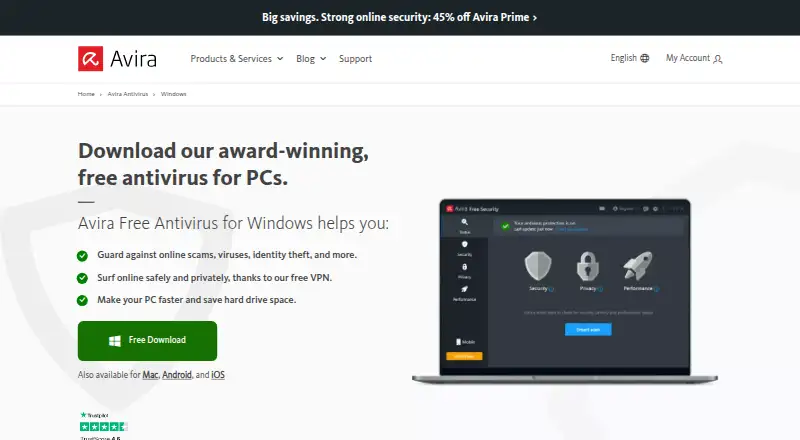
This free security tool runs on Windows, macOS, Android, and iOS. It offers continuous malware defense, scanning, browser protection, a password manager, and VPN access with usage limits. Windows adds software updating and tune-up functions; macOS has junk-file cleanup, while Android provides storage and performance tools. Community assistance is available to people using the free version.
Review
In a line
This free Avira product pairs malware defense with online privacy and device-maintenance features. Versions exist for Windows, macOS, Android, and iOS.
What it does
Avira’s cloud-based protection continuously monitors the system and checks questionable files. Users can launch or schedule full, quick, and custom scans; detected unsafe items are placed in quarantine for later restoration or removal.
Smart Scan checks security, privacy, and performance, covering malware, network threats, outdated software, tracking cookies, and unnecessary files. Its browser safety extension stops dangerous or phishing pages and malicious downloads, while also offering ad blocking and anti-tracking.
The free VPN has a monthly data allowance on desktop and a daily allowance in Android. Windows supplies an updater for programs and drivers, privacy-setting controls, and tune-up tools. On Mac, Junk Cleaner removes cache, log, and temporary files.
How it connects
Avira’s package includes apps for Windows, macOS, Android, and iOS plus a browser safety extension. No integrations with other software or public API are identified. The product is not open source.
People on the free plan can seek assistance from Avira’s community. To send a support request to Avira, users need an Avira license.
Good fit
It may suit people who want basic antivirus protection alongside browser privacy features and device-care tools in one free product. The password manager and limited VPN are additional included tools.
Windows users get an updater that patches third-party programs and drivers; Avira says it covers more than 150 Windows applications.
Watch for
The VPN has limited free data: desktop use is capped monthly, and Android use has a daily cap. The free version also does not include parental controls.
Smart Scan can flag issues that are minor or cannot be fixed in the free edition, and upgrade prompts may appear. Some reviewers have reported slow scans, occasional false alarms, extra apps, or high use of device resources.
Community help is available at no cost, but sending a support request to Avira requires an Avira license.
Pricing
Avira Free Security is offered at no charge. Its free plan provides antivirus, a desktop VPN allowance of 500 MB per month, an Android allowance of 100 MB per day, and apps for Windows, macOS, Android, and iOS.
A trial option appears, though its duration and paid-plan pricing are not provided.
Verdict
Choose Avira Free Security if you want a no-cost starting point for antivirus, browser safety, and a few privacy and cleanup tools, and you are comfortable with the VPN limits and community-based free help. Check the feature list for your device, since Windows, Mac, and mobile versions differ. It is a weaker fit if parental controls, direct Avira support without a license, or uncapped VPN access are important.
Our take
Avira Free Security may appeal to people seeking antivirus plus several privacy and device-care functions at no charge. Scheduled scans, its browser extension, password manager, and platform-specific extras broaden the package, while VPN allowances remain restricted and free assistance is community-based. Review the tools available on your device before installing. Look elsewhere if parental controls or direct support without a license are requirements.
- Free plan includes antivirus protection and a password manager.
- Users can schedule full, quick, or custom scans.
- Browser extension includes unsafe-site blocking and anti-tracking.
- Avira says the Windows updater covers more than 150 applications.
- Desktop VPN is limited to 500 MB of data per month.
- Android VPN is limited to 100 MB of data per day.
- No parental controls.
- An Avira license is required to contact Avira support directly.
- Pick it ifPeople seeking free antivirus with browser safety and privacy tools; Windows users who want an updater for programs and drivers; People comfortable getting free help from a community
- Skip it ifYou need parental controls or direct Avira support without a license; You need more VPN data than the free limits provide
Pricing
The no-cost plan supplies antivirus, restricted VPN allowances, and apps for Windows, macOS, Android, and iOS.
- Avira Free Securityfree antivirus · VPN with 500 MB monthly data on desktop · Android VPN 100 MB daily · Windows, macOS, Android and iOS appsFree
As avira.com lists them, checked 15 Oct 2026.
Questions
Is Avira Free Security free?
Yes. Avira offers a free plan with antivirus, limited VPN allowances, and apps for Windows, macOS, Android, and iOS.
What VPN allowance comes with the free plan?
Desktop VPN use gets 500 MB each month, while the Android app gets 100 MB per day.
Which devices does it support?
Avira offers versions for Windows, macOS, Android, and iOS. Supported computer versions include Windows 7 SP1, 8, 10, and 11, plus macOS 10.15 through 14.
Are parental controls part of Avira Free Security?
No. Parental controls are not included.
Can I get help without paying?
Free users may seek help from Avira’s community. Submitting a support request to Avira requires an Avira license.
Near it
All alternatives →- CClamAV#1 on this board
- PM
 PC Matic#3 on this board
- CCCombo Cleaner#4 on this board
- AO
 Avast One#5 on this board
- TA
 TotalAV Antivirus#6 on this board
- FS
 F-Secure Internet Security#7 on this board
- EH
 ESET HOME Security#8 on this board
- MDMicrosoft Defender for Business#9 on this board
- CFCrowdStrike Falcon Pro#10 on this board
- SE
 Seqrite Endpoint Protection Cloud#11 on this board