
Backlog: Project and Issue Tracking in One Place
nulab.com · checked 30 Sept 2026
Backlog brings project planning, issue handling, team collaboration, and code hosting together.
How it plugs in
Signal on Project Management Software6.6#36 of 188
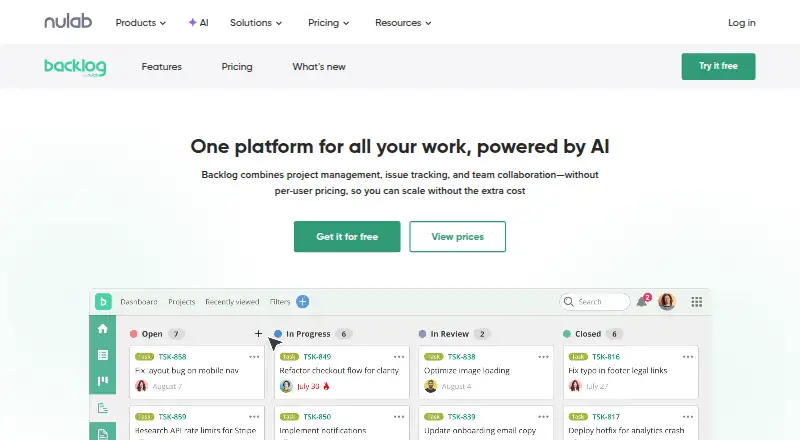
Backlog is a project and issue tracking service made by Backlog in Japan. You can use it through a browser or iOS and Android apps, while an API and an Enterprise private-server option extend access. Plans include a free tier for 10 users, paid tiers from $35 a month, and tools such as boards, Gantt charts, Git, and Subversion.
Review
In a line
Project planning, issue tracking, and team collaboration are handled within Backlog. Backlog was founded in 2004 and is headquartered in Fukuoka, Japan.
What it does
Its work-management features cover issue tracking, Kanban-style boards, subtasks, Gantt charts, burndown charts, issue templates, roadmaps, and custom workflows. Guest access is available.
For code management, Backlog supplies built-in Git repositories and Subversion support. Premium and Enterprise each include an AI Assistant with 2,000 monthly credits.
How it connects
Access is available through a browser and iOS or Android devices. Developers can create custom connections with the open API.
Backlog lists Cacoo, Slack, Jenkins, Microsoft Teams, Google Drive, Dropbox, and iCal Sync among its connections, along with Redmine and Jira importers. Enterprise adds SAML single sign-on, SCIM user provisioning, audit logs, centralized access controls, and private-server installation.
For teams comparing categories, Backlog sits between project management software and issue tracking software.
Good fit
Teams can keep projects, issues, collaboration, and code repositories in one account without per-user pricing. The plans range from small groups to organizations with unlimited users.
The browser and mobile apps help people follow work away from a desk, while Git, Subversion, boards, charts, templates, and roadmaps support software and general project work.
Watch for
Backlog does not provide automation rules or time tracking, so verify that your workflow can work without them.
Free permits 10 users, one project, and 100 MB of storage. Starter allows 30 users; Standard, Premium, and Enterprise allow unlimited users.
Paid plans offer a 30-day trial without a credit card, and plan changes are unavailable during that period. Enterprise private hosting and advanced security are reserved for that plan.
Pricing
The Free plan is billed free forever and covers 10 users, one project, 100 MB of storage, Git and Subversion, and a board.
At $35 per month on monthly billing, Starter provides 30 users, five projects, 1 GB of storage, Git and Subversion, a board, and subtasks. Standard is $100 per month on monthly billing and supports unlimited users, 100 projects, 30 GB of storage, six-month Gantt views, burndown charts, and issue templates.
Premium is $175 per month on monthly billing, with unlimited users and projects, 100 GB of storage, the AI Assistant, third-level subtasks, unlimited Gantt views, custom fields, and dedicated support. Enterprise pricing is on request and includes unlimited users, SAML SSO, SCIM provisioning, audit logs, advanced security and compliance, and private-server installation.
Email support is listed across plans. Enterprise includes an Enterprise Customer Success Manager.
Verdict
Choose Backlog if you want one workspace for projects, issues, team work, and code, and need options such as an API, mobile access, or private hosting.
Look elsewhere if automation or time tracking is essential, or if the Free plan's one-project limit is too tight. Compare its scope with tools such as Linear before committing.
Our take
Backlog makes sense for teams that prefer a single system for planning work, tracking issues, collaborating, and storing code. The free tier gives small groups a way to start, while higher plans add capacity, charts, templates, AI credits, support, and enterprise controls. Its open API and listed integrations can connect it to common workplace tools. The main trade-offs are the lack of automation rules and time tracking, plus tight project and storage limits on lower tiers. Test the trial around your needed plan because switching is blocked during the trial.
- Free plan permits 10 users and one project
- Built-in Git repositories and Subversion support
- Open API plus listed workplace integrations
- Mobile apps for iOS and Android
- Enterprise offers private-server installation
- No automation-rule feature
- No time-tracking feature
- Free plan has 100 MB storage
- Free plan allows only one project
- Paid trial does not allow plan switching
- Pick it ifTeams combining project and issue tracking; Groups needing built-in Git or Subversion; Organizations requiring private hosting
- Skip it ifAutomation rules or time tracking are essential; You need more than one project on the free plan; You require a fixed Enterprise price
Pricing
Backlog offers a Free plan for 10 users and one project. Paid plans have a 30-day trial.
- FreeFree forever · 10 users · 1 project · 100 MB storage · Git & Subversion · BoardFree
- Starterbilled monthly · 30 users · 5 projects · 1 GB storage · Git & Subversion · Board · Subtasking$35/mo
- Standardbilled monthly · Unlimited users · 100 projects · 30 GB storage · Gantt charts (6 months view) · Burndown chart · Issue templates$100/mo
- Premiumbilled monthly · Unlimited users · Unlimited projects · 100 GB storage · AI Assistant · 3rd level subtasks · Unlimited Gantt view · Custom fields · Dedicated support$175/mo
- EnterpriseContact · Unlimited users · SAML SSO · SCIM provisioning · Audit logs · Advanced security and compliance · Private server installationOn request
As nulab.com lists them, checked 30 Sept 2026.
Questions
Is Backlog free?
Yes. Free is billed forever at no charge and allows 10 users, one project, 100 MB of storage, Git and Subversion, and a board.
What does Backlog cost?
Monthly billing is $35 for Starter, $100 for Standard, and $175 for Premium. Enterprise pricing is on request.
Does Backlog have a trial?
Paid plans offer 30 days at no charge without requiring a credit card, and plans cannot be changed during the trial.
Can Backlog run on a private server?
Yes, private-server installation is available with Enterprise. That plan also provides controls for data, users, security settings, updates, and permissions.
What integrations does Backlog support?
Connections listed include Cacoo, Slack, Jenkins, Microsoft Teams, Google Drive, Dropbox, and iCal Sync; Redmine and Jira importers are also available.
Does Backlog offer an API?
Yes. An open API supports custom integrations, and Backlog provides documentation for developers.