Canva: Features, Plans, and Pricing
canva.com · checked 17 Nov 2026
Canva brings presentation, social, video, print, photo, website, and PDF design into one visual app.
How it plugs in
Signal on Graphic Design Software7.4#7 of 150
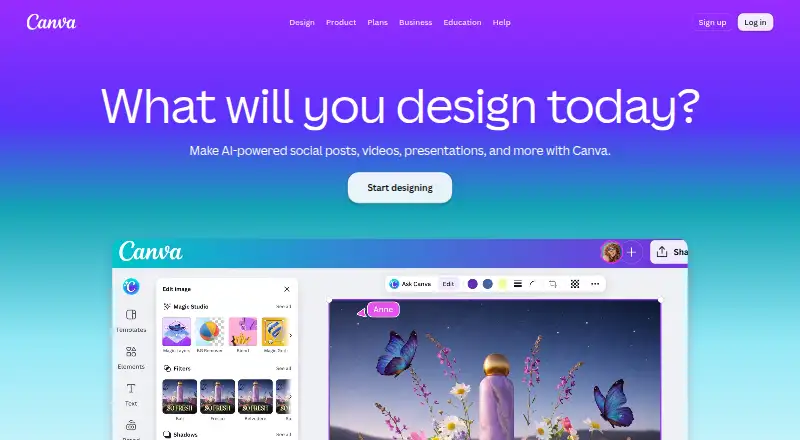
Canva combines templates, design editors, AI tools, and team features in desktop and mobile apps. It offers presentations, illustrations, brand kits, photo and PDF editing, and more. Its no-cost tier comes with templates, media, storage, a brand kit, and a capped amount of AI use. Paid plans add storage, collaboration, administration, and security options.
Review
In a line
Canva, created in 2013 by the company of the same name, is headquartered in Sydney, Australia. It runs on Windows, Mac, and mobile devices.
What it does
You can make presentations, slideshows, pitch decks, social posts, videos, print pieces, illustrations, websites, and PDFs. Photo editing and template-based design are included.
Its AI set covers Magic Layers, Magic Eraser, Background Remover, Magic Write, and AI image creation. Inputs can be text prompts or files including CSV, DOC, DOCX, XLS, XLSX, TXT, MD, PDF, JPG, and PNG.
Finished work can be saved as PDF, JPG, PNG, SVG, or PPT. Print-ready export is available.
How it connects
Canva offers an Apps Marketplace, access to its Apps SDK, and a REST API for building custom apps. It also supports publishing to ad platforms.
The service offers real-time collaboration, team administration, approvals, permissions, and brand kits. Enterprise adds single sign-on, user provisioning, audit logs, custom apps, and integrations.
Good fit
Canva suits people who need ready-made designs for presentations, social media, marketing, print, video, websites, or documents. Its templates and media library help non-specialists start quickly.
Teams can use shared editing, brand controls, approvals, and permissions. Qualifying nonprofits may get premium features at no cost for one team of up to 50 users.
Watch for
On the free tier, storage is 5GB, the single brand kit supports three colours, and Standard or Premium AI use is capped at 20 uses. AI usage is pooled across tools, resets monthly, and higher-tier tools consume more allowance.
Canva Enterprise does not include a free trial, although its sales team can arrange a demo. Check which plan supplies the storage, AI allowance, administration, and security controls your team needs.
Canva Offline is listed for Free, Pro Lite, Pro, and Business plans.
Pricing
Canva has a free plan and a 30-day trial. The free tier provides the core editor, templates and content library, basic collaboration and exports, 1.6M+ templates, 4.7M+ photos, videos, graphics, and audio, 5GB storage, one three-colour brand kit, and up to 20 Standard or Premium AI uses.
Pro has daily and weekly options, a free trial, 1TB cloud storage, and is billed ₹ 4,000 a year for one person; its listed price is not provided. Pro Lite costs ₹ 1,590 a year for one person and includes a free trial; no listed price is provided.
Business costs ₹ 6,800 a year per person, offers a free trial, and requires contacting sales; its listed price is not provided. Enterprise pricing is available on request, with no free trial, and includes organization-wide administration, advanced security, and support. During a Business trial, invited teammates can use the service without billing.
Verdict
Canva works well when you want template-led visual production for presentations, social content, video, print, photos, websites, and PDFs in one place. It is also a candidate for teams that need shared editing, brand rules, approvals, or enterprise administration.
The free plan is suitable for occasional work, but its storage and AI limits may matter to frequent users. Review the plan details before committing, especially if you need larger storage, more AI use, advanced controls, or enterprise security.
Our take
Canva is a practical option for people who want templates and visual editing without assembling separate tools. The free plan covers basic design and includes a large library, but storage, brand-kit, and AI limits make it less suitable for heavy use. Teams should check the AI allowance and controls they need before choosing a plan.
- Free plan includes 1.6M+ templates and 4.7M+ media items.
- Works on Windows, Mac, and mobile devices.
- Offers a REST API and Apps Marketplace.
- Supports real-time collaboration and brand kits.
- Files can be exported as PDF, JPG, PNG, SVG, or PPT.
- Free storage is 5GB, with one three-colour brand kit.
- The free tier permits up to 20 Standard or Premium AI uses.
- AI allowance is pooled and resets monthly.
- Enterprise does not provide a free trial.
- Pick it ifTemplate-led work for presentations, social posts, video, print, and documents; Teams needing brand controls, approvals, and shared editing; Nonprofits eligible for premium access for up to 50 users
- Skip it ifYou need an Enterprise free trial.; You require more free storage or AI use than the Free plan provides.; You need a clearly published price for every paid plan.
Pricing
Free is available. Pro Lite is billed ₹ 1,590 a year, Pro ₹ 4,000 a year, and Business ₹ 6,800 a year per person; listed prices are not provided for these plans. Enterprise is price on request. Pro Lite, Pro, and Business offer free trials, while Enterprise does not.
- Pro₹ 4,000 /year for one person · 1 TB cloud storageOn request
- Business₹ 6,800 /year per person · Team collaboration · Brand management · Higher usage and administration controlsOn request
- EnterpriseOrganization-wide administration · Advanced security and supportOn request
- Freeper year for one person · 5GB cloud storage; limited AI accessFree
- Pro Lite₹ 1,590 /year for one personOn request
As canva.com lists them, checked 27 Sept 2026.
Questions
Does Canva have a free plan?
Yes. The free tier provides the core editor, templates and content library, basic collaboration and exports, 5GB storage, one three-colour brand kit, and up to 20 Standard or Premium AI uses.
What devices does Canva support?
Canva offers desktop apps for Windows and Mac, plus a mobile app.
Does Canva provide an API?
Yes. Its integration options include the Apps SDK, a REST API for custom apps, and an Apps Marketplace.
What can Canva export?
You can export to PDF, JPG, PNG, SVG, or PPT, including print-ready output.
Does Canva offer a free trial?
A 30-day trial is listed. Pro Lite, Pro, and Business offer free trials; Enterprise does not, though sales can provide a demo.
How does Canva AI usage work?
AI use is pooled across listed tools, resets monthly, and higher-tier tools use more of the allowance.
Can nonprofits use Canva for free?
Qualifying nonprofits may receive a free subscription with premium features for one team of up to 50 users.