CleverWaiver Digital Waiver Software Review
cleverwaiver.com · checked 15 Oct 2026
Online and offline tools for creating, signing, storing, and managing digital liability waivers.
How it plugs in
Signal on Gym Waiver Software6.6#4 of 38
CleverWaiver is a cloud service for building, collecting, signing, and storing electronic liability waivers. Participants can use emailed links, web pages, kiosks, embedded forms, or phone-scanned QR codes. Offline mobile collection syncs later, while search, export, Stripe payments, and service integrations support waiver operations.
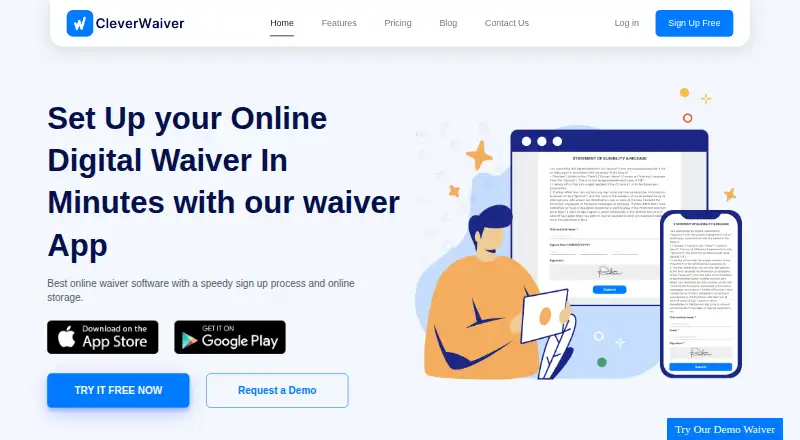
Review
In a line
CleverWaiver provides digital liability waiver creation and management. Businesses use it to collect signatures and keep signed forms in the cloud.
What it does
Users can make a waiver with the online builder or submit an existing paper form for CleverWaiver to recreate without an extra charge. Forms can collect signatures, initials, contact details, custom questions, photos, and identification images.
Participants may complete waivers from emailed URLs, browser pages, website embeds, QR prompts, or Android and iOS kiosk applications. The mobile app can record forms without connectivity and send them up when a connection is restored.
Templates can include a YouTube video, support adult signatures for minors, set age limits, use different languages, and carry your logo, colors, and wording. Stripe can be connected to take payment within the waiver. Returning participants can locate a prior waiver with their phone, email, or name and renew it.
Completed waivers can be looked up using a name, phone number, or signing date. Records can be downloaded in CSV format, and individual forms can be saved as PDFs. Bluetooth Star Micronics thermal printers can automatically produce a confirmation receipt after signing.
How it connects
CleverWaiver runs on the web, Android, and iOS, and lists an API platform. It provides copy-and-paste code for putting forms on a business website.
Its integration catalog lists tools including Zapier, HubSpot, Mindbody, payment services, storage platforms, marketing systems, rental products, and booking software. Additional PDF copies can go to Dropbox or Google Drive, while Mailchimp and Constant Contact can receive email addresses gathered through forms.
The service says waiver data is protected with 256-bit encryption, backed up every two hours, and not sold or shared with third parties.
Good fit
CleverWaiver is aimed at organizations collecting signed liability forms in tourism, rentals, events, fitness, and entertainment. The site also describes applications for retail, nonprofits, tattoo and body piercing, sports, and beauty.
It may suit organizations moving from paper to kiosks, QR-based phone signing, website forms, or advance email links. Businesses comparing digital waiver software can consider its search, export, and integration options.
Watch for
The no-cost tier is limited to under 20 waivers each month. Most subscription plans bill 20 cents for every waiver above their allowance, while Enterprise and Customized plans follow separate terms.
Check the number of templates and monthly waivers your operation needs before choosing a plan. Also confirm that your required service appears in CleverWaiver's integration catalog.
Pricing
CleverWaiver has a continuing free option for usage under 20 waivers per month, plus a 15-day trial on paid plans.
Basic is $9.99 monthly for 70 waivers and one template. Starter charges $29.99 per month for 500 waivers and three templates. Standard costs $49.99 monthly for 1,000 waivers with unlimited templates.
Professional is $123.99 per month for 2,500 waivers, while Premier is $223.99 for 6,000; both provide unlimited templates. Enterprise costs $499.99 monthly for 20,000 waivers and priority support. The Customized plan supports higher volume with pricing provided on request.
Verdict
Choose CleverWaiver if you need a single system for designing forms, collecting signatures in several ways, and finding or exporting completed waivers. Its offline mobile mode and kiosk apps help locations where customers sign in person.
The service is less suitable if you process more than the included monthly volume without budgeting for overage fees, or if you need an integration outside its listed catalog. Small operations can start free, while larger teams should compare template and waiver limits across paid plans.
Our take
CleverWaiver is a practical option for businesses moving liability paperwork online. It covers form creation, remote and on-site signing, offline collection, search, exports, and connections to payment, storage, marketing, and booking services. A no-cost option handles very low volume, and subscriptions range from 70 to 20,000 waivers per month. Review overage charges, template caps, and the integration list before committing. Organizations with unusual workflows or higher volumes may need the customized plan or another waiver service.
- No-cost access is available for monthly use under 20 waivers
- The mobile app can store signatures offline and sync them after reconnection
- Website embeds, QR codes, links, browsers, and kiosk apps support signing
- Completed waivers support name, phone, and date lookup plus CSV or PDF export
- Integrates with payment, storage, marketing, and booking services
- The free tier allows fewer than 20 waivers monthly
- Extra waivers cost 20 cents on most subscription plans
- Basic and Starter restrict the number of templates
- Customized pricing is supplied on request
- Pick it ifOrganizations replacing paper-based liability forms; Teams needing kiosks, QR-based signing, or offline collection; Operations requiring searchable waiver records and exports
- Skip it ifYou need a service absent from CleverWaiver's integration list; Your volume makes variable overage billing hard to forecast; You need over 20,000 waivers without seeking a custom quotation
Pricing
The free option can be used indefinitely while monthly volume remains below 20 waivers.
- FREEless than 20 waivers per month · available as long as neededFree
- BASIC$9.99/mo after your free trial · 70 waivers/mo · 1 waiver template · 20 cents per extra waiver$9.99/mo
- STARTER$29.99/mo after your free trial · 500 waivers/mo · 3 waiver templates · 20 cents per extra waiver$29.99/mo
- STANDARD$49.99/mo after your free trial · 1000 waivers/mo · unlimited waiver templates · 20 cents per extra waiver$49.99/mo
- PROFESSIONAL$123.99/mo after your free trial · 2500 waivers/mo · unlimited waiver templates · 20 cents per extra waiver$124/mo
- PREMIER$223.99/mo after your free trial · 6000 waivers/mo · unlimited waiver templates · 20 cents per extra waiver$224/mo
- Enterprise$499.99/mo after your free trial · 20000 waivers/mo · unlimited waiver templates · priority support$500/mo
- Customized PlanCustomized Price/mo after your free trial · more than 20000 waivers/mo · unlimited waiver templates · priority supportOn request
As cleverwaiver.com lists them, checked 15 Oct 2026.
Questions
Is a no-cost CleverWaiver option available?
Yes. The free tier remains available when monthly usage stays under 20 waivers.
What signing methods can customers use?
They can sign from emailed links, browser pages, embedded website forms, QR codes, or Android and iOS kiosk apps.
Does CleverWaiver support offline collection?
Yes. Its mobile app records waivers without an internet connection and uploads them once connectivity is restored.
Are completed waivers exportable?
Yes. Find them by name, phone number, or signing date, then download CSV records or individual PDFs.
Which outside services can CleverWaiver connect with?
The catalog includes services such as Zapier, HubSpot, Mindbody, Stripe, Dropbox, Google Drive, and Mailchimp, among others.
Can forms take payments?
Yes. A Stripe connection allows payment collection within the waiver form.
Do paid subscriptions include a trial period?
Yes. Paid plans provide a 15-day trial before charges begin.