
CompassDocs software review
compassdocs.io · checked 15 Oct 2026
Self-hosted team knowledge base for SOPs, technical documentation, policies, and internal knowledge.
How it plugs in
Signal on HR Knowledge Base Software7.7#1 of 50
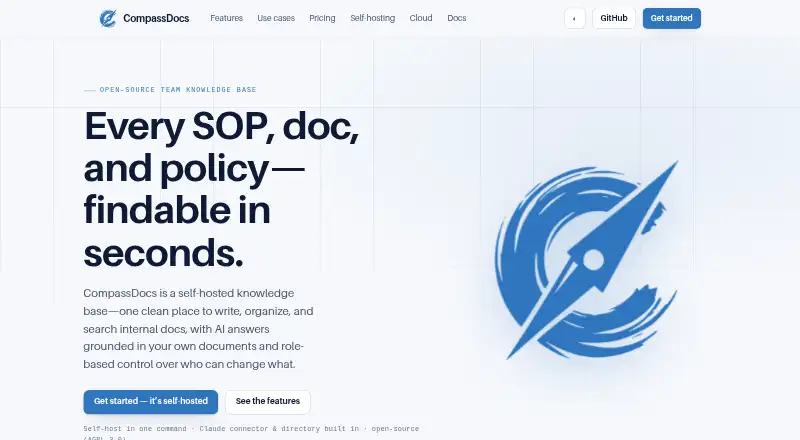
CompassDocs is an open-source, self-hosted knowledge base for teams. It supports rich text and Markdown documents, search, AI answers with citations, approvals, version history, private spaces, and public read-only sites. It runs through Docker or manual installation and offers free Community, planned Cloud, and Enterprise plans.
Review
In a line
CompassDocs is a self-hosted team knowledge base for writing, organizing, and finding SOPs, technical documents, policies, and internal information.
What it does
People can edit documents in rich text or Markdown, with live preview, comments, mentions, screenshots, checklists, tables, embeds, and diagrams. AI proofreading is included.
Questions can receive plain-English answers from team documents with inline citations. Without an AI provider key, CompassDocs returns ranked keyword results or matching snippets.
Spaces may be internal, private to selected groups, or public read-only sites. Version history includes side-by-side or inline differences, change notes, restore, and private draft branches. Strict approval mode sends edits to an Approver queue; open mode allows direct publishing.
How it connects
CompassDocs is open source under the GNU Affero General Public License 3.0 and provides a public REST API at /api/v1. The API uses bearer personal tokens with read or write scopes and allows up to 120 requests per minute.
Listed connections include Claude, Microsoft 365 and Entra, Google Workspace, Outlook, Webex, Teams, Slack, email, and webhooks. The Outlook add-in can search, answer questions, and insert document links.
Docker starts CompassDocs with PostgreSQL. It runs on Linux, macOS, Windows, the web, and through an API; manual installation needs Node.js 20 or newer and PostgreSQL. Self-hosted backups can be scheduled, retained, restored, and mirrored to S3, R2, MinIO, or Azure.
Good fit
CompassDocs suits teams that need controlled internal documentation, SOPs, policy publishing, or technical knowledge in one place. Its roles, custom permissions, review queue, acknowledgements, completion tracking, analytics, and audit logs support managed publishing.
It also fits organizations that want to host the system themselves, publish selected spaces as a branded public site, or connect document work with Microsoft, Google, chat, email, and Claude tools.
Watch for
Cloud hosting is listed as coming soon. The free Community plan requires self-hosting and community GitHub support. Enterprise features add SSO, SCIM, directory synchronization, policy acknowledgements, training tracking, and audit export.
Public sharing is off by default, and visibility affects search, AI answers, and API results. Check your AI-provider, identity, backup, and hosting requirements before choosing a plan.
Pricing
Community is free forever, with unlimited users and documents, self-hosting, AGPL-3.0 licensing, and community GitHub support.
Cloud is listed at $8 a month per user, from, and is coming soon. It includes managed hosting, updates, encrypted backups, managed TLS, a custom domain, and export to self-hosting. A free trial without a credit card is planned at launch.
Enterprise costs $599 a year per installation, with unlimited users. It adds SSO, Microsoft 365 and Entra sync, policy acknowledgements, training tracking, SCIM, and audit export. Dedicated support is an optional $3,000 per year add-on with a 48-hour response commitment.
Verdict
Choose CompassDocs if your team wants open-source documentation software that can stay on its own infrastructure while still offering AI-assisted answers, structured approvals, and broad workplace connections.
It is a better match for organizations with someone to operate Docker, PostgreSQL, backups, and security settings than for buyers seeking an immediately available managed service. The upcoming Cloud plan may suit teams that prefer hosting without running the system themselves.
Our take
CompassDocs is a practical option for teams building a controlled knowledge base around SOPs, policies, and technical material. Self-hosting, open licensing, version control, approval rules, and space visibility give administrators clear control over publishing. AI answers, keyword fallback, an API, Outlook access, and workplace connectors broaden how people find information. The main trade-off is operational responsibility: Community users run the service themselves, while Cloud is not yet available. Enterprise pricing and optional support make the product more suitable for organizations with formal identity, compliance, or training needs.
- Open-source Community edition with unlimited users and documents
- AI answers include inline citations, with keyword search as fallback
- Docker self-hosting plus scheduled encrypted backup options
- Roles, approvals, private spaces, and detailed permissions
- REST API, Outlook add-in, Claude, Microsoft, Google, and chat connections
- Cloud plan is listed as coming soon
- Community users must manage self-hosting and PostgreSQL
- Enterprise costs $599 a year per installation
- Dedicated support costs an additional $3,000 per year
- Pick it ifTeams managing SOPs, policies, and technical documentation; Organizations needing self-hosting and controlled publishing; Businesses connecting knowledge work to Microsoft, Google, or chat tools
- Skip it ifYou need an available managed cloud service today; You do not want to operate Docker, PostgreSQL, backups, or security settings; You need pricing below the Enterprise plan for identity and compliance features
Pricing
Community is free forever and self-hosted. Cloud is planned at $8 a month per user. Enterprise is $599 a year per installation, with optional dedicated support for $3,000 a year.
- Communityforever · unlimited users and documents · self-hosted · AGPL-3.0 · community GitHub supportFree
- Cloudper user; from; coming soon · managed hosting · updates · encrypted backups · managed TLS · custom domain · export to self-hosting$8/mo
- Enterpriseflat per install; unlimited users · SSO · Microsoft 365 and Entra sync · policy acknowledgements · training tracking · SCIM · audit export · optional $3,000/year dedicated support$599/yr
- Enterprise dedicated support add-on$3,000/yr · Optional add-on · 48-hour response commitment$3,000/yr
As compassdocs.io lists them, checked 15 Oct 2026.
Questions
Is CompassDocs open source?
Yes. The Community software is open source under the GNU Affero General Public License 3.0.
Does CompassDocs have a free plan?
Yes. Community is free forever, with unlimited users and documents, self-hosting, and community GitHub support.
How does its AI search work?
It answers plain-English questions from team documents and adds inline citations. Without an AI provider key, it uses ranked keyword results or matching snippets.
Can CompassDocs be self-hosted?
Yes. Docker is the recommended path. Manual installation requires Node.js 20 or newer and PostgreSQL; supported hosts include Linux, macOS, and Windows through Docker Desktop.
What integrations are listed?
CompassDocs lists Claude, Microsoft 365 and Entra, Google Workspace, Outlook, Webex, Teams, Slack, email, and webhooks.
Does it provide an API?
Yes. The public REST API is under /api/v1, uses bearer personal tokens with read and write scopes, and limits users to 120 requests per minute.
What does Enterprise add?
Enterprise adds SSO, Microsoft 365 and Entra synchronization, policy acknowledgements, training tracking, SCIM, audit export, and unlimited users.