Social Media Template Libraries
Content Drifter: Social Media Tools and Pricing
contentdrifter.com · checked 14 Oct 2026
AI-assisted social media content creation, scheduling, publishing, and analytics in one workspace.
How it plugs in
Signal on Social Media Template Libraries6.7#1 of 41
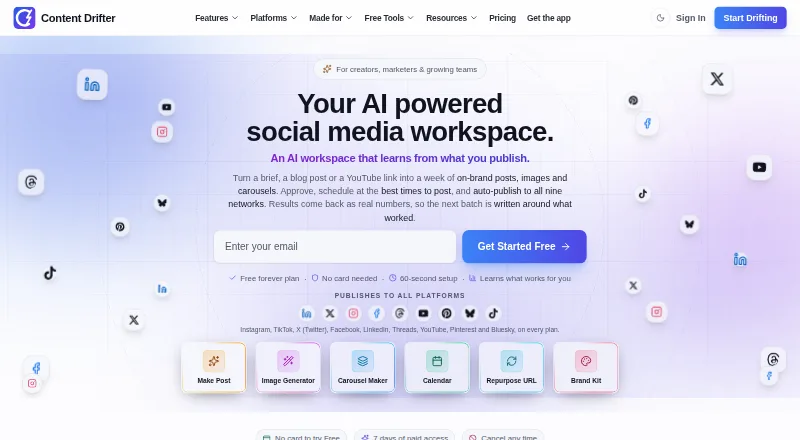
Content Drifter helps teams draft social posts in a saved brand voice, create branded images, and publish across nine social networks. It can turn blog posts or YouTube links into platform-specific posts, then use engagement metrics to shape later batches. Plans range from a free tier to paid options for larger teams, with some scheduling and repurposing tools limited to paid plans.
Review
In a line
Content Drifter is a social media workspace for creating, scheduling, publishing, and measuring AI-assisted posts.
What it does
Its AI Post Maker drafts posts for different platforms using a saved brand voice. Voice-Match scores drafts against the account’s writing style, and the image studio makes branded photos and graphics with editable layouts.
Starter and higher plans can turn a blog post or YouTube link into multiple posts. Pro and higher plans add five-slide Instagram and LinkedIn carousels. Engagement data from published posts feeds into later content batches.
How it connects
It publishes to Instagram, TikTok, X, Facebook, LinkedIn, Threads, YouTube, Pinterest, and Bluesky. The browser-based app can be installed on iPhone, iPad, Android, Windows, Mac, and Linux.
Starter and higher plans include a public MCP connection for AI assistants such as Claude Desktop, Cursor, and Cline. It can generate, schedule, publish, show upcoming posts, and manage brand kits; it cannot delete posts or read analytics through this connection. Content Drifter is hosted, not self-hosted.
Good fit
It may suit creators, small businesses, marketers, agencies, and other teams that want to prepare posts for several social networks in one place. Team collaboration and a per-post approval gate help keep publishing under review.
The Free plan has best-time recommendations. Paid plans add AI scheduling, and Pro and Agency can automatically choose and adjust publishing times.
Watch for
Free covers seven of the nine platforms and has monthly limits on posts, images, and publishing. Blog and YouTube repurposing starts with Starter, while Auto-Pilot and carousels require Pro or higher.
The maker says engagement metrics are kept for 90 days. The documented MCP connection has request limits and no delete or analytics-reading feature.
Pricing
The Free plan costs nothing. Lite is $12.50 a month when billed annually, or $15 a month at the monthly rate. Starter is $25 a month annually or $30 at the monthly rate; Pro is $50 or $60, respectively.
Business is $100 a month annually or $120 at the monthly rate. Agency is $165.83 a month annually or $2,388 a year at the monthly rate. Custom / Enterprise pricing is on request. A 7-day trial is available.
Verdict
Content Drifter is worth considering if you need social post creation and publishing across several networks, especially if brand controls, approvals, or team workspaces matter. Check each plan’s limits and which features are included before choosing: repurposing, Auto-Pilot, and carousels have different minimum tiers. The Free plan offers a way to start, but it limits monthly output and platform access.
Our take
Content Drifter makes sense for people who want to handle social drafts, brand styling, approvals, and publishing in one workspace. It covers nine networks and can reuse blog or video material, but those repurposing tools start above Free. Teams should compare post, image, publishing, and workspace limits against their workload, and check that the required scheduling features are in their chosen plan. If you need a self-hosted service or analytics through its MCP connection, this is not a fit.
- Publishes to nine social networks.
- Brand Kit stores logos, colors, voice, and topics.
- Approval workflow blocks posts until review.
- Engagement metrics inform later content batches.
- Free supports seven of the nine platforms.
- Repurposing requires Starter or higher.
- MCP has no delete or analytics-reading endpoint.
- The service has no self-hosting option.
- Pick it ifTeams managing branded posts across several social networks; Creators and marketers who want approvals before publishing
- Skip it ifYou need a self-hosted social publishing service; You need analytics or post deletion through the MCP connection
Pricing
A free plan is available, and a 7-day trial is available. Annual billing lowers the monthly equivalent compared with paying month to month. Plan limits and feature access vary, and Enterprise pricing is on request.
- Freefree forever · 8 AI posts/month · 8 AI images/month · 10 publishes/month · 1 workspace · 7 of 9 social platformsFree
- Starter$300/year billed annually or $360/year at monthly rate · 150 AI posts/month · 50 AI images/month · 500 publishes/month · 2 workspaces · 2 GB storage$25/mo
- Pro$600/year billed annually or $720/year at monthly rate · 300 AI posts/month · 120 AI images/month · 1,000 publishes/month · 5 workspaces · 3 team members · 10 GB storage$50/mo
- Agency$1,990/year billed annually or $2,388/year at monthly rate · 1,000 AI posts/month · 360 AI images/month · 3,600 publishes/month · 15 workspaces · 10 team members · 50 GB storage · white-label reports$166/mo
- Lite$150/year billed annually or $180/year at monthly rate · 60 AI posts/month · 25 AI images/month · 250 publishes/month · 1 workspace · all 9 platforms · 1 GB storage$12.50/mo
- Business$1,200/year billed annually or $1,440/year at monthly rate · 600 AI posts/month · 240 AI images/month · 2,000 publishes/month · 8 workspaces · 5 team members · 25 GB storage$100/mo
- Custom / EnterpriseLet's talk · For needs exceeding 10 brands, 7 seats, or 900 posts/monthOn request
As contentdrifter.com lists them, checked 14 Oct 2026.
Questions
Which social networks can Content Drifter publish to?
Instagram, TikTok, X, Facebook, LinkedIn, Threads, YouTube, Pinterest, and Bluesky.
Can it turn a blog post or video into social posts?
Yes. Starter and higher plans can use a blog post or YouTube link to create multiple platform-specific posts.
Does it have a free plan?
Yes. Free includes 8 AI posts, 8 AI images, and 10 publishes per month, one workspace, and access to seven social platforms.
What does the MCP connection do?
On Starter and higher plans, it can generate and publish content, schedule posts, show upcoming posts, and manage brand kits. It cannot delete posts or read analytics.
Can I review posts before they go live?
Yes. The approval workflow keeps a post from publishing until its final review is complete.
Does it have an app for phones and computers?
It installs from a browser as a progressive web app on iPhone, iPad, Android, Windows, Mac, and Linux.