Cursor: AI Coding Agent and Editor
cursor.com · checked 21 Oct 2026
An AI coding agent and editor for planning, building, fixing, and reviewing software.
How it plugs in
Signal on AI Development Tools6.7#2 of 26
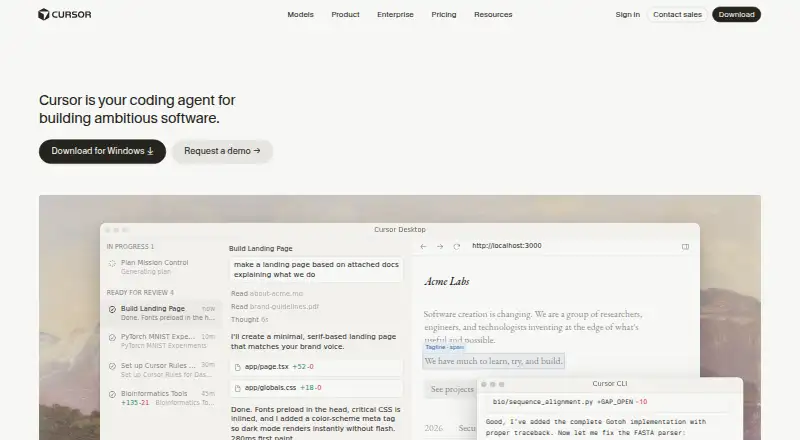
Cursor is a standalone coding editor for macOS, Windows, and Linux that also supports terminal work and Slack and GitHub workflows. It can understand repositories, suggest edits, run commands, and handle coding tasks through agent modes. A free plan is available, while paid plans add usage and team or enterprise controls.
Review
In a line
Cursor is an AI coding agent and editor for building software. It helps programmers understand repositories, plan features, fix bugs, and review changes.
What it does
Cursor offers code completion, code chat, and an Agent mode that carries out end-to-end coding tasks while keeping the programmer involved. Tab predicts the next edit, including multi-line changes.
It builds project context from a codebase and accepts files, symbols, images, web results, and documentation through @ mentions. It can run build, test, and install commands with confirmation and sandboxing enabled by default.
Git integration and checkpoints let users inspect history and roll back snapshots. Parallel agent fleets can work on tasks for hours or days.
How it connects
The desktop app runs on macOS, Windows, and Linux. Terminal work, Slack collaboration, and GitHub pull-request reviews are also supported. Cloud Agents integrate with Slack, GitHub, GitHub Enterprise Server, GitLab, and Linear.
The model picker includes offerings from OpenAI, Anthropic, Gemini, SpaceXAI, and Cursor. Plugins, Skills, and MCP connect prompts, extensions, and outside tools or data.
The Cursor CLI includes Agent, Plan, and Ask modes for scripts, continuous integration, and GitHub Actions. Python and TypeScript SDKs provide local and hosted agent runtimes. A beta Environments API can create and manage cloud-agent environments.
Cursor is proprietary and does not offer self-hosted server deployment. Its desktop requirements include macOS 12 or later, Windows 10 or later, or supported Debian, Ubuntu, RHEL, and Fedora Linux installations.
Good fit
Cursor suits people who want AI help inside a standalone coding editor, from autocomplete and repository questions to broad feature work and bug fixes.
It can fit teams using GitHub, Slack, GitLab, Linear, or terminal-based workflows. Enterprise includes controls for repositories, models, and MCP, along with auto-run, browser and network settings, audit logs, and service accounts.
Watch for
Large projects may lose context, use tokens inefficiently, make excessive changes, or encounter occasional command-line or model problems. Review generated work before keeping it.
Model capacity comes with every plan; once that allowance runs out, on-demand use remains available and is charged in arrears. With Privacy Mode enabled, Cursor says customer data is not used for training and that technical and contractual safeguards apply with model providers.
Cursor is not open source and cannot be deployed as a self-hosted server.
Pricing
Cursor has free options. Free and Hobby plans have limited Agent or chat use and access to Composer; Hobby does not require a credit card.
Plus costs $8 a month and uses Grok models only. Pro costs $20 a month and adds higher Agent limits, frontier models, MCPs, skills, hooks, cloud agents, and usage-based Bugbot billing. Teams costs $30 a month per user.
Premium costs $30 a month with four times Plus usage, cloud agents, automations, code hosting, AI reviews, and third-party models at API list price. Pro+ is $60 a month, Super is $100 a month, and Ultra is $200 a month, with increasing usage or access limits. Enterprise is price on request.
Verdict
Choose Cursor if you want an AI-first editor that can work across a repository, run terminal commands, and connect coding tasks with team services. Its free entry point allows a limited trial, while paid tiers cover individual, team, and enterprise needs.
Look elsewhere if you require open-source software or self-hosted deployment. Also check how your projects handle context and usage billing, since larger codebases and work beyond included amounts may need closer oversight.
Our take
Cursor is a fit for programmers who want repository-aware assistance, natural-language coding tasks, terminal access, and connections to services such as GitHub or Slack. The free plans offer a way to start, while paid levels add more model usage, cloud agents, automation, and administration. It is less suitable for buyers that require open-source licensing or a self-hosted server. Teams should also review usage limits and the extra billing that begins after included model capacity runs out.
- Free plans are available, including one with no credit card required.
- The available model lineup includes OpenAI, Anthropic, Gemini, SpaceXAI, and Cursor.
- Runs on macOS, Windows, Linux, web, iOS, and through an API.
- Includes terminal, GitHub, Slack, GitLab, and Linear connections.
- CLI and SDKs support scripts, CI, and hosted or local agents.
- Cursor is proprietary and has no self-hosted server option.
- Large codebases can lose context and use tokens inefficiently.
- Use beyond the included model allowance continues on an arrears-billed basis.
- Some plans restrict model choice or Agent and chat usage.
- Pick it ifDevelopers wanting an AI coding editor with repository context; Teams working with GitHub, Slack, GitLab, or Linear; Organizations needing enterprise access and audit controls
- Skip it ifYou require open-source software or self-hosted deployment.; Your projects cannot accommodate usage-based billing after plan limits.; You need unrestricted Agent, chat, or model access on a free plan.
Pricing
Free and Hobby plans are available with limited use. Usage beyond the included amount is charged in arrears.
- Freemonthly · limited Agent and chat usage · Composer accessFree
- HobbyFree · No credit card required · Limited Agent requests · Access to ComposerFree
- Plusmonthly · Grok models only$8/mo
- Pro$20/mo. · Extended Agent limits · Frontier models · MCPs, skills, and hooks · Cloud agents · Bugbot usage-based billing$20/mo
- Teamsper user monthly · team administration and controls$30/mo
- Premiummonthly · 4× Plus usage · cloud agents · automations · code hosting · AI reviews · third-party models at API list price$30/mo
- Pro+$60/mo. · 3x Pro Agent limits · Higher Grok Bot usage limits · Frontier models · Cloud agents$60/mo
- Supermonthly · 15× Plus usage · priority model access$100/mo
As cursor.com lists them, checked 21 Oct 2026.
Questions
Is Cursor free?
Yes. Cursor has Free and Hobby plans with limited Agent or chat use and Composer access. Hobby does not require a credit card.
Which computers can run Cursor?
The desktop app supports macOS 12 or later, Windows 10 or later, and supported Debian, Ubuntu, RHEL, and Fedora Linux installations. Cursor also lists web, iOS, and API platforms.
What services does Cursor connect to?
Slack, GitHub, GitHub Enterprise Server, GitLab, and Linear are available to Cloud Agents. Cursor also works in a terminal and can review GitHub pull requests.
Can Cursor use different AI models?
Cursor's model choices include OpenAI, Anthropic, Gemini, SpaceXAI, and Cursor. The Plus plan is limited to Grok models.
Does Cursor offer an API or SDK?
A beta Environments API manages cloud-agent environments. Python and TypeScript SDKs provide local and Cursor-hosted agent runtimes.
Is Cursor open source or self-hosted?
No. Cursor is proprietary and does not provide self-hosted server deployment.
What happens after included usage is used?
After the included allowance is exhausted, on-demand model use can continue and is billed in arrears.