DriveWipe: Free Open-Source Disk Wiping Suite
github.com · checked 15 Oct 2026
Open-source drive wiping and management tool with command-line, terminal, and desktop interfaces.
How it plugs in
Signal on Disk Wiping Software7.6#1 of 28
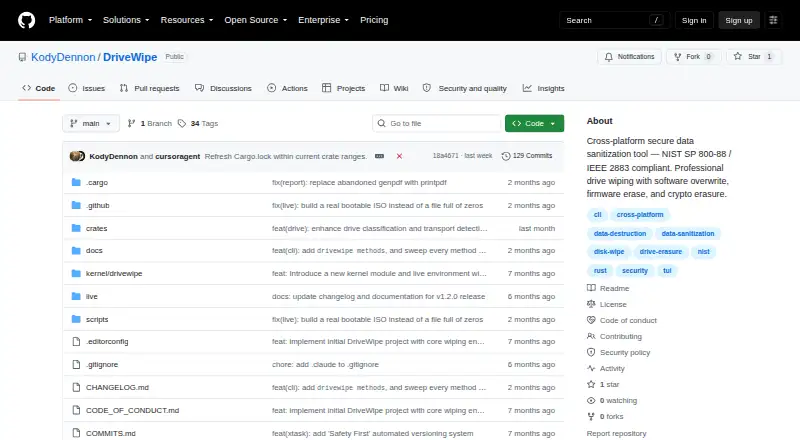
DriveWipe is a free, open-source suite for sanitizing and managing disks on Linux, macOS, and Windows. It offers 27 software, firmware, and hybrid wipe methods, verification, resume support, cloning, partition tools, health checks, forensic analysis, bootable media, PXE boot, and audit reports. Raw-device work requires administrator access.
Review
In a line
DriveWipe is an open-source tool for wiping and managing disks. It runs on Linux, macOS, and Windows, and can also boot from USB or ISO media.
What it does
The project lists 27 wipe methods covering software overwrites, firmware erase, and cryptographic erasure. Four DriveWipe Secure methods combine device-specific steps for HDD, SATA SSD, NVMe, and USB media.
It can verify data by reading it back byte by byte, optionally after each pass, and saves state every 10 seconds so interrupted jobs can resume. A live queue supports wiping several drives at once.
Beyond wiping, it monitors drive health, clones disks, manages GPT and MBR partitions, and provides forensic checks such as entropy analysis, signature scans, sampling, hidden-area detection, and chain-of-custody reports.
Operations can create JSON audit logs plus JSON or PDF certificates. Bootable USB/ISO media and PXE network boot support larger wiping setups.
How it connects
DriveWipe is open source and delivered as one binary with command-line, terminal, and desktop interfaces. Its code is organized into Rust crates, with a Linux kernel module for low-level ATA and NVMe access.
No hosted web API or SDK is documented. Extensibility comes through Rust crates, command-line commands, configuration, and kernel ioctl interfaces—system calls for hardware operations.
Release archives cover Linux, macOS, and Windows on x86_64 and ARM64. Linux and macOS provide a shell installer with checksum checks, uninstall support, version pinning, and custom install locations.
Good fit
DriveWipe suits people who need free disk sanitization for personal, hobby, or commercial work. It supports SSDs and removable media.
It is also suited to administrators handling many drives, because it offers parallel queues, PXE boot, saved-state resumption, verification, and audit certificates. Partitioning, cloning, health snapshots, and forensic tools extend it beyond a basic wipe utility.
Watch for
Raw-device operations require root or Administrator privileges, although installation does not. Wiping is irreversible, and the license places responsibility on the user to select the correct drive.
ATA Secure Erase and TCG Opal crypto erase are not supported on macOS. TCG Opal crypto erase is also listed as not yet supported on Windows. The project warns about SSD software wiping and USB bridges.
Building from source requires Rust 1.94 or newer. The custom license disclaims warranties and liability, and security-related organizations are encouraged to support or contribute to development.
Pricing
DriveWipe is free. The stated plan covers personal, hobby, and commercial use, with government, intelligence, forensic, and security organizations encouraged to support development.
There is no free trial because the software is already offered at no cost.
Verdict
Choose DriveWipe if you need an open-source disk wiping suite with many erase methods, verification, resume support, bootable environments, and audit output. Its cloning, partition, health, and forensic functions make it broader than a simple shredder.
Look elsewhere if your workflow depends on a hosted web API, or if you need ATA Secure Erase on macOS or TCG Opal crypto erase on macOS or Windows. For other options, compare Data Erasure Software and Disk Wiping Software.
Our take
DriveWipe is a practical choice for people who want free, open-source control over disk sanitization across Linux, macOS, and Windows. Its 27 methods, verification, resumable jobs, boot media, PXE support, and audit certificates suit both single-drive work and larger operations. The same breadth brings responsibility: raw-device access needs elevated rights, wiping cannot be undone, and some firmware erase options are unavailable on macOS and Windows. It is less suitable for teams seeking a hosted API or SDK.
- Free for personal, hobby, and commercial use
- 27 software, firmware, and hybrid wipe methods
- Byte-level verification and resumable wipe sessions
- Bootable USB/ISO and PXE network boot
- JSON and PDF erasure reports
- Raw-device work requires root or Administrator access
- Wiping is irreversible and drive selection is the user's responsibility
- Some ATA and TCG Opal erase modes are unavailable on macOS or Windows
- No hosted web API or SDK is documented
- Pick it ifFree disk wiping with verification and audit reports; Administrators sanitizing multiple drives; Users needing bootable or PXE wiping
- Skip it ifYou need a hosted web API or SDK; You require ATA Secure Erase on macOS; You require TCG Opal crypto erase on macOS or Windows
Pricing
DriveWipe is free for personal, hobby, and commercial use. Government, intelligence, forensic, and security organizations are encouraged to support development. There is no separate trial.
- DriveWipeFree for personal, hobby, and commercial use; government, intelligence, forensics, and security organizations are expected to support or contribute to developmentFree
- Freepersonal use · hobby use · commercial use · government, intelligence, forensic and security organizations encouraged to support developmentFree
As github.com lists them, checked 30 Sept 2026.
Questions
Is DriveWipe free?
Yes. The plan is free for personal, hobby, and commercial use. Government, intelligence, forensic, and security organizations are encouraged to support development.
Which systems can run DriveWipe?
Release archives are available for Linux, macOS, and Windows on x86_64 and ARM64. Bootable USB/ISO media and PXE network boot are also supported.
How many wiping methods does it include?
The project lists 27 methods across software overwrites, firmware erase, and hybrid approaches.
Can an interrupted wipe continue later?
Yes. Wipe state is saved automatically every 10 seconds, allowing interrupted sessions to resume.
Does DriveWipe verify erased data?
Yes. It supports byte-for-byte read-back verification and optional verification after every pass.
Are administrator rights needed?
Root or Administrator privileges are required for raw-device access, but not for installation.
Does it provide an API?
No hosted web API or SDK is documented. Extensibility is provided through Rust crates, CLI commands, configuration, and kernel ioctl interfaces.
What reports can it create?
Operations can produce JSON audit logs and JSON or PDF certificates.
Near it
All alternatives →- LLethe#2 on this board
- SDStrix Disk Cleaner#3 on this board
- BD
 BitRaser Drive Eraser#4 on this board
- AKActive@ KillDisk#5 on this board
- Nnwipe#6 on this board
- CECertus Erasure#7 on this board
- SSecureWipe#8 on this board
- MEMultiDrive Erase Drive#9 on this board
- H
 HDShredder#10 on this board
- SShredIt#11 on this board