
Event Schedule: Features, Integrations, and Pricing
eventschedule.com · checked 15 Oct 2026
Event Schedule combines event calendars, ticketing, appointments, newsletters, and check-ins.
How it plugs in
Signal on Event Management Software7.3#5 of 181
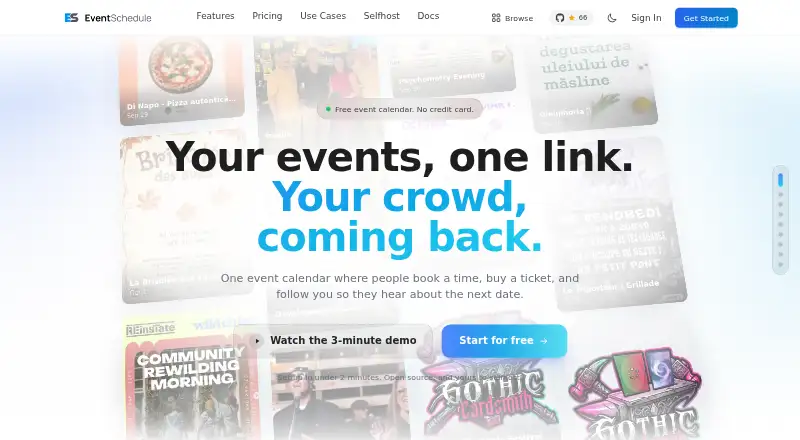
Event Schedule helps venues, performers, curators, and communities publish event calendars, take registrations and ticket payments, book appointments, and check in attendees. It also includes newsletters and audience tools. A free plan is available; paid plans start at $5 a month. You can use it online or install it on your own server; Pro adds API access and webhooks.
Review
In a line
Event Schedule combines calendars for events with tools for ticket sales, appointment bookings, newsletters, and attendee check-in. Organizers can use the hosted service or install it themselves.
What it does
Organizers can create recurring schedules, accept registrations, sell tickets, and check attendees in by scanning ticket QR codes. Ticket options include add-ons and promo codes. Guests can reserve free or paid appointments in their own time zone, and calendar synchronization is intended to reduce double-booking.
The platform includes newsletters with templates, audience segments, A/B testing, and delivery statistics. Pasted copy, links, or flyer images can be converted into event records, within daily limits. Built-in analytics report views, device types, popular events, check-ins, and sales.
How it connects
Two-way calendar synchronization is available for Google Calendar, Microsoft 365 or Outlook, and CalDAV. Supported payment services are Stripe, PayPal, Payfast, and Invoice Ninja. The integrations list also includes Eventbrite import, Meta ads, WhatsApp, and Google Wallet.
The Pro plan offers a REST API and webhooks to link Event Schedule with other services. Self-hosting is available, with Docker, Softaculous, and manual installation among the deployment options. The published source uses the Attribution Assurance License, which requires attribution to stay with the code.
Good fit
The maker positions the product for talent, venues, and curators, such as musicians, DJs, comedians, and food trucks. It may work for organizers looking to handle calendars, ticketing, appointment booking, email newsletters, and check-in through a single service.
Watch for
A seating map with customer seat selection is offered only on Enterprise or self-hosted installations. On the free plan, there is one appointment type and 10 newsletter recipients per month; the limits rise to 100 on Pro and 1,000 on Enterprise.
Manual self-hosting calls for PHP 8.2 or later, MySQL 5.7 or MariaDB 10.3, Apache or Nginx, HTTPS, and a cron job running every minute. API use is capped per IP address at 300 reads and 30 writes per minute.
Pricing
Forever Free is $0 and comes with unlimited events and schedules, free registration, one appointment type, 10 newsletter recipients a month, and one team member. A separate Free plan listing also describes a free-forever tier with the same listed limits.
Pro is $5 monthly after a 7-day trial, or $50 for a year. It enables paid tickets and bookings, unlimited appointment types, the REST API and webhooks, and 100 newsletter recipients each month.
Enterprise is $15 monthly after a 7-day trial, or $150 for a year. It includes reserved seating, as many as five team members, custom domains, private events, WhatsApp event creation, and 1,000 newsletter recipients per month.
Verdict
Event Schedule is an option for event work that involves publishing schedules, taking bookings or ticket sales, and handling check-ins or newsletters. Free covers event publishing and free registration, while Pro enables paid transactions and API access. Compare the newsletter and team-member limits with your needs; reserved seating calls for Enterprise or self-hosting. Self-hosting provides another deployment route, but requires a server that meets the technical requirements.
Our take
Consider Event Schedule for organizing events that need calendars, registration, ticketing, appointments, newsletters, and check-in tools. The free plan covers unlimited schedules and events with free registration, with limits on appointment types, newsletter recipients, and team members. Pro adds paid bookings and API access; Enterprise provides reserved seating and higher allowances. Before self-hosting, check that you can operate a server meeting the listed requirements. Reserved seating requires Enterprise or self-hosting.
- Free plan supports unlimited events and schedules.
- Calendar sync works in both directions with Google, Microsoft 365/Outlook, and CalDAV.
- Pro provides a REST API and webhooks.
- Ticket revenue is paid to the organizer’s own payment account; the company says it charges no platform fee.
- Self-hosting is offered, and the maker says Enterprise features are included at no cost.
- Free includes one appointment type and 10 newsletter recipients per month.
- Reserved seating requires Enterprise or self-hosting.
- Self-hosting has specific server software requirements and needs a recurring cron job.
- API access is limited to 300 reads and 30 writes per minute per IP.
- Pick it ifVenues, performers, and curators managing event schedules and attendance; Organizers seeking ticket sales, appointment booking, and newsletters together
- Skip it ifYou need reserved seating but cannot use Enterprise or self-host.; You need more appointment types or newsletter recipients than the free plan permits.
Pricing
The free tier supports event publishing and free registration, with limits on appointments, newsletters, and staffing. Pro costs $5 monthly or $50 yearly and adds paid bookings, API access, and a larger newsletter allowance. Enterprise costs $15 monthly or $150 yearly and includes reserved seating and higher limits. Paid monthly plans have a 7-day trial.
- Forever Free$0 /month/year · Unlimited events and schedules · 1 free appointment type · 10 newsletter emails/month · Free event registration and QR check-inFree
- Promonthly after 7-day trial; $50/year when billed annually · paid tickets and bookings · unlimited appointment types · REST API and webhooks · 100 newsletter recipients/month · 1 team member$5/mo
- Enterprisemonthly after 7-day trial; $150/year when billed annually · reserved seating · up to 5 team members · custom domains · private events · WhatsApp creation · 1,000 newsletter recipients/month$15/mo
- Freeforever · unlimited events and schedules · unlimited free registration · 1 appointment type · 10 newsletter recipients/month · 1 team memberFree
As eventschedule.com lists them, checked 29 Sept 2026.
Questions
Does Event Schedule have a free plan?
Yes. Forever Free includes unlimited events and schedules, free registration, one appointment type, 10 newsletter recipients per month, and one team member.
How much does Event Schedule cost?
Pro costs $5 a month or $50 a year. Enterprise costs $15 a month or $150 a year. Paid monthly plans have a 7-day trial.
Which calendars can it sync with?
It can synchronize in both directions with Google Calendar, Microsoft 365 or Outlook, and CalDAV.
Can I take ticket payments through Event Schedule?
Yes. Pro supports paid tickets and bookings. Payouts go to the organizer’s own payment account, and the company says it charges no platform fee.
Can I host Event Schedule on my own server?
Yes. Deployment choices include Docker, Softaculous, or manual installation. The maker says Enterprise features are included at no cost for self-hosted installations.
Which plan includes reserved seating?
Reserved seating is offered with Enterprise or on self-hosted installations.
Does Event Schedule provide an API?
Yes. Pro includes a REST API and webhooks. API use is limited to 300 reads and 30 writes per minute per IP address.