
ExpoCut: Mobile Video Editor With On-Device AI
expocut.com · checked 9 Oct 2026
ExpoCut brings on-device AI, multi-track editing, and optional assistant control to a mobile video editor.
How it plugs in
Signal on Video Editing Software6.7#25 of 153
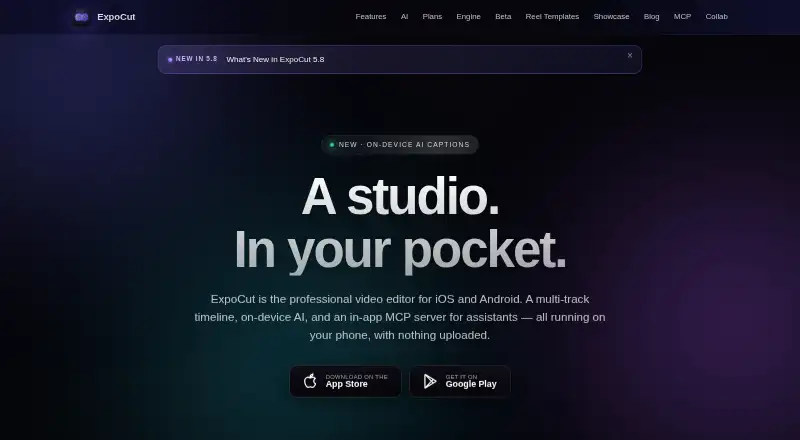
On iOS and Android, ExpoCut provides unlimited tracks, frame-precise cutting, captions, silence removal, audio cleanup, and exports reaching 4K at 60 frames per second. Most work stays on the device. Compatible assistants such as Claude and ChatGPT can edit and export projects through an optional in-app MCP server. A desktop renderer also runs on macOS, Windows, and Linux.
Review
In a line
ExpoCut comes from a Valley Stream, New York maker and is built as a mobile video editor. It combines a multi-track timeline with on-device artificial intelligence tools.
What it does
Video, audio, image, text, sticker, and shape tracks can be added without a stated limit, then trimmed or split at exact frames.
Tools cover automatic captions, silence removal, audio cleanup, background removal, chroma key, automatic reframing, and text-to-speech voiceover. The app also includes royalty-free Pexels photos and videos plus built-in sound effects.
Hardware-based encoding produces H.264 or HEVC files as large as 3840×2160 at 60 frames per second.
How it connects
The app runs on iOS, iPadOS, and Android. Editing, rendering, captions, and exports are handled on the device by default, with projects and media staying local unless cloud AI is selected.
An optional in-app MCP server gives Claude, ChatGPT, or another MCP-compatible assistant a way to edit and export projects. MCP is a connection method for giving assistants access to app actions.
For macOS, Windows, and Linux, a command-line renderer can process projects into MP4, HLS, image-frame sequences, or a preview stream.
Good fit
ExpoCut suits mobile creators who need several media layers, precise trimming, captions, voiceover, or quick cleanup without sending projects to a server.
It can also fit people who want assistant-driven editing, or teams considering the maker’s private-beta toolkit with remote rendering, branding, custom AI providers, audit logs, and private support.
Watch for
Free-plan exports end with a three-second ExpoCut outro. Clean exports are listed under Pro instead.
Cloud AI is opt-in, while Firebase Analytics and Crashlytics are on by default; both analytics services can be disabled in Settings. API keys are kept in Apple’s Keychain or Android’s Keystore.
The desktop renderer is separate from the mobile downloads, so check which workflow you need.
Pricing
ExpoCut’s Free plan costs $0 forever, needs no account, and includes the full timeline editor with exports up to 4K; those exports include a three-second outro.
Pro and Elite use local store pricing with weekly through annual billing options, but no amounts are listed. Pro includes effects, shaders, transitions, AI voiceover, stem separation, captions, clean audio, auto-cut, stabilization, keyframes, custom templates, and clean exports. Elite includes all Pro features and adds motion paths, video-inside-text, AI background removal, template import/export, and a commercial license.
Verdict
Choose ExpoCut if you want a free starting point, device-based processing, and a mobile editor that can grow into assistant-controlled or desktop rendering workflows.
The free tier is useful for testing the timeline and 4K output, but its outro may not suit finished publishing. Buyers who need clean exports or advanced effects must request the local store prices for Pro or Elite before committing. It is less suitable if you require fixed, published subscription costs or a fully cloud-based editing process.
Our take
ExpoCut is a practical choice for mobile-first editing when local processing matters. Its free plan covers the core timeline and 4K export, while assistant connections and a desktop renderer extend the workflow beyond a phone. The main buying uncertainty is cost: Pro and Elite have no published amounts, only local-store billing intervals. Free exports also carry a short outro, so professional publishing may require a paid tier. Check whether your device, preferred assistant, and need for desktop rendering match the available platforms before choosing it over other video editing software.
- The no-cost tier includes the complete timeline editor and 4K output.
- Video, audio, image, text, sticker, and shape tracks can be used without a stated limit.
- Captions, silence removal, and audio cleanup are available.
- Editing and rendering stay on-device by default.
- An optional MCP server lets assistants work with editing and export.
- Free-plan output includes a three-second ExpoCut outro.
- Pro and Elite prices are not published.
- Analytics and crash reporting start enabled by default.
- Cloud AI requires opt-in, so some features may depend on that choice.
- Pick it ifMobile creators needing layered editing and 4K output; People who want local processing or assistant-controlled projects; Teams evaluating a private-beta rendering toolkit
- Skip it ifYou need published prices before choosing a paid plan.; You require clean exports without paying for Pro or Elite.; You want a fully cloud-hosted editor by default.
Pricing
The no-cost Free plan lasts forever and needs no account, but its exports include a three-second outro.
- Free$0 forever · No account needed · Full timeline editor · Export up to 4K · Exports end with a 3-second ExpoCut outroFree
- ProLocal store price; weekly through annual options · Full effects, shaders and transitions · AI voiceover and stem separation · Auto captions, Clean Audio, Auto-Cut and stabilization · Keyframes and custom templates · Clean exportsOn request
- EliteLocal store price; weekly through annual options · Everything in Pro · Motion paths and video-inside-text · AI background remover · Template import/export and commercial licenseOn request
As expocut.com lists them, checked 9 Oct 2026.
Questions
Is ExpoCut free?
Yes. The Free plan is billed at $0 forever, needs no account, and includes the full timeline editor with exports up to 4K.
Which devices can run ExpoCut?
The mobile app is available for iOS, iPadOS, and Android via the Apple App Store and Google Play.
Does ExpoCut upload my projects?
Editing, rendering, captions, and export are performed on-device, and projects and media remain unuploaded by default. Cloud AI is optional.
Can an AI assistant control ExpoCut?
Yes. Through the optional in-app MCP server, Claude, ChatGPT, or another MCP-compatible client can edit and export projects.
What does the desktop renderer support?
On macOS, Windows, and Linux, the command-line renderer outputs MP4, HLS, frame sequences, or a preview stream.
Do free exports have branding?
Free exports end with a three-second ExpoCut outro, while Pro lists clean exports as a feature.