FLOWN: Online Coworking for Focus and Accountability
flown.com · checked 15 Oct 2026
Online coworking with guided focus sessions, virtual rooms, planning and accountability.
How it plugs in
Signal on Virtual Study Room Apps6.7#2 of 37
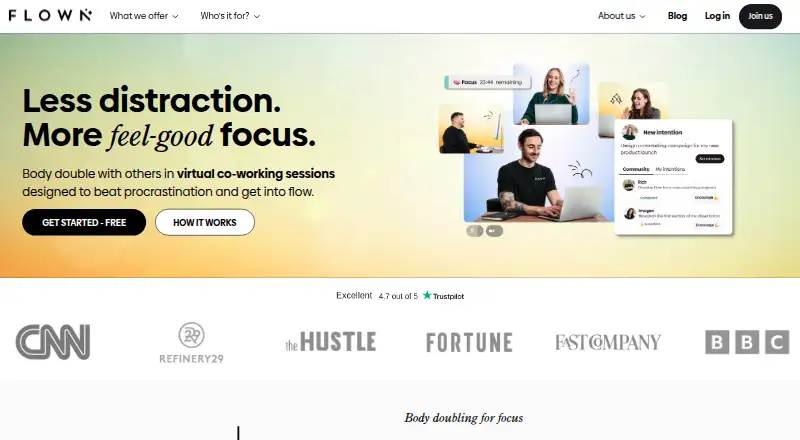
FLOWN is an online coworking service built around body doubling: working near other people to limit distraction. It offers facilitator-led one- and two-hour sessions, an always-open Drop-In room, private browser rooms, planning and recharge activities. It runs through a web app on computers and phones, with calendar feeds and some Zoom sessions.
Review
In a line
FLOWN is an online coworking platform for focused work and accountability. It combines live sessions with virtual rooms where people work alongside others.
What it does
You can join a one-hour Power Hour or a two-hour Deep Dive led by a facilitator. Drop-In is an always-open focus room for starting work without booking.
The private Focus Room creates a browser-based space for invited friends, with an agenda. FLOWN also offers daily and weekly Take-Off planning, guided recharge activities, and community sessions.
A personal timer supports preset or custom focus and break lengths, repeating Pomodoro cycles, and tracking for the current session. Rooms can include shared music or YouTube audio, plus private ambient sounds.
How it connects
FLOWN provides an iCal feed that you can subscribe to in Apple Calendar, Google Calendar, Outlook, or Yahoo Calendar. Some sessions use Zoom and require the same email address in both services.
It is delivered as a Progressive Web App, which means a supported browser can install it on a computer or phone. FLOWN recommends Chromium-based browsers. There is no dedicated mobile app.
Browser sessions need camera and microphone permissions. Community hosts can create breakout rooms, move participants between them, and schedule sessions for up to six hours with as many as 500 participants.
Good fit
FLOWN suits busy professionals with ADHD and neurodivergent members who want visible company while working. Its body-doubling approach is intended to reduce distraction and procrastination.
It fits people who want a choice of facilitated sessions, silent Drop-In time, private rooms, planning, or guided breaks. Members can host private sessions; public hosting opens after at least 30 attended sessions.
Watch for
Sessions require camera and microphone access, and FLOWN advises closing demanding apps or tabs if video performance suffers. The service collects identity, payment, technical, usage, and location data under its privacy policy.
Some reviewers found check-ins and guided breaks interrupt sustained work. Another reported removal after an inactivity prompt without an audible warning, while a reviewer found facilitator music distracting.
Pricing
FLOWN has a free membership with four community sessions per month, all Friday sessions, and private-session attendance. It does not include public-session hosting. A 30-day trial is also offered.
The Yearly plan is $19 a month, billed annually. Monthly is $25 a month, billed monthly. Both include unlimited sessions and features, private hosting, and public hosting after 30 or more attended sessions.
Flocks pay-as-you-go costs $80 one time for 10 focus sessions, with no recurring membership fee. Lifetime costs $900 one time for unlimited platform access, including facilitated sessions and 24/7 Drop-In rooms.
Verdict
Choose FLOWN if scheduled company, live facilitators, and an always-open room help you begin and sustain work. The free plan offers limited community access, while some paid plans provide unlimited sessions and hosting options.
Look elsewhere if you need a native mobile application, dislike camera-based coworking, or prefer uninterrupted solo timers. Check the session format and audio controls first if guided breaks or shared music could affect your concentration.
Our take
FLOWN is a fit for people who work better with other people present, especially those seeking structured accountability or body doubling. Its mix of scheduled facilitation, private rooms, planning, and 24/7 access covers different work rhythms. The free membership provides a limited way to participate, while some subscriptions add unlimited use and hosting. Consider another tool if you want a dedicated phone app, no camera or microphone permissions, or completely interruption-free sessions. Review the audio setup and inactivity behavior before relying on it for long, quiet work blocks.
- 24/7 Drop-In room for immediate coworking
- Facilitated one- and two-hour focus sessions
- Private browser rooms with friends and agendas
- Calendar feeds for Apple, Google, Outlook and Yahoo
- Personal timer with Pomodoro and custom breaks
- No dedicated mobile app
- Camera and microphone permissions are required
- Public hosting needs 30 attended sessions
- Some reviewers found breaks and music distracting
- Pick it ifPeople who use body doubling for focused work; Professionals wanting guided sessions and accountability; Members who need private or always-open coworking
- Skip it ifYou require a native iOS or Android app; You avoid camera and microphone-based sessions; You need uninterrupted work without guided check-ins
Pricing
A free membership includes four community sessions monthly, all Friday sessions, and private-session attendance. Paid choices are $19 a month billed annually, $25 a month billed monthly, $80 one time for 10 Flocks, or $900 one time for lifetime access. A 30-day trial is available.
- FLOWN freefree membership · 4 community sessions per month · all Friday sessions · private-session attendance · no public-session hostingFree
- Yearlybilled annually · Unlimited access to FLOWN sessions and features · private-session hosting · public hosting after 30+ attended sessions$19/mo
- Monthlymonthly subscription · Unlimited access to FLOWN sessions and features · private-session hosting · public hosting after 30+ attended sessions$25/mo
- Flocks pay-as-you-go10 Flocks per purchase · No recurring membership fee · 10 focus sessions$80 one-time
- Lifetimeone up-front payment · Unlimited platform access · 80+ hours of facilitated sessions weekly · 24/7 Drop-In rooms · community events · on-demand content$900 one-time
- Lifetime membershipOne upfront payment · Unlimited access to the FLOWN platform · 80+ hours of live facilitated coworking per week · 24/7 Drop-In focus rooms$900 one-time
- FLOWN member (Monthly or Yearly)Yearly subscription; price not stated on the page · Unlimited access to FLOWN sessions and features · can attend and host private community sessions · can host public community sessions after attending 30+ sessionsOn request
- FLOWN member (Monthly or Yearly)Monthly subscription; price not stated on the page · Unlimited access to FLOWN sessions and features · can attend and host private community sessions · can host public community sessions after attending 30+ sessionsOn request
As help.flown.com lists them, checked 15 Oct 2026.
Questions
Does FLOWN have a free plan?
Yes. FLOWN free includes four community sessions per month, all Friday sessions, and private-session attendance. Public-session hosting is not included.
Can I use FLOWN on a phone?
FLOWN is a Progressive Web App that supported browsers can install on phones. The service has no dedicated mobile app and recommends Chromium-based browsers.
Does FLOWN connect to calendars?
Yes. Its iCal feed can be subscribed to from Apple Calendar, Google Calendar, Outlook, and Yahoo Calendar.
What are Power Hour and Deep Dive?
Power Hour is a one-hour facilitator-led focus session. Deep Dive lasts two hours and is aimed at larger or more demanding work.
Can I create a private coworking room?
Yes. Focus Room is a private browser space where you can invite friends and set an agenda.
When can members host public sessions?
Public community hosting becomes available after a member has attended at least 30 sessions. Private hosting is available to members.
Does FLOWN use Zoom?
Some sessions are Zoom-based. You must join Zoom with the same email address used for FLOWN.